Posts Tagged 'OSB'


Using BAM Adapter in OSB

OSB has support for BAM adapter since 11.1.1.3 release. This post talks about creating a business service using BAM JCA adapter that can push data into BAM Active Data Cache for displaying in real-time dashboards or in BAM reports. Before actually proceeding further i want to thank my colleague who allowed  me to take shameless copy of her screenshots.

This post assumes basic understanding of BAM and data objects.

To use the JCA BAM adapter we have to create the necessary JCA, WSDL and other files in JDeveloper and get them into OSB project. This procedure is same irrespective of the JCA adapter that we want to use with OSB as the Eclipse environment does not have support for this.

So the first step is creating BAM connection JDeveloper. To create BAM connection do File->New->Connections->BAM Connection.
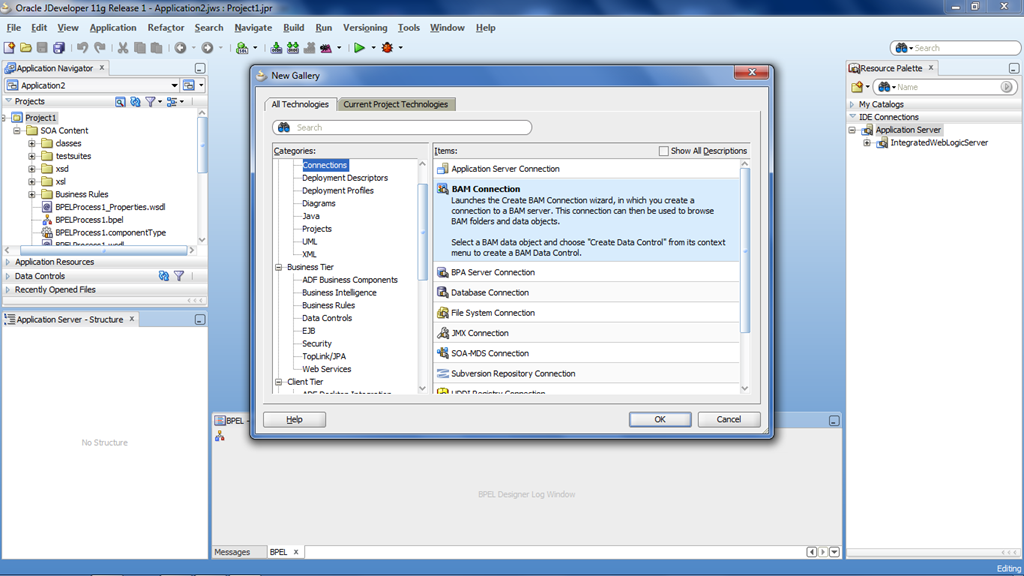
                      image

Enter any meaningful name for BAM connection and click on Next.

                       image

Give the host name where the BAM server is hosted as shown in the following screenshot and click on Next.

                         image

In the next screen, do the Test Connection to make sure that Jdeveloper is able to connect to BAM server. This connection will be used in the BAM adapter wizard to select the required data object.

Now create a SOA project and drag the BAM adapter from Service Adapters section to External References section swim lane of the composite.xml to bring up adapter wizard as shown below.

                            image

Enter the meaningful name and click on Next. Select the operation that has to be performed on BAM data object as shown below.
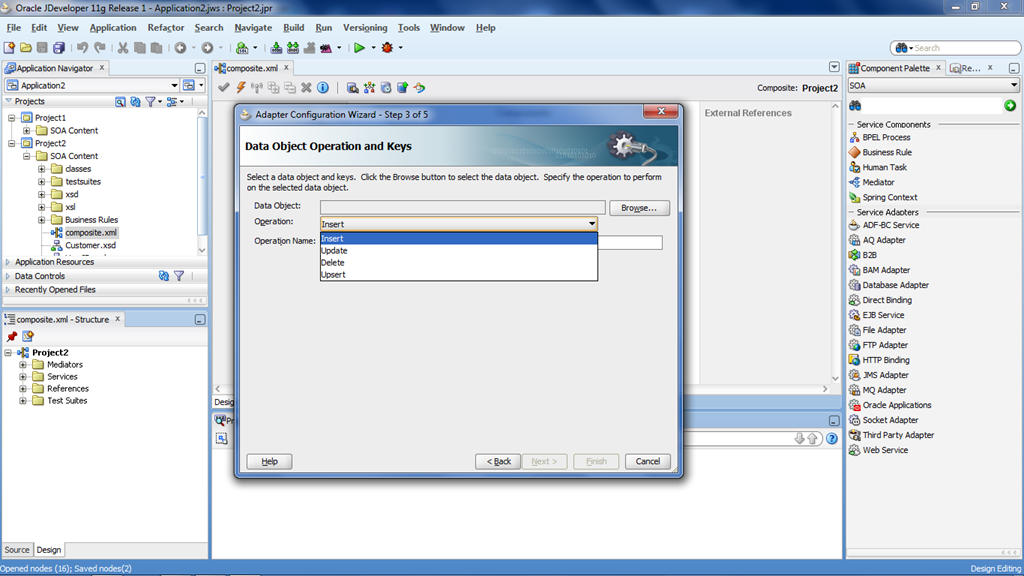
                            image 

Click on the Browse button which fetches all the data objects that are created as shown below.

                            clip_image002

In my case, i have selected the operation ‘upset’ and ‘Testdataobject’. Select the columns from available list that have to be available to perform the selected operation from OSB.
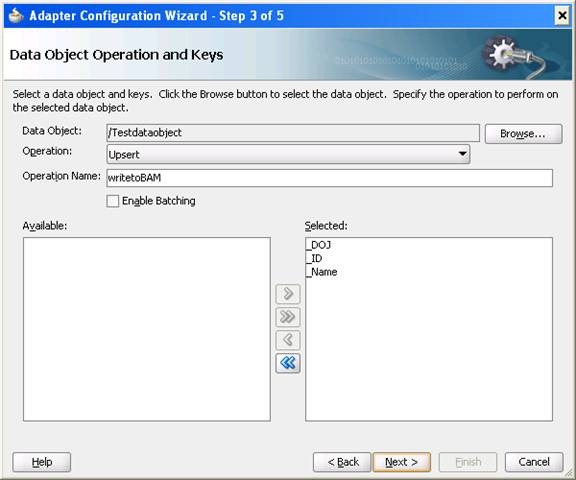
                            clip_image004

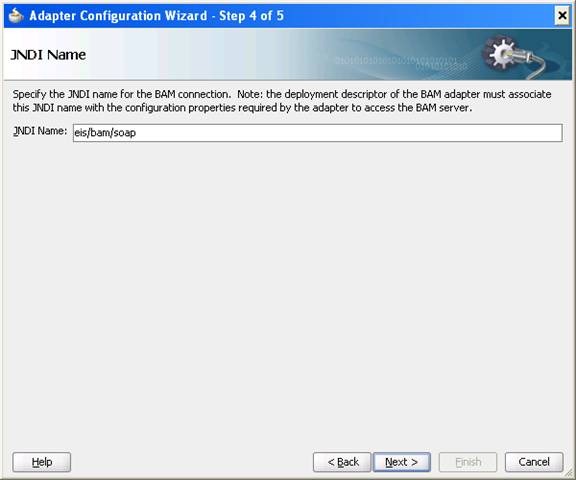
Click on Next which brings the screen to enter the JNDI name of the connection pool. This connection pool has to be created in the WLS admin console for BAM Adapter in OSB. Enter eis/bam/soap as JNDI value  and click on Next and Finish to complete the wizard.
                             clip_image006

After finishing this wizard, we can see the WSDL, JCA and XSD files getting created in our SOA project. Copy these files into an OSB project and do right click on JCA file and select Oracle Service Bus –> Generate Service to create the business service as shown below.

                                image

Make sure that you have done the following configuration in OSB WLS Admin console i.e. required for connecting to BAM server. Login to WLS Admin Console and go to Deployments->OracleBamAdapter. Click on Configuration –> Outbound Connection Pools which brings up the following screen.
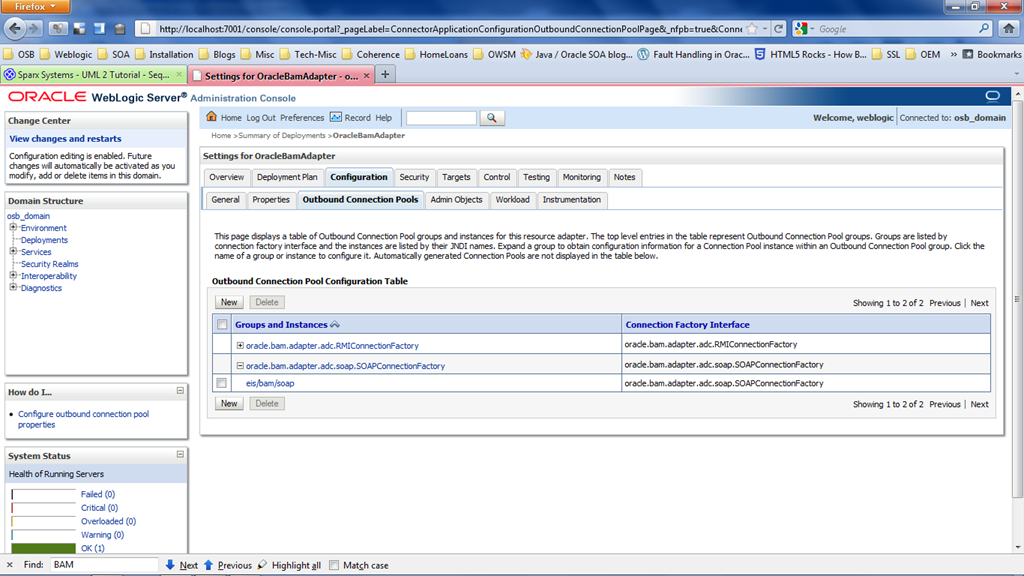
                              image

Click on eis/bam/soap and enter the BAM server details as shown below.

                               image

Now run the above created business service and verify.

Email Attachments with OWSM in OSB

We all know that OWSM policies can’t be used when MTOM is enabled for the proxy services. Looking at the note ID 1347447.1, it seems that we don’t have OWSM support even for SOAP with Attachments (SwA) as well.

Following is the solution given in the metalink note.

Solution

Use WS-SecurityPolicy or policies packaged in WebLogic Server (see http://download.oracle.com/docs/cd/E14571_01/web.1111/e13713/message.htm ) instead of OWSM.
Support for MTOM and SwA assertions with OWSM will be introduced in OSB 12

OSB Introduction

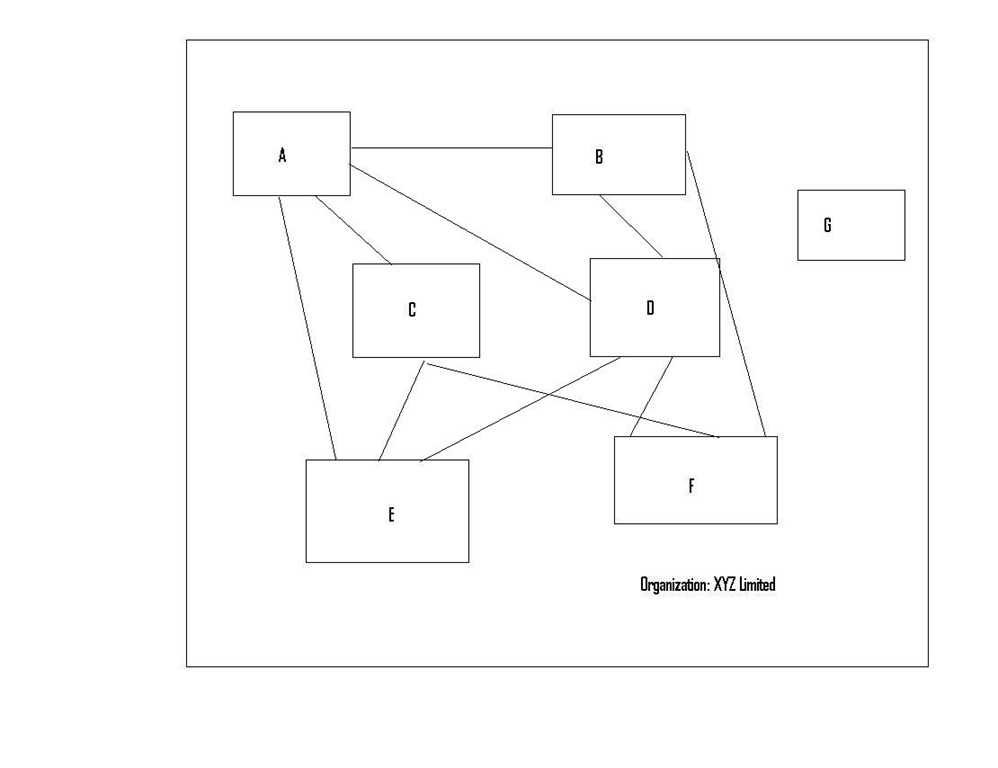
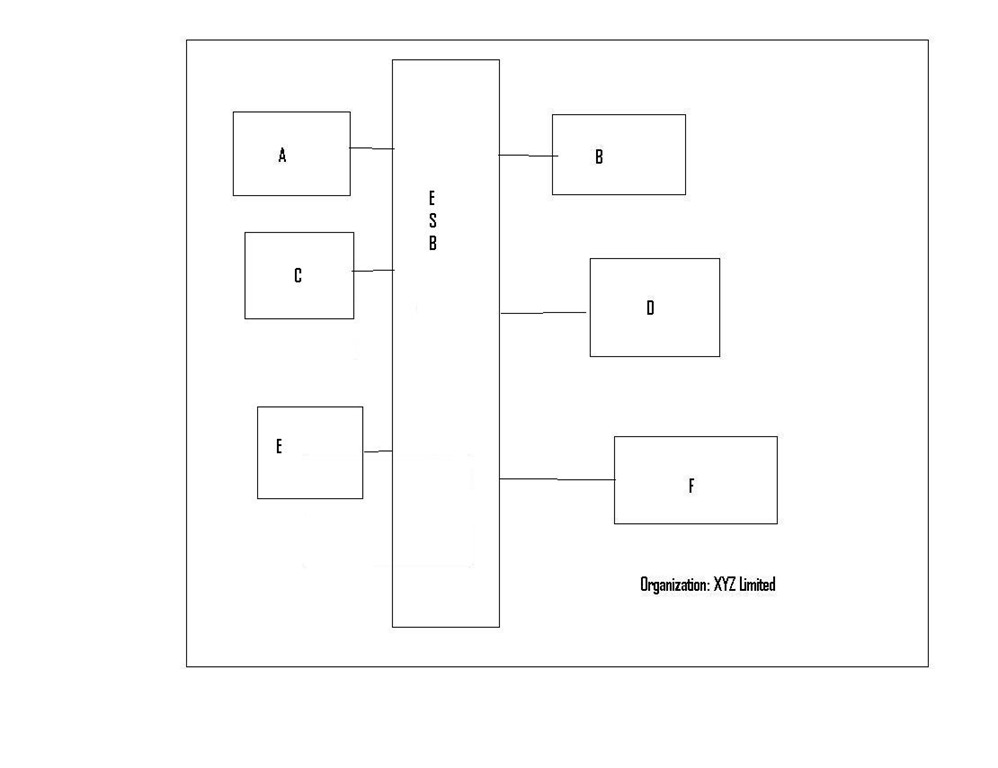
Recently, took help of following visuals to introduce OSB to an interested team comprising technical people of different levels. Just wanted to share the same.

               Systems

             PointtoPoint

            ESB

          OSB

Using FLWOR expressions in OSB

As Wikipedia defines FLWOR is an acronym: FOR, LET, WHERE, ORDER BY, RETURN. FLWOR is loosely analogous to SQL’s SELECT-FROM-WHERE. FLWOR expressions can be used in OSB.

If we are creating variables in assign actions for just intermediate XQuery expressions evaluation then ‘let’ can be used multiple assign actions into one to increase proxy service performance.

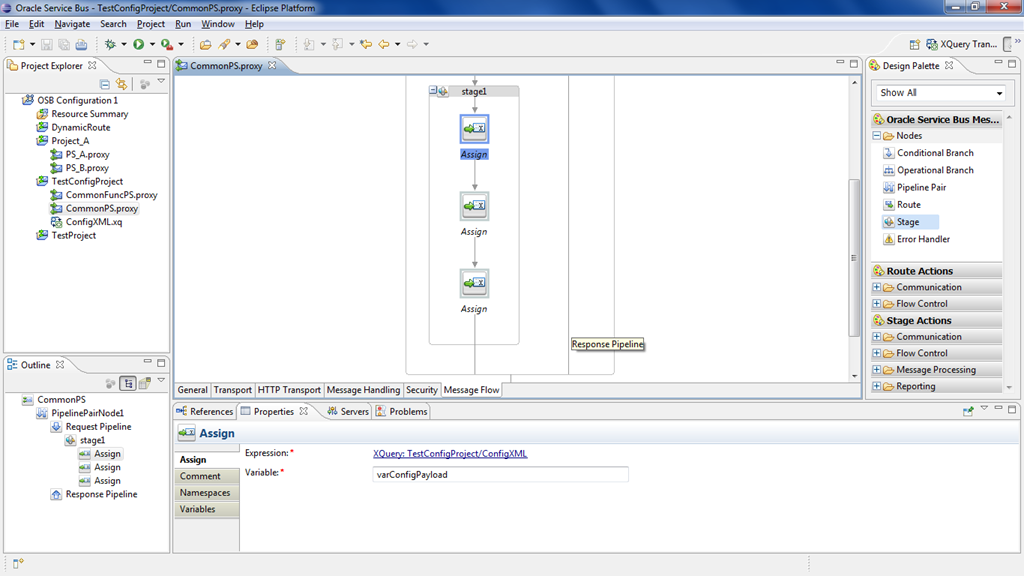
In the following screenshot, 1st assign action loads contents XQuery resource and stores it in ‘varConfigPayload’ variable. The 2nd assign action gets the proxy name sent in payload using ‘$body/Payload/ProxyName/text()’ and stores it in ‘varProxyName’ variable. And the 3rd assign activity uses ‘$varConfigPayload/ProxyService[@name=$varProxyName]/Flag/text()’ to get the value from XQuery resource and store it in ‘varFlagValue’ variable.

             image

Assume that variable ‘varProxyName’ is not used anywhere else, then we can combine the 2nd and 3rd assign actions by giving the expression as shown in below screenshot.

            image

This is how we can use the FLWOR expressions to combine multiple assign activities into one.

Using Dynamic Routing in OSB

Dynamic Routing in OSB can be used when we want to determine the business service at runtime in the message flow. To store the information about the business services that can be used, we can use XQuery resource.

Consider a scenario where OSB has to route the incoming requests to 2 different services based on the CustomerType element value sent in the payload. So create a XQuery resource with the following contents. Observe that we are using the absolute path of business service in configuration as required by dynamic routing.

<Configuration>
<CustomerType value =’Privileged’>
<Service>DynamicRoute/BSSystem1</Service>
</CustomerType>

<CustomerType value =’Ordinary’>
<Service>DynamicRoute/BSSystem2</Service>
</CustomerType>
</Configuration>

Following is the XML schema that we use.

<xsd:schema targetNamespace=”http://xmlns.oracle.com/schema/Customer”
    xmlns:xsd=”http://www.w3.org/2001/XMLSchema” xmlns:ns1=”http://xmlns.oracle.com/schema/Customer”>

    <xsd:complexType name=”Customer”>
<xsd:sequence>
<xsd:element name=”CustomerId” type=”xsd:string” />
<xsd:element name=”FirstName” type=”xsd:string” />
<xsd:element name=”LastName” type=”xsd:string” />
<xsd:element name=”MiddleName” minOccurs=”0″ type=”xsd:string” />
<xsd:element name=”CustomerType” type=”xsd:string” />
<xsd:element name=”Email” minOccurs=”0″ type=”xsd:string” />
<xsd:element name=”Mobile” minOccurs=”0″ type=”xsd:string” />
</xsd:sequence>
</xsd:complexType>

    <xsd:complexType name=”StatusMsg”>
<xsd:sequence>
<xsd:element name=”CustomerId” type=”xsd:string” />
<xsd:element name=”Response” type=”xsd:string” />
<xsd:element name=”ErrorCode” type=”xsd:string” minOccurs=”0″/>
<xsd:element name=”ErrorMessage” type=”xsd:string” />
</xsd:sequence>
</xsd:complexType>

    <xsd:element name=”Customer” type=”ns1:Customer” />
<xsd:element name=”StatusMsg” type=”ns1:StatusMsg” />
</xsd:schema>

Following is the WSDL that we will use for the proxy service:

<wsdl:definitions name=”CustomerService”
targetNamespace=”http://xmlns.oracle.com/wsdl/CustomerService”         xmlns:wsdl=”http://schemas.xmlsoap.org/wsdl/”
    xmlns:ns1=”http://xmlns.oracle.com/schema/Customer” xmlns:xsd=”http://www.w3.org/2001/XMLSchema”
    xmlns:tns=”http://xmlns.oracle.com/wsdl/CustomerService” xmlns:soap=”http://schemas.xmlsoap.org/wsdl/soap/”>
<wsdl:types>
<xsd:schema>
<xsd:import namespace=”
http://xmlns.oracle.com/schema/Customer”
                schemaLocation=”Customer.xsd” />
</xsd:schema>
</wsdl:types>

    <wsdl:message name=”CustomerCreate”>
<wsdl:part name=”parameters” element=”ns1:Customer” />
</wsdl:message>
<wsdl:message name=”CustomerCreateResponse”>
<wsdl:part name=”parameters” element=”ns1:StatusMsg” />
</wsdl:message>

    <wsdl:portType name=”CustomerServicePort”>
<wsdl:operation name=”CustomerCreate”>
<wsdl:input message=”tns:CustomerCreate” />
<wsdl:output message=”tns:CustomerCreateResponse” />
</wsdl:operation>
</wsdl:portType>

    <wsdl:binding name=”CustomerServiceBinding” type=”tns:CustomerServicePort”>
<soap:binding style=”document”
transport=”
http://schemas.xmlsoap.org/soap/http” />

        <wsdl:operation name=”CustomerCreate”>
<soap:operation soapAction=”CustomerCreate” />
<wsdl:input>
<soap:body use=”literal” />
</wsdl:input>
<wsdl:output>
<soap:body use=”literal” />
</wsdl:output>
</wsdl:operation>
</wsdl:binding>
</wsdl:definitions>

Create the required resources a proxy service based on the above WSDL, 2 business services and a XQuery resource with the contents shown above.

image

Create the message flow as shown below.

image

The first assign activity loads the XQuery resource and stores the contents of the file in variable ‘varConfig’. The second assign activity stores the value of customer type element in the payload in ‘varType’ variable using the xpath expression $body/cus:Customer/CustomerType/text().

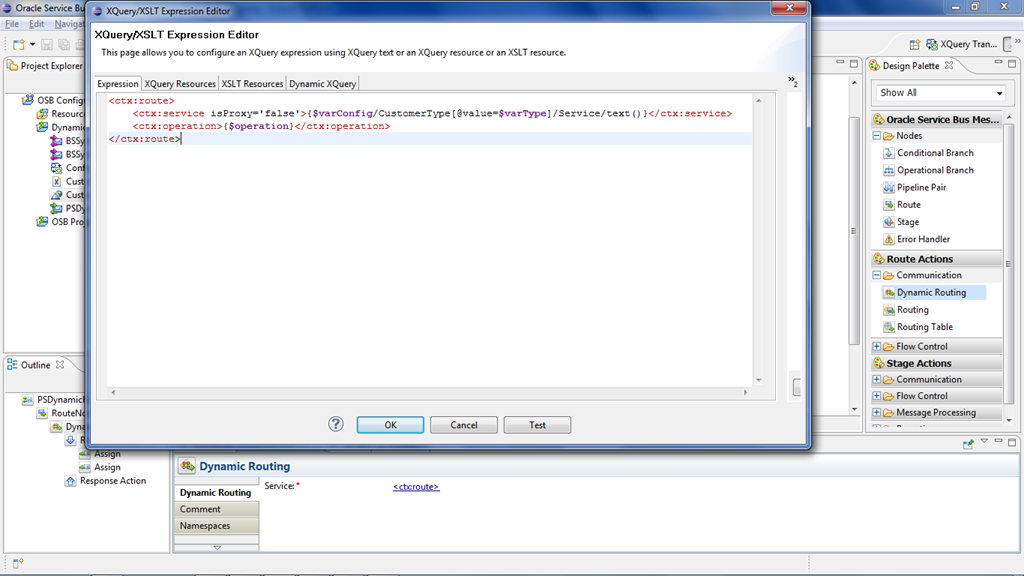
For the dynamic routing the expression should resolve to the following XML snippet. The attribute isProxy has to be set to ‘true’ if routing the request to proxy service or ‘false’ if routing the request to business service. Operation name is optional as business service might  not be WSDL service always.

<ctx:route>
<ctx:service isProxy=’false’>absolute path of business service</ctx:service>
<ctx:operation>operation name</ctx:operation>
</ctx:route>

So for our case use the XML contents as shown in the below screenshot along with the XPath expressions to get the required values.

image

Deploy the configuration jar and test it from test console to verify its working as expected.

The sample jar can be download from the following location.

OEPE versions in OSB

As we know that Weblogic and OEPE installation are pre-requisites for OSB11g installation. Oracle had started shipping Weblogic bundled with Coherence and OEPE. Using this Weblogics installer is the best way to get compatible OEPE for a particular release. However, these are not available for 64-bit machines and need to do manual installation JDK, Weblogic using generic Installer, compatible OEPE version along with your required version of OSB 11g.

So you need to better understand compatible versions of OEPE for a particular OSB 11g release. The following shows the compatibility matrix:

OSB Weblogic Server OEPE
11.1.1.6.0
11.1.1.7.0
10.3.6 11.1.1.8.0
11.1.1.5.0 10.3.5 11.1.1.7.2
11.1.1.4.0 10.3.4 11.1.1.6.1
11.1.1.3.0 10.3.3 11.1.1.5

These versions of Oracle Enterprise Pack for Eclipse are available here.

SOA Suite 11g R1 Developers Guide

Ever since i have seen this post by Antony Reynolds, i wanted to grab my copy of this book. But the price of the book in India kept me away for some time. Finally last week i am able to get my copy of it.

The first sight of the book perplexed me as i was expecting the book to be of size similar to Thomas Erls’ book ‘Web Service Contract Design & Versioning for SOA’. But the contents of the book made me realize that the size does not matter always.

The book is well organized into 3 parts. Part-I  introduces the SOA architecture SCA, developing BPEL composites, endpoint virtualization using OSB and using JCA Adapters, Human workflows, Business Rules, Business Events and Business Activity Monitoring (BAM) that are components of Oracle SOA Suite. Part-II introduces the business requirements of a fictitious company and proceed with the development of application using SOA architecture by making use of the components described in Part-I. Finally the book ends with chapters on deployment, testing and security which constitutes Part-III of the book.

The first thing i did was the search for the following 2 things as i wanted to confirm the best practices from what i know currently:

  • Scheduling the BPEL processes
  • Way to differentiate System and Business faults in OSB

The above things are covered in Chapter 16 and Chapter 14 respectively.

I am reading the chapters in no sequence and i found the chapters Designing Service Contract (Chapter 11), Error Handling (Chapter 14) and Message Interaction Patterns (Chapter 16) very interesting as of now.

Though my recommendation does not add any brownie points, i recommend this book to novice to learn the basics of SOA Suite11g and to experts to get the quick summary.

I want to finish it off asap before somebody steals the book Smile.

Coherence in OSB

In one of our proxy services, we call one service to get credentials with which we can proceed with next service calls in the message flow. As anybody can guess, the credentials might remain same for a period of time (though based on the reset policy).

So if we can reduce number of service calls by caching the service results will increase the performance of the service. I felt that i have realized this very late Smileonce i started searching for this feature in OSB as i find number of articles on the same.
Using Oracle Coherence is the way to cache service results and ‘Result Caching’ is the feature of business service through which OSB can leverage coherence functionality. Thought of putting all my findings in one post but after seeing this article on OTN, i don’t dare to do that.

I have just taken this simple scenario to make a point on using coherence in OSB. The context explained over here may not be the right candidate if we are not aware of the credential reset policy. Then the credentials stored in cache may not be the right ones always and need to clear the cache. So the context has to be clearly ascertained to use coherence.

Currently in the process of finding the way to use coherence in BPEL.

Custom XPath Functions in OSB

Wikipedia says “Extensibility is a system design principle where the implementation takes into consideration future growth.Extensions can be through the addition of new functionality or through modification of existing functionality”.

The extensibility is possible even in case of OSB and custom XPath functions is one of the ways to extend the out-of-the-box functionality provided with OSB. In this  post, we talk about the procedure to come up with the custom XPath functions. Though the example taken in this post (division of numbers)does not represent the real-world case but sufficient enough to stress the point.

During the IDE and server start up, OSB checks for custom functions in the path $OSB_HOME/config/xpath-functions.

Creating the custom XPath functions involves coming up with an xml file and the java code that does the required task. The xml file is going to be similar to the file osb-built-in.xml provided in above path that contains OSB functions. So let us create a xml file custom-func-demo.xml with the below contents and place it the folder mentioned above.

<?xml version="1.0" encoding="UTF-8"?>
<xpf:xpathFunctions xmlns:xpf="
http://www.bea.com/wli/sb/xpath/config">
    <xpf:category id="Custom Functions">
       <xpf:function>
        <xpf:name>DivideNumbers</xpf:name>
        <xpf:comment>Function used for division of numbers</xpf:comment>
        <xpf:namespaceURI>
http://www.oracle.com/custom/custom-functions</xpf:namespaceURI>
        <xpf:className>demo.DivideNumbers</xpf:className>
        <xpf:method>java.lang.Double divide(java.lang.Double,java.lang.Double)</xpf:method>
            <xpf:isDeterministic>true</xpf:isDeterministic>
            <xpf:scope>Pipeline</xpf:scope>
            <xpf:scope>SplitJoin</xpf:scope>
            </xpf:function>
        </xpf:category>
</xpf:xpathFunctions>

The above XML fragment shows the custom XPath function name (Divide Numbers), Class Name, Java Method and the namespace that should be used to access the function in the message flow. ‘isDeterministic’ specifies whether the function is deterministic or non-deterministic. Deterministic functions always provide the same results where as Non-Deterministic functions return the unique results.

Create a simple java class with the following code. Make sure that class name (including the package) and method signature matches with the above xml contents. Create a jar of this and place it in the above mentioned location so that IDE and server can detect the custom function.

package demo;

import java.lang.Double;

public class DivideNumbers {
    public static Double divide(Double a, Double b) {
        return a/b;
    }
  }

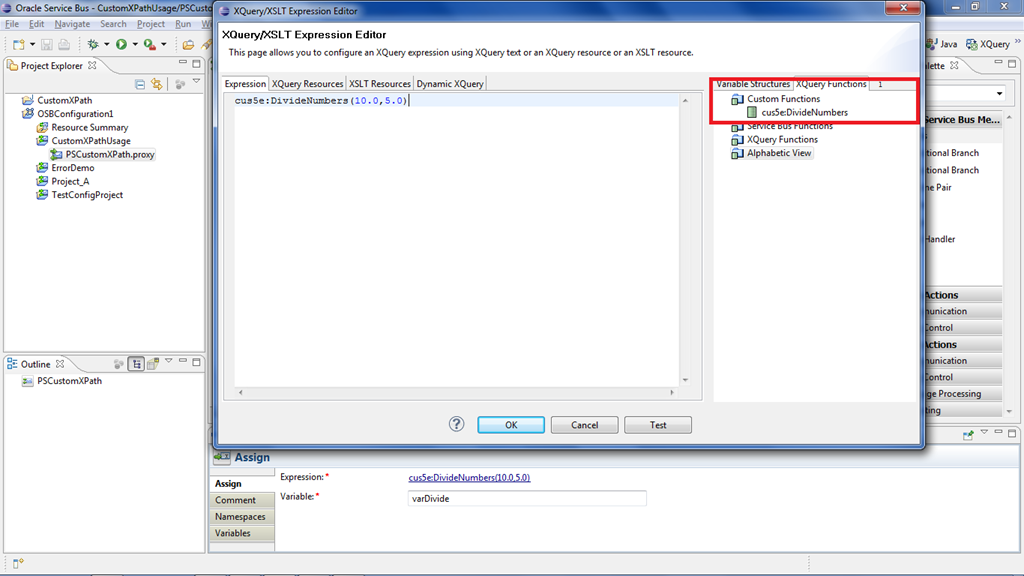
On restart of Eclipse IDE and OSB server, we should be able to see the custom XPath function that we just defined.

           Xpath1

           Xpath4

           Xpath2

            Xpath3
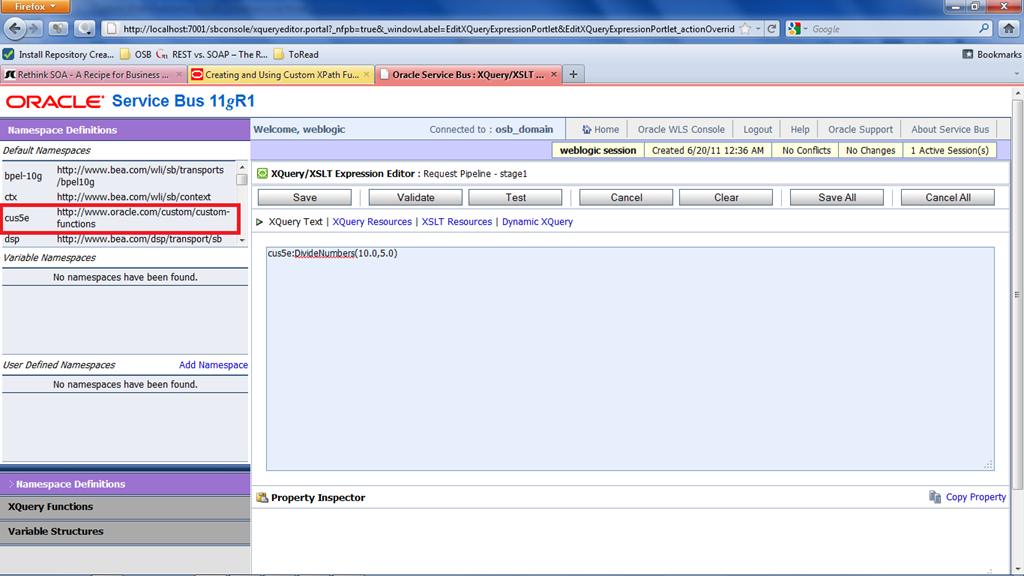
Use the custom XPath function and run the proxy service to see the expected results as shown below.

            Xpath5

Common Mistakes in OSB message flow

I see following are the few common errors that developer might come across during the initial stages of OSB learning.

1)

Failed to set the value of context variable "body". Value must be an instance of {http://schemas.xmlsoap.org/soap/envelope/}Body.

Failed to set the value of context variable "header". Value must be an instance of {http://schemas.xmlsoap.org/soap/envelope/}Header.

This error is because of, OSB always enclose the context variables $body and $header with <soap-env:Body> and <soap-env:Header> respectively. So when we are manipulating $header and $body we should make sure that these soap-env tags are not removed. For example, doing in the following way in an Assign activity can cause the above error as we are not maintaining <soap-env:Body> tag in $body variable.

            Expression: <Value>Sample Value</Value>

            Variable: body

And the correct usage in assign activity is like below:

             Expression:

           <soapenv:Body xmlns:soapenv="http://schemas.xmlsoap.org/soap/envelope/">                    <Value>Sample Value</Value>

            </soapenv:Body>
            Variable: body

When we use service call out, the variable given for ‘SOAP Request Header’ should always contain <soap-env:Header> element irrespective of the selection of either ‘Çonfigure SOAP Body’ or ‘Configure Payload Document’. Otherwise again the above header related error will come.

2) 

Invalid message: the SOAP Header value is not an XML instance

One of the scenarios that this error can come is, when we use the service call out and the variable given for ‘SOAP Request Header’ is null.


Pages

Enter your email address to subscribe to this blog and receive notifications of new posts by email.

Join 196 other subscribers

Enter your email address to follow this blog and receive notifications of new posts by email.