Archive Page 8

Service Bus 12c – Deploying and Testing

During development, you may often deploy and test your Business and Proxy services to verify that you are able to send request and receive response as expected. And typically, if the service provider is external to your organization, you have to configure your business service to use HTTP proxy server.

Note: HTTP Proxy Server is a global resource to be created in Service Bus Application and can be attached to business service in Advanced Settings of Transport Details tab.

In Service Bus 12c, you can use either Integrated or Standalone WLS to test business/proxy services.

Integrated WLS:

Right click business/proxy service and select Run.

clip_image002

If Default Domain does not exist, JDeveloper will prompt for credentials to create Integrated WLS. Enter credentials click OK to start server.

clip_image004

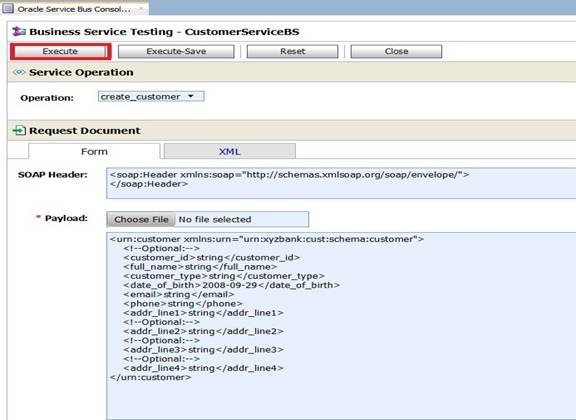
Once the server starts, Test Console is opened as shown below. This Test Console shows all available operations (If it’s based on WSDL), Request Document section (to enter payload), Transport section (to enter transport headers) and Attachments section.

clip_image006

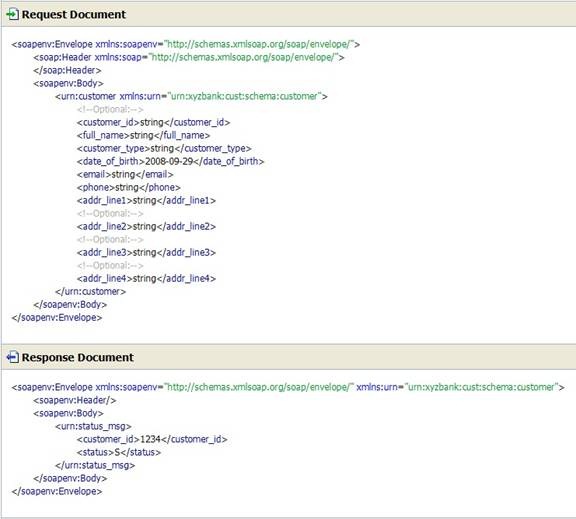
Click Execute and observe that you are able to send request and receive response as shown below. You can use Back to modify payload and repeat your test scenarios.

clip_image008

Standalone WLS:

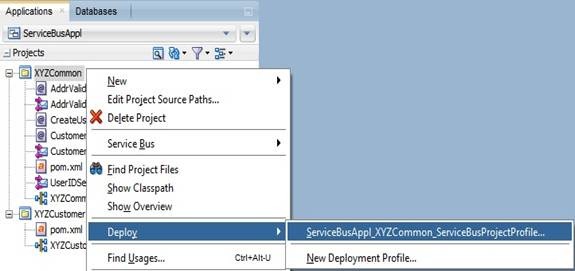
You can also deploy your service bus project to standalone WLS from JDeveloper and test from sbconsole. Right click XYZCommon project and choose Deploy as shown below.

clip_image010

Finish deployment using steps shown below.

clip_image012

clip_image014

clip_image016

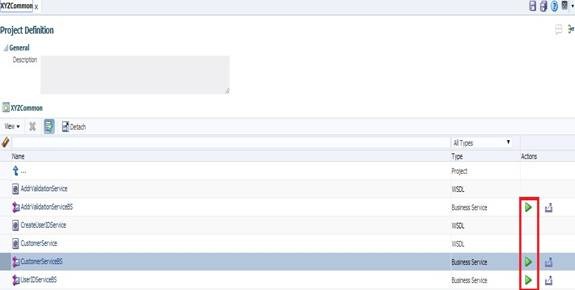
Once deployment is done, login to sbconsole using http://host:port/sbconsole. Clicking arrow icon (highlighted below) will bring up the same Test Console shown earlier.

clip_image018

Another option is exporting your projects as Configuration Jar and deploy to either Integrated or Standalone WLS. To do this, right click XYZCommon project and select Export as shown below.

clip_image019

Select Service Bus Resources option as shown below.

clip_image021

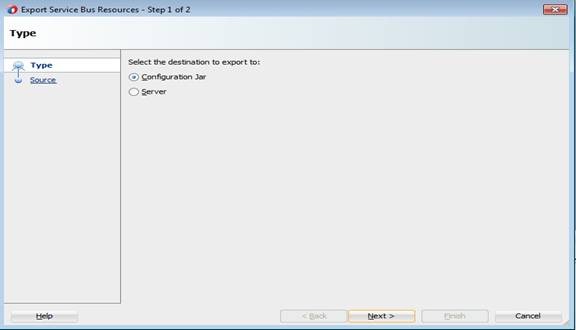
Select Configuration Jar as destination.

clip_image023

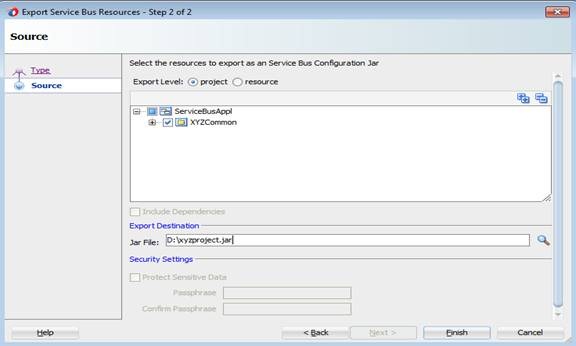
Click Next. Give Jar file name including file system path as shown below and click Finish.

clip_image025

Open sbconsle. Create new session by clicking Create to import configuration jar.

clip_image026

Click Import icon in Resources tab.

clip_image028

Select configuration jar using Choose File button as show below.

clip_image030

Click Next. Accept defaults and click Import.

clip_image032

Click Close on confirmation screen and verify new project is shown as below in Resources tab.

clip_image034

Click Activate and confirm the session so that your changes will be effective.

clip_image035

clip_image037

Similarly, you can export service bus project directly to server by choosing Server as shown below in Export Service Bus Resources window shown earlier.

clip_image039

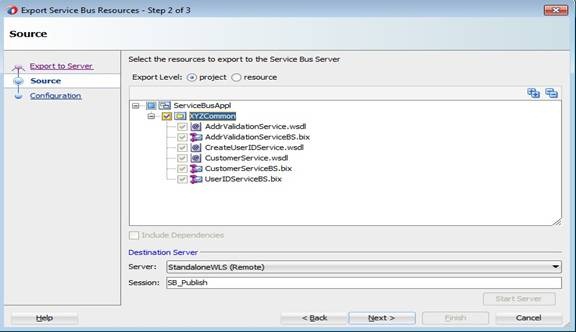
Click Next and choose Destination Server as shown below.

clip_image041

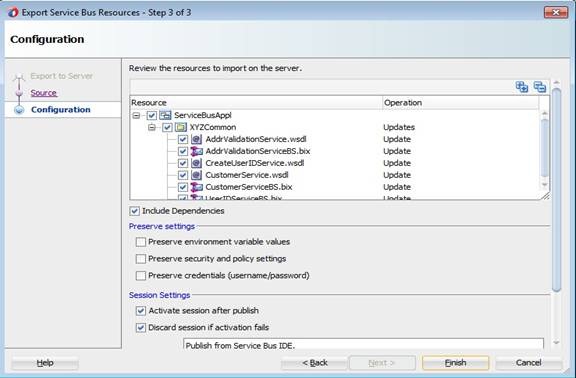
Click Next. Accept defaults and click Finish. Once export is successful, you can launch sbconsole and test your business and proxy services as shown above.

clip_image043

Note: Developer can choose any of the above options for deploying and testing business/proxy services.

Service Bus 12c – Creating Business Services

In Service Bus, Business Services provide abstraction layer and take care of communication with Service Providers. In this post, you will see different ways of creating Business Service in Service Bus project using JDeveloper based on a WSDL. And for the demonstration purpose, we will consider the Service Bus project and WSDLs shown below.

biz1

Method 1:

Right click Service Bus project and select New -> Business Service.

clip_image002

Give a meaningful name for Business Service as shown below.

clip_image004

Click Browse WSDLs icon (shown above) and choose CustomerService WSDL as shown below.

clip_image006

Click OK to go back to Create Business Service wizard.

biz5

Method 2:

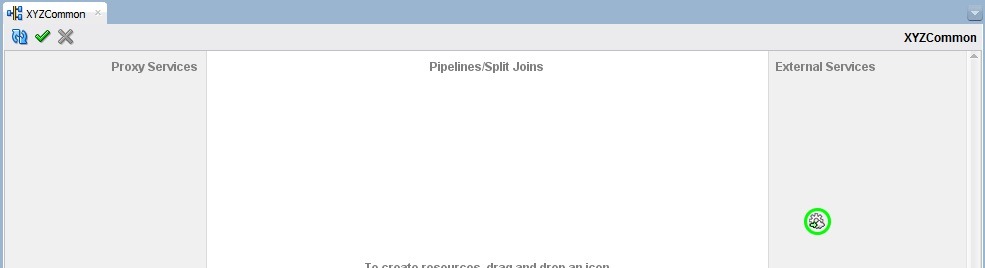
Open the Service Bus overview file (file with same name as your project) and drag HTTP adapter into from Components –> Service Bus –> Technology –> HTTP into External Services swim lane to bring up Create Business Service wizard as shown below.

adapter1

overview1

biz2

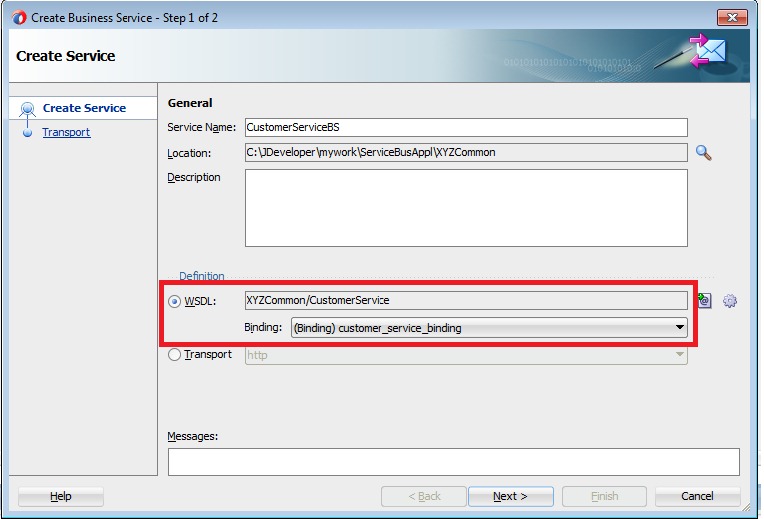
Give meaningful name for Business Service and click Next. Select the option WSDL and choose WSDL as shown in previous method by clicking Browse WSDLs icon.

biz3

biz4

Method 3:

Right click WSDL in Service Bus project and select Service Bus –> Generate Business Service as shown below.

wsdlbiz

Verify that Create Business Service wizard has come up showing WSDL and binding selected.

wsdlbiz1 

And the following steps are common irrespective of the above methods you choose to create Business Service.

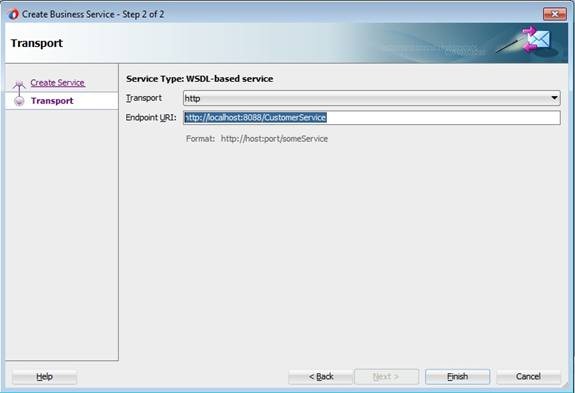
Click Next and enter Endpoint URI of the service.

clip_image008

Click Finish to bring up a new tab showing CustomerServiceBS.bix.

clip_image010

Service Bus 12c – Creating Service Bus Application and Project

In Service Bus development, you make use of different resources like Proxy Service, Business Service, WSDL, XSD, XQuery, XSLT etc. Also there are other resources like SMTP Server, JNDI Provider called Global resources. Service Bus Project acts as a container for different resources and Service Bus Application is a high-level container for all these Service Bus projects and Global resources.

You usually start development activity with creation of new Service Bus Application. Create one by navigating to File -> New -> From Gallery -> Service Bus Tier. Select Service Bus Application and give meaningful name and click Finish. Here we are using ServiceBusAppl as Application Name.


Creating Service Bus Projects

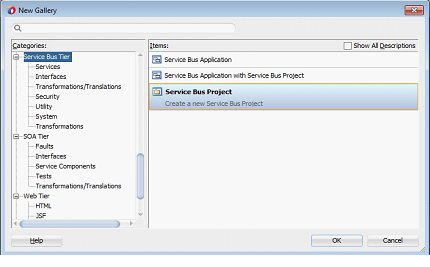
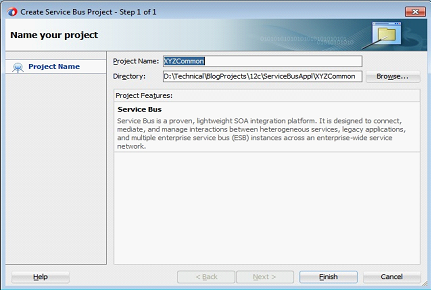
Now you can proceed with the creation of Service Bus Projects considering reusability and modularity. Create new Service Bus Project by navigating to File -> New -> From Gallery -> Service Bus Tier. Select Service Bus Project and give meaningful name and click Finish. Here we are using XYZCommon as Project Name.


Now your Project Explorer should look like below showing Service Bus Application and Service Bus Project containing 2 files (pom.xml and XYZCommon). You will see a file with same name as your project called project overview file which opens up Service Bus Overview editor when opened.


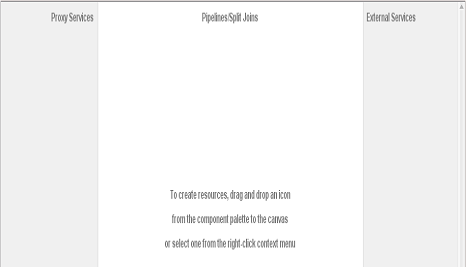
 Now your Service Bus Overview Editor should look like below. Left swim lane is for services providing an entry point to application so limited to Proxy Services. Middle swim lane is for components providing routing and transformation so limited to Pipelines and Split-joins. Right swim lane is for references providing communication with actual service providers so limited to Business Services or Proxy Services. For more information refer to this link.


Service Bus 12c – A Hands-on Tutorial

I published a Service Bus 12c Tutorial considering the use case described in my previous blogs. The Tutorial is available for download here and would like to know your valuable comments. The WSDLs and other material used in this tutorial can be downloaded from here.

By the time you finish this tutorial, you will learn:

  • Creating Service Bus Application, Project, Proxy and Business services.
  • Working with resources like WSDL, XSD, XSLT, XQuery etc.
  • Sharing Service Bus resources across Service Bus projects to enable reuse and modularity.
  • Creating Pipeline Templates, Pipelines and using nodes like Pipeline Pair, Stage, Routing and Operational Branches.
  • Using Domain Value Maps (DVM) for storing configuring properties and using them in message flow.
  • Creating Service Accounts and using them in message flow at Runtime.
  • Enriching the messages using intermediate Service callouts in Pipelines.
  • Routing messages to business services using Service Callout, Routing and Routing Table.
  • Working with Split-Joins.
  • Using Service error handlers in Pipelines.
  • Securing Proxy service using OWSM.
  • Deploying and Testing Proxy and Business services.

SOA 12c – Durable Subscribers with Weblogic JMS

Business Events are used to notify the interested parties (subscribers) about an occurrence of activity which is of important to them. On raising the business events, the subscribers would consume them and process it based on their business flows. All these things would happen in a highly loose coupled manner and business events producers may not be aware of the subscribers. So when designing an application based on business events one of the aspects requires attention is, Will there be any loss of event? This is very important as subscribers are not in a position to request providers to raise event again, even if they do its going to be a duplicate event (occurrence) for other subscribers. Technically speaking, the loss of event can be translated into any of these following scenarios:

  • Subscriber received the business event but faulted during processing.
  • Subscriber is unavailable when the business event is published.
  • The hosted server itself is down when the business event is published.

Scenario 1: For this scenario, EDN provides different Consistency levels and Auto Retry feature which you can use. The post discusses this behavior and also highlights major differences between 11g and 12c SOA Suite releases. In other cases where this feature can’t be leveraged, developer had to take care of manually storing event information and retrieving later on processing failure.

Scenario 2: Typically this scenario may not arise in production environments but there is a possibility when event producer and subscribers are deployed on different managed servers and maintenance cycles for both are different. EDN 11g does not support for this case and it mandates Subscribers to be available when event is published. But in 12c, this scenario is handled using Durable Subscribers which we see shortly.

Scenario 3: This scenario also automatically handled by EDN as it queues the events. And once the server is up, the events in queue will get delivered to their respective subscribers.

In this post, we will see how Durable property works for Business Events. We will use the same 3 composites used in previous post, where we have 3 subscribers for CreateOrder and 1 subscriber for UpdateOrder business events respectively. From here onwards, we will use subscribers or composites terminology interchangeably.

  • Deployment of composites with Durable property to Yes.
  • Any of the Composites subscribed to business events are shutdown.
  • Redeployment of composites with same revision.
  • Redeployment of composites with different default revision.
  • Server shutdown and restart when a few business events are pending to be delivered.
  • Un-deployment of the composites.
  • Redeployment of composites after modifying Durable property to No.

So let’s us get started!!!

To start with let’s have a quick look at Events and Subscriptions used for demonstration. To view these navigate to soa-infra->Business Events.


Durable property to Yes:

Set Durable property to Yes for all subscribers and do deploy.

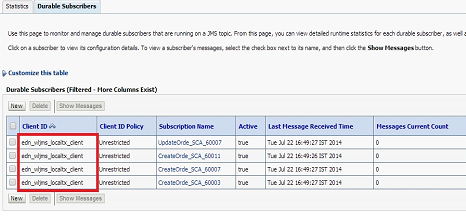
When Durable property is set to Yes, EDN leverages Weblogic JMS durable subscriptions and creates Durable subscribers for each such subscription. Durable subscriptions mean that Weblogic server will store the messages in persistent store until it gets delivered to subscriber. This can be observed in Weblogic Admin Console by navigating to Services->Messaging->JMS Modules->SOAJMSModule->EDNTopic->Monitoring->Durable Subscribers.

You can observe 4 Durable subscribers in the above screen where 3 of them for CreateOrder and 1 for UpdateOrder business events respectively. You can find out JNDI of JMS Topic used for an event in default JMS Mapping by navigating to Business Events screen from soa-infra and you can also modify this default JMS Mapping for business events.

Subscribers Down:

Shutdown EDNSubscribeSync composite and observe durable subscribers.

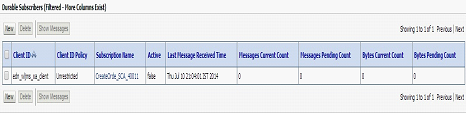
In above screenshot, you can observe that corresponding durable subscriber is inactive (observe value for Active column).

Now raise CreateOrder business event. Go to flow trace and observe that event is not delivered to this composite.

Also, since it’s a durable subscriber we would ideally expect this message to be stored by Weblogic server. Now go to Durable Subscribers and you can observe a pending message to be delivered.

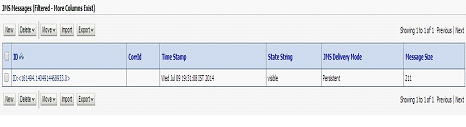
Click Show Messages to see all pending messages.


Click on message to see details as shown below.


Now shutdown EDNSubscribeAsync composite and observe corresponding durable subscribers.

Raise another CreateOrder business event and observe pending messages.


Bring up EDNSubscribeAsync composite and you will see a new composite instance gets generated as the pending event is delivered by EDN.


Also observe that corresponding Durable Subscribers are active.

Now bring up EDNSubscribe composite and observe 2 new composite instances are generated for both of the pending messages.

Also observe that all Durable Subscribers are up.

Redeployment of Composites:

There will be no change in Durable subscribers, when composites are redeployed with the same revision or different revision as the default.

Server shutdown:

Shutdown EDNSubscribeSync and EDNSubscribeASync composites and raise 2 CreateOrder and 1 UpdateOrder business events. As shown below, these will be shown as pending for corresponding Durable Subscribers.


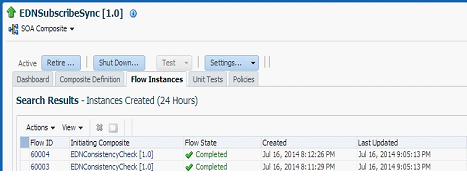
Now Shutdown SOA server and restart it. Navigate to EDNTopic and observe that messages are not lost and survived the server shutdown as expected. Bring up the composites and you would observe new instances get created as shown below.


In the above screenshot, the first 2 instances are created for CreateOrder and 3rd instance is created for UpdateOrder business events respectively.

Un-deployment of Composites:

Now Un-deploy EDNSubscribeSync composite. Navigate to Durable Subscribers and observe that only 3 subscribers exist.

Un-deploy EDNSubscribeASync composite too and observe that Durable Subscribers is reduced to 1 as shown below.

Now un-deploy all the composites and observe that all Durable Subscribers are deleted automatically.

Durable property to No

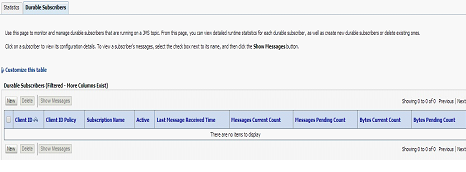
When you set Durable property to No and deploy the composites, you will not see any of the Durable Subscribers for EDNTopic as shown below.


Other Observations:

  • Durable subscribers are taking a little time to become active when server is restarted and shutdown composites are started up (scenario described above in Server shutdown section).
  • Client IDs for Durable subscribers are getting created differently based on event subscription consistency level. Observed that Client ID is set as edn_wljms_xa_client for OneandOnlyOne consistency level. For Guaranteed consistency level, it’s edn_wljms_localtxn_client. This denotes Global Transaction used for OneandOnlyOne and Local Transaction used for Guaranteed consistency levels respectively.

  • 12c documentation for EDN mentions, The EDN does not support durable subscriptions (whether they are backed by native AQ or Oracle WebLogic Server JMS). The subscribing service component must be running to receive events, though we are able to achieve this using Durable Subscribers. We see the same mention in 11g documentation too.

All of the above observations are nicely summarized over here, see table 33-2.

SOA 12c – Business Events and Consistency Levels

I have chosen Business Events as first feature to explore in recent release of SOA Suite12c. Also, I want to cross verify my earlier observations in 11g.

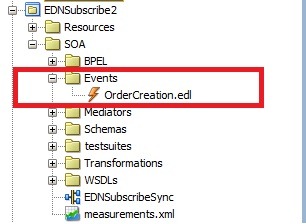
The initial observation is, now the new SOA project will have the folders for different artifacts and the folder Events is for edl files.

soaproj

Secondly, 12c   supports One and Only one and  Guaranteed consistency only and no longer supports immediate. Also new property Durable is added to event subscriptions.

edn1

Even migration of 11g composites to 12c is resulting into error, if composite uses immediate consistency level. We have to manually make this change by choosing either of the 2 supported consistency levels.
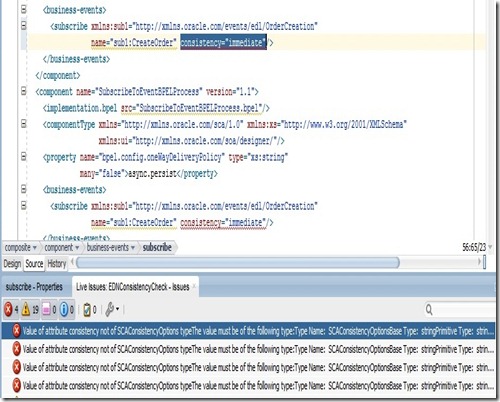
edn2

But in EM Console, we are still able to see immediate consistency level in the search region. You can navigate to this UI by selecting soa-infra –> Business Events.

edn3

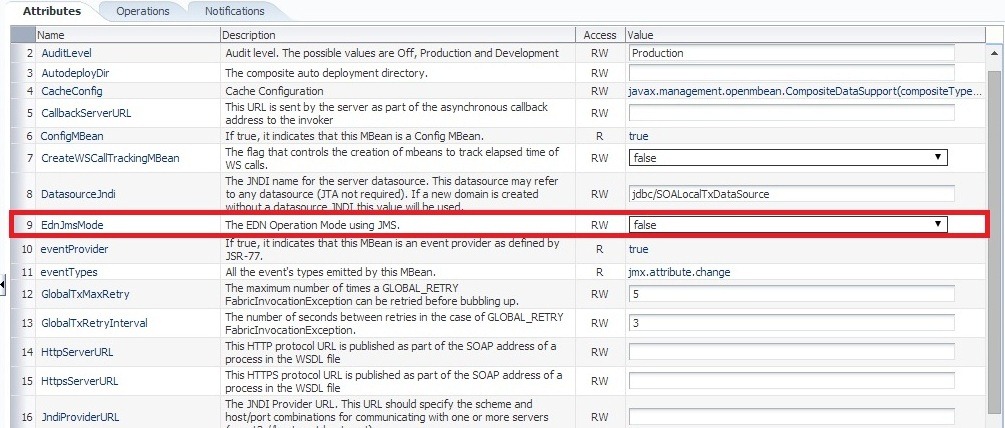
Thirdly, in 11g  EDN uses DB AQ 11g by default for publish and subscribe model of business events. This can be confirmed by verifying value of MBean property EdnJmsMode.  False value denotes EDN using DB and True value denotes EDN using Weblogic JMS. You can verify by navigating to oracle.as.soainfra. config –> SoaInfraConfig –> soa-infra in Application Defined MBeans.
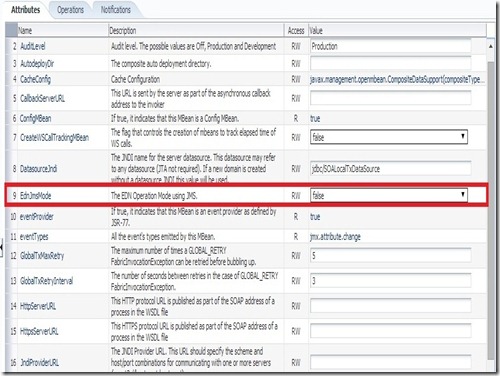
edn5

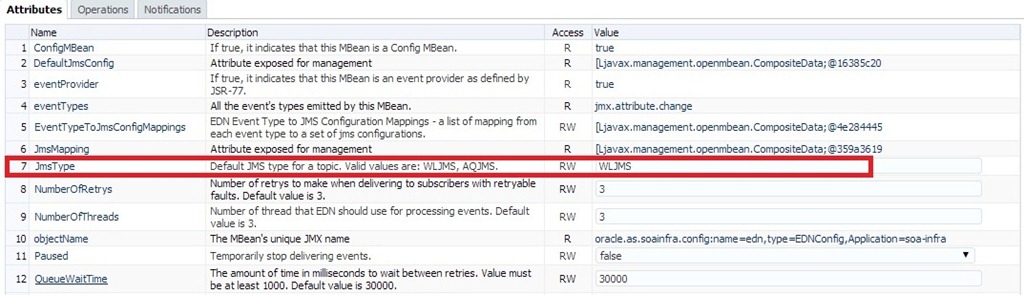
But in 12c, EDN uses Weblogic JMS by default.  This can be confirmed by verifying value of MBean property JmsType .  WLJMS value denotes EDN  using Weblogic JMS and  AQJMS value denotes EDN using AQ DB . You can verify by navigating to oracle.as.soainfra.config –> EDNConfig –> edn in Application Defined MBeans.
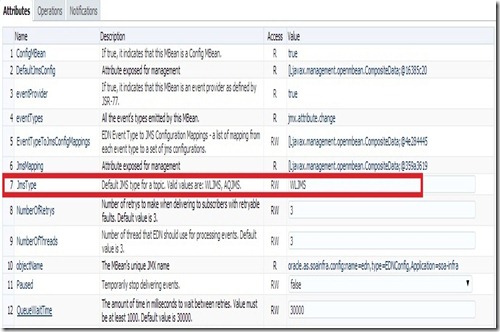
edn4

Another quick observation is, in 12c there is no Faults tab shown in Business Events page. You can select soa-infra –> Business Events to bring up this page. In 12c, we can do manual Retry and Abort of Business Events in Flow Instances screen itself which we will observe later in this post.

soainfra

Now let us start exploring functionality of Business Events from perspective of consistency levels like we did it earlier. As per 12c documentation, one of the major differences is auto retry is supported by Guaranteed consistency level too.

Use case:

We use mediator to raise  2 business events CreateOrder and UpdateOrder. We have following subscribers for CreateOrder event:

  • Mediator routing request to Async BPEL (EDNSubscribeToBPEL process in composite EDNSubscribe).
  • Mediator routing request to Sync BPEL (EDN2BPEL process in composite EDNSubscribe2 ).
  • Asynchronous BPEL process (SubscribeToEventBPELProcess  process in composite EDNConsistencyCheck).

And we have following subscribers for UpdateOrder event:

  • A mediator routing the request to ASync BPEL (in different composite)

Test EDNConsistencyCheck from EM console to raise these business events. The sample composites are available here.

Earlier to simulate Fault condition, we used <onReply/> tag  in mediator while routing to Asynchronous BPEL as shown below.

<switch>

<case executionType=”direct”

name=”Order2BPELProcess1.order2bpelprocess1_client.process”>

<action>

<transform>

<part name=”$out.payload”

function=”xslt(xsl/CreateOrder_To_process.xsl, $in.payload)”/>

</transform>

<invoke reference=”Order2BPELProcess1.order2bpelprocess1_client”

operation=”process”>

<onReply/>

</invoke>

</action>

</case>

</switch>

The behavior is quite different in 12c when same approach has been used to simulate Fault condition. This is resulting into non-recoverable fault in all the times. Though the same behavior is expected in 11g, in actual this fault was considered as recoverable and also auto-retry is made. So here we will simulate Fault condition by throwing Remote Fault manually.
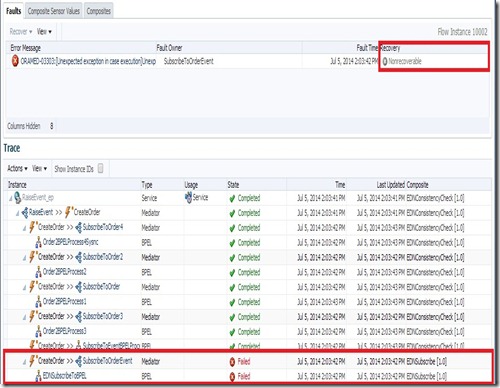
edn6

Configuration:

Navigate to soa-infra-> Administration –> System MBean Browser -> Application Defined MBeans -> oracle.as.soainfra.config -> EDN Config –> edn in EM Console. Here, we can set EDN configuration including properties NumberOfRetrys and QueueWaitTime.

Though 11g has QueueWaitTime property, it was not considered as the retry interval. But in 12c, this property is being honored and we will observe the same later in this post.

edn4

Demonstration:


Verify Events and Subscriptions in Business Events. You can observe that there are 2 business events and 4 subscriptions The subscriptions page also shows you consistency level for each subscription.

events

subscr

Consistency Level – Guaranteed:

Make sure that all event subscriptions consistency level is set to Guaranteed and raise CreateOrder business event.

We can observe a lot of visual improvements in this Flow Trace screen. The composite instances are clearly marked as ‘Recovery Required’ and ‘Auto-retrying’ as applicable. As expected, the Asynchronous BPELs went into Auto Recovery and   Event auto retry is happening for Synchronous BPEL process. Also note that all  subscribers have received the business event raised though some faulted subscribers exist.

edn9

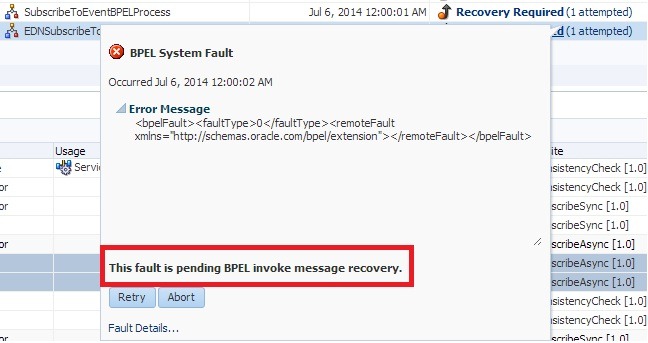
By clicking on the ‘Recovery Required’ link in Faults tab, we can observe that BPEL fault is pending for Invoke message recovery as shown below.

bpel recovery

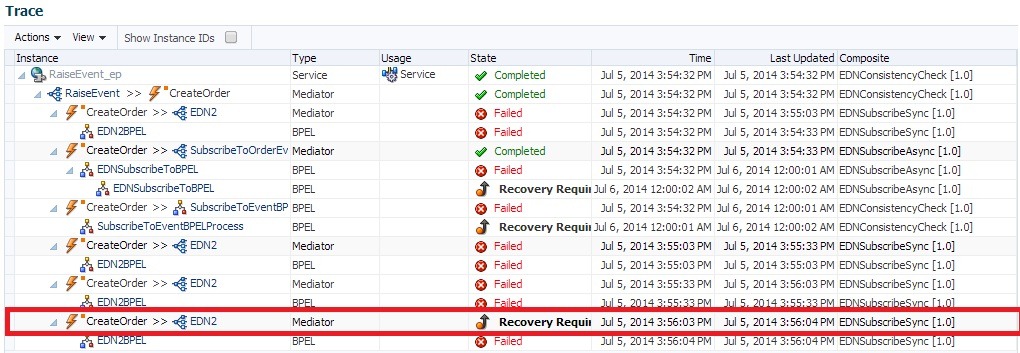
You can also observe that Synchronous BPEL is marked as Recovery Required after retry is done for configurable number of times. Also the property value of QueueWaitTime is honored as the event Retry Interval.
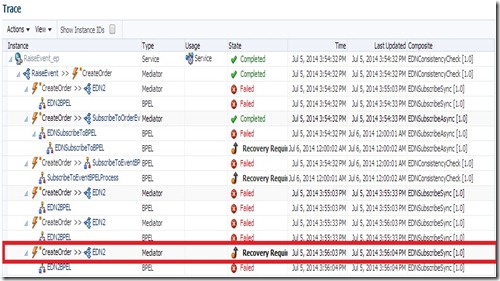
eventrecovery

The Faults tab is shown as below along with number of retry attempts.

attempt

By clicking on the ‘Recovery Required’ link in Faults tab for this flow instance, we can observe that fault is pending for EDN recovery as shown below. From this popup, we can again do Retry manually or abort the flow using Retry and Abort buttons respectively.

ednrecover

Selecting a fault from Faults tab will highlight the corresponding flow instances along with retry attempts (if any).
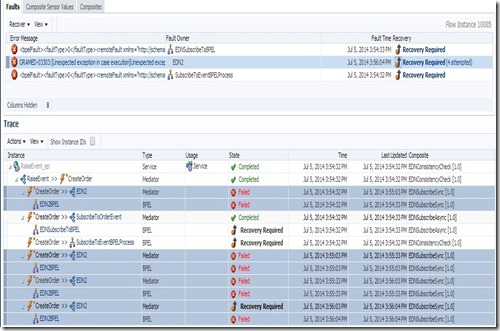
edn11

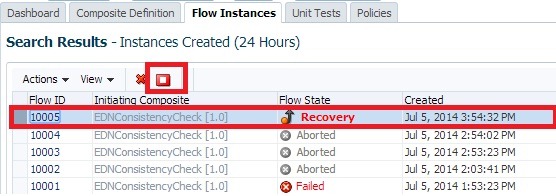
We can also do manual Retry or Abort from Flow Instances page. Selecting a Flow ID row will enable Abort Selected icon as shown below (if applicable).

abort

And same Faults tab shown earlier is also available in Flow Instances page as shown below.

fault2

Now set bpel.config.oneWayDeliveryPolicy to sync for all the Asynchronous BPELs. Raise CreateOrder event and observe that all the instances are auto-retrying as the BPELs would be invoked in Synchronous manner.
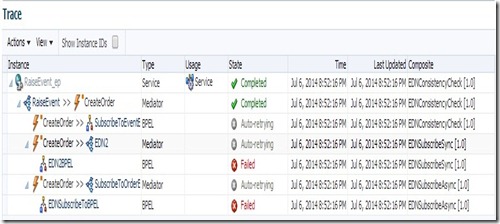
asyncassync

Now set bpel.config.oneWayDeliveryPolicy to async.cache for all the Asynchronous BPELs. Raise CreateOrder event and observe that auto-retrying is only happening for Synchronous BPEL.

asynccache

Now reset bpel.config.oneWayDeliveryPolicy to async.persist and bpel. config.transaction to requiresNew for Asynchronous and Synchronous BPEL respectively. Raise CreateOrder event and observe auto-retry is happening for Synchronous BPEL only.

Now set bpel.config.transaction  to notSupported for the Synchronous BPEL.  Raise CreateOrder event and again observe auto-retry is happening only for Synchronous BPEL.

Consistency Level – One and Only One:

When  above scenarios are tried using One and Only One consistency level, I observed the same behavior as Guaranteed. As per 12c documentation, the difference lies in type of transaction used (Local vs Global). Guaranteed uses Local where as One and Only one uses Global Transaction for De-queue and Delivery of Business Events.

Summary:

  • When Mediator routes request to Sync BPEL that throws fault and not caught, then event auto retry is happening irrespective of consistency level and value of bpel.config.transaction.
  • When Mediator routes request to ASync BPEL that throws fault and not caught, then event auto retry is not happening irrespective of consistency level with async.persist as value for bpel.config. oneWayDeliveryPolicy.  This makes sense as the transaction can’t be  propagated and value of bpel.config.transaction is irrelevant.
  • When Mediator routes request to ASync BPEL that throws fault and not caught, then event auto retry is happening irrespective of consistency level with sync as value for bpel.config.oneWayDeliveryPolicy. This makes sense as BPEL is invoked in Synchronous manner. Also the same behavior is observed, when an Async BPEL is directly subscribed to business event.
  • When Mediator routes request to ASync BPEL that throws fault and not caught, then event auto retry is not happening irrespective of consistency level with async.cache as value for bpel.config. oneWayDeliveryPolicy.

We will explore the Durable property of Event Subscriptions in next blog.

SOA Suite 12c Installation

By this time, you might already know that SOA Suite12c released last week. The twitter world is abuzz with the most awaited SOA Suite release and gave a welcome in great fashion. I too was equally excited to get a glimpse of it and try out some hands-on the same. In this post, we will quickly go through the SOA Suite 12c installation.

We can say that installation is quite streamlined and made simple with single installer that includes JDeveloper, JDev SOA Extension, RCU, Standalone WLS and Service Bus (formerly Oracle Service Bus). The installer can be downloaded from here.

I tried this installation in Windows 7, 64-bit machine. Make sure you installed JDK and JAVA_HOME environment variable is set before  proceeding with the  installation.

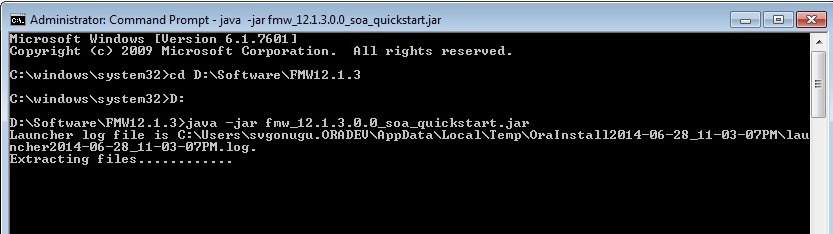
Unzip the installer and start the installation as shown below.

javac

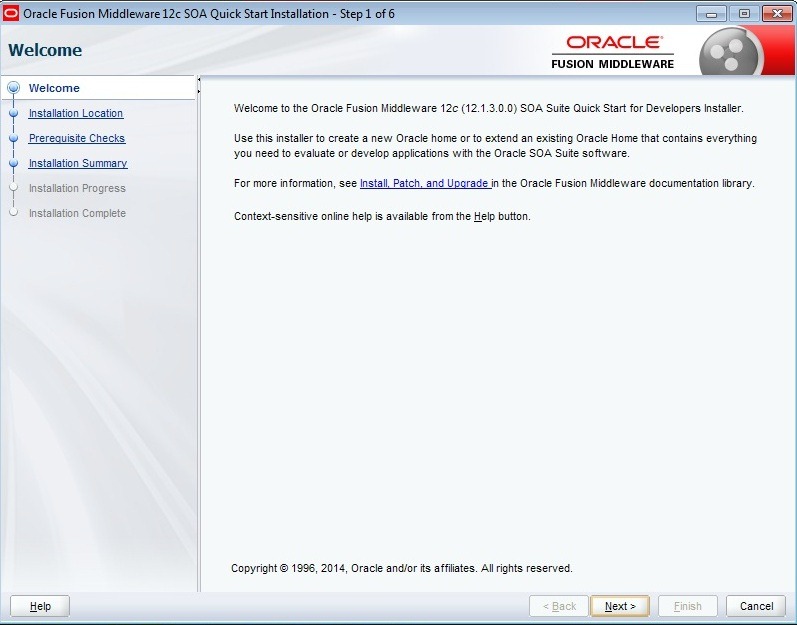
This brings up the welcome screen.

1

Click Next and set Oracle Home to your desired location.

2

Click Next to finish Prerequisites check.

3

Click Next. Here you can review the installation summary and click Install.

4

5

Click Finish to complete the installation.

6

RCU Installation

You need to create the required schemas using RCU before proceeding with domain creation. As I mentioned earlier, no separate installer is required for RCU and comes by default with SOA Suite.

Navigate to $MW_HOME/oracle_common/bin. Locate file rcu.bat and select ‘Run as Administrator’ on right click to bring up the following welcome screen. Make sure that you installed a supported database before proceeding.

rcu2

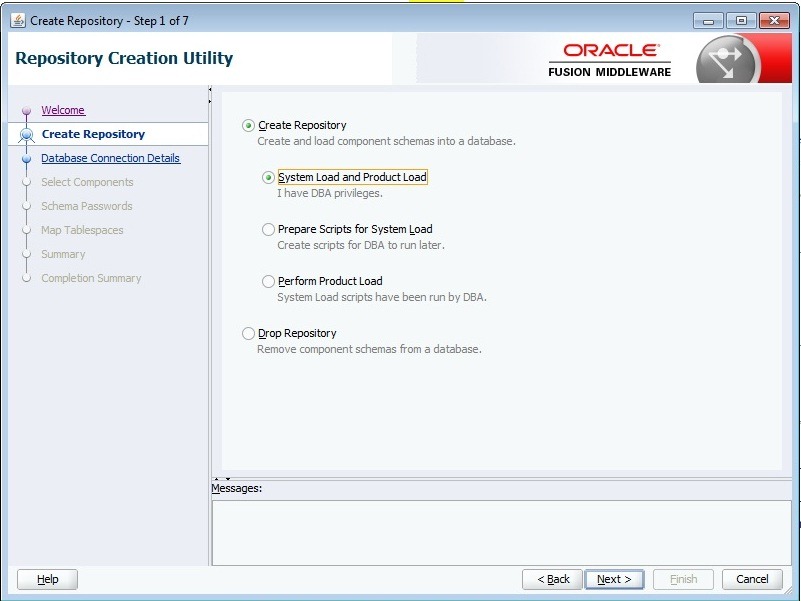
Click Next and choose default options for creating the repository.

rcu3

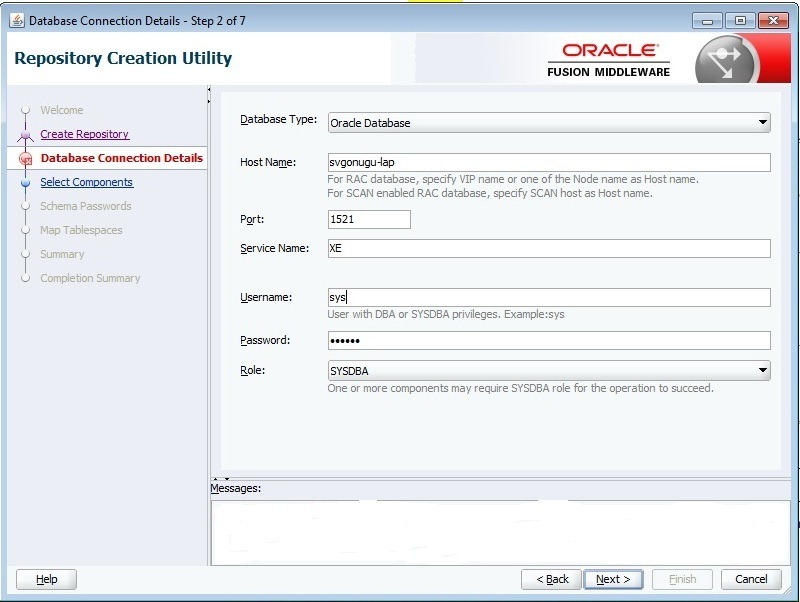
Click Next and enter your database information with sys credentials.

rcu4

Click on Next and you can Ignore the warning related to Oracle XE database as you are going to use this domain for development purpose.

rcu5

RCU will perform some prerequisite checks.

rcu6

Click OK to bring up following screen. Enter prefix as you desired and select SOA Infrastructure schema. This will automatically select all other dependent schemas as shown.

rcu7

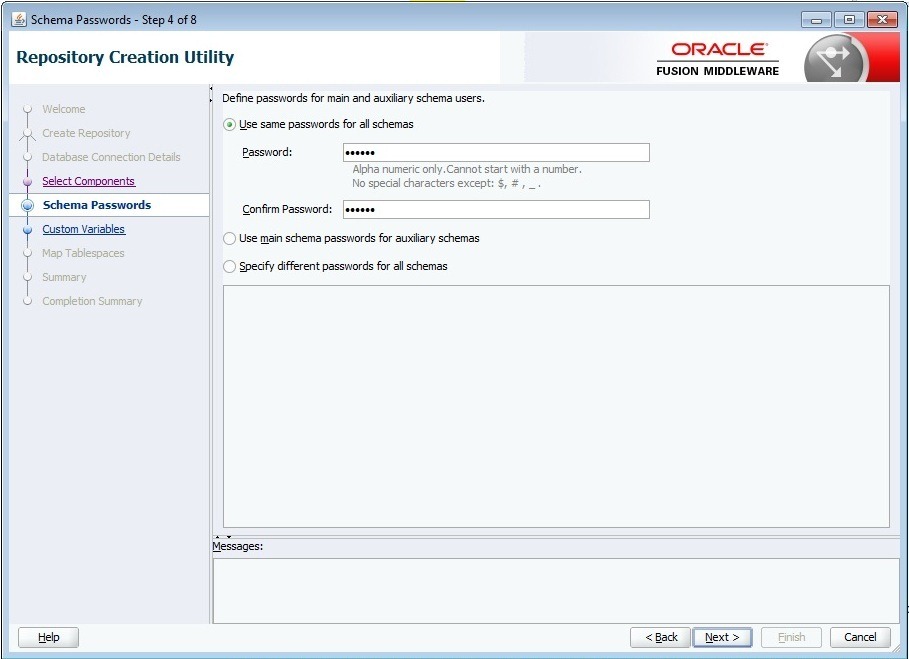
Click Next and enter the password for all schemas.

rcu9

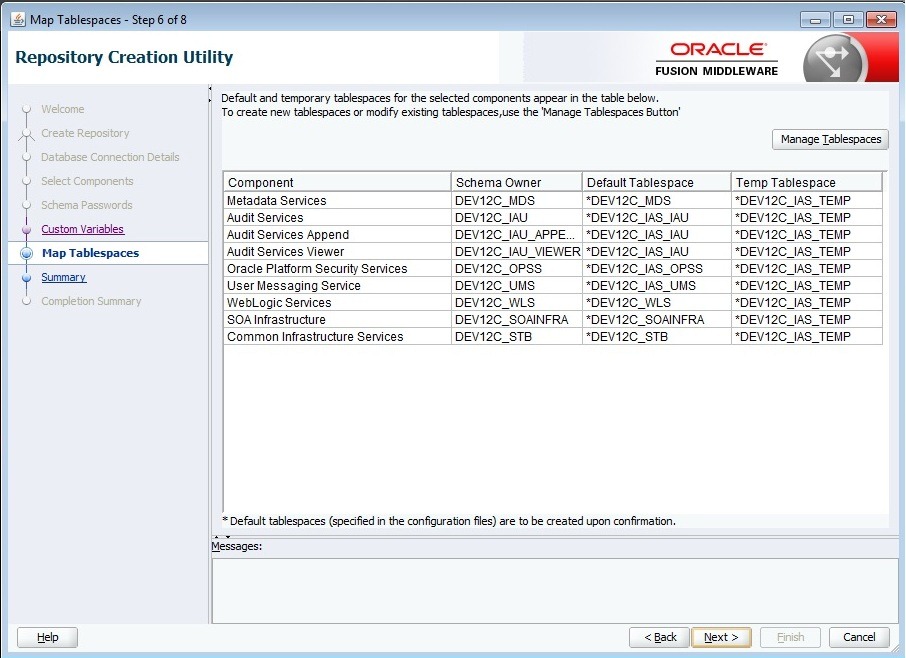
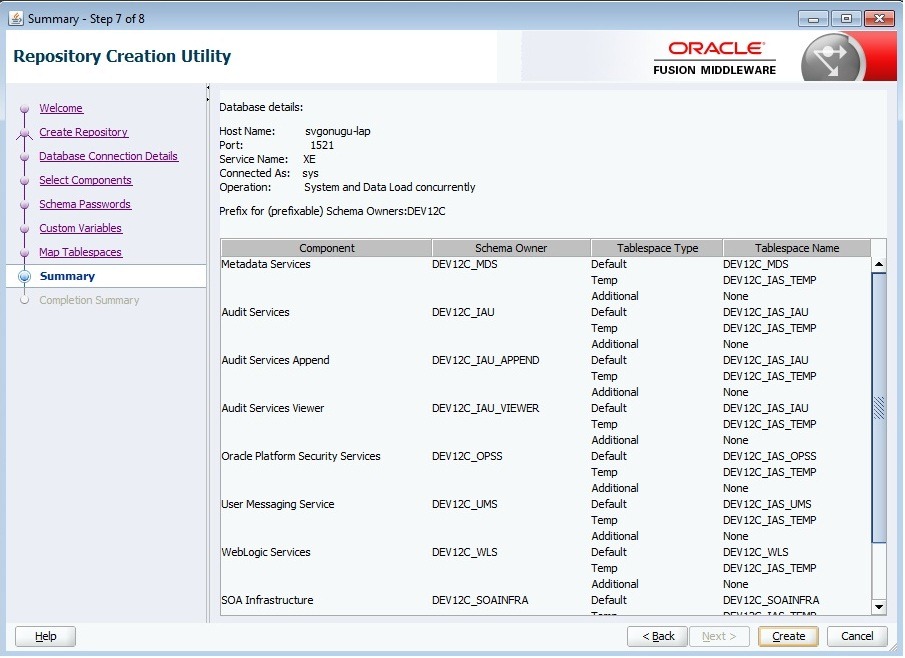
Click Next and proceed to next screen by accepting the defaults.

rcu11

rcu12

rcu13

rcu14

Click on Close to finish RCU installation.

Domain Creation

Navigate to $MW_HOME/oracle_common/common/bin and locate the file config.cmd. Right click and select ‘Run as Administrator’ to bring up the following screen. Enter your desired domain name.

domain1

Click Next and select the products that your domain want to support.

domain3

Click Next and proceed further by accepting the defaults.

domain4

Click Next and enter the credentials.

domain5

Click Next and choose Domain Mode. You may want to retain Development as Domain Mode. You can accept defaults for JDK or you can select any other location.

domain6

Click Next. Enter STB schema information as shown below and click Get RCU Configuration.

domain8

Once schema retrieving is successfully done, click Next.

domain9

Click Next and verify that connection test is successful for all the schemas. If not, you can go back to previous screen and modify individual schema connection information.

domain10

Once testing is done, Click Next and accept the defaults.

domain11

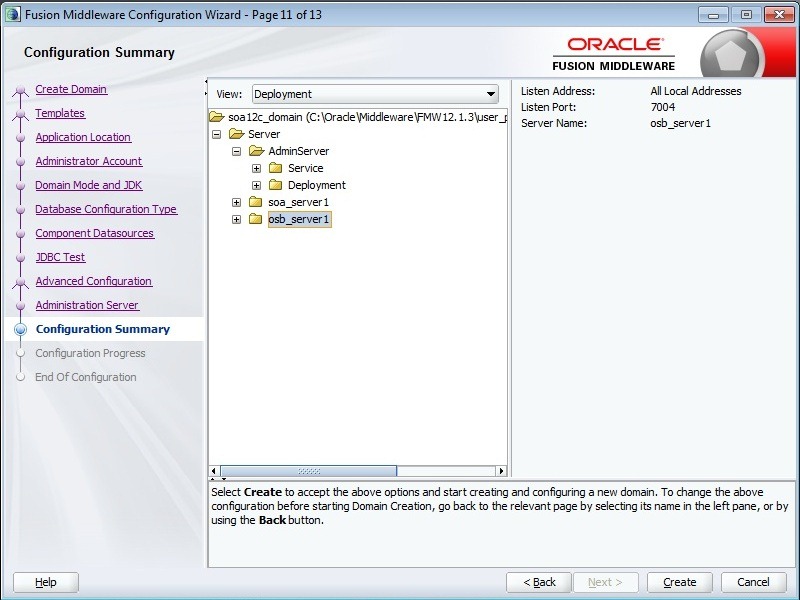
Click Next and in this screen you verify the domain configuration the wizard is going to create.

domain13

Click Create to start the domain creation.

domain14

Once the the domain creation is successful, Click Next.

domain15

Remember Domain Location and Admin Server URL and click Finish to exit the configuration wizard.

Start the Admin and Managed Servers by executing startWebLogic.cmd, startManagedWeblogic.cmd respectively from bin folder of Domain Location (shown above).

SOA Suite 12c Released!!!!

Oracle had officially released SOA Suite 12c (12.1.3) yesterday and can be downloaded from OTN.

SOA Suite download itself contains JDeveloper (including SOA Extension), RCU and Weblogic Server 12.1.3.

OSB 11g – A Hands-on Tutorial

I published a OSB11g tutorial considering the use case described in my earlier blog posts. The tutorial can be accessed from here as I am not sure on how to place it in OTN. I would like to know your valuable comments on this. The WSDLs and other material used in this tutorial can be downloaded from here.

How-To: Attach OWSM Policy to ADF BC Service

Open ServiceAMImpl and place the cursor on the Annotations section.

ServiceAMImpl

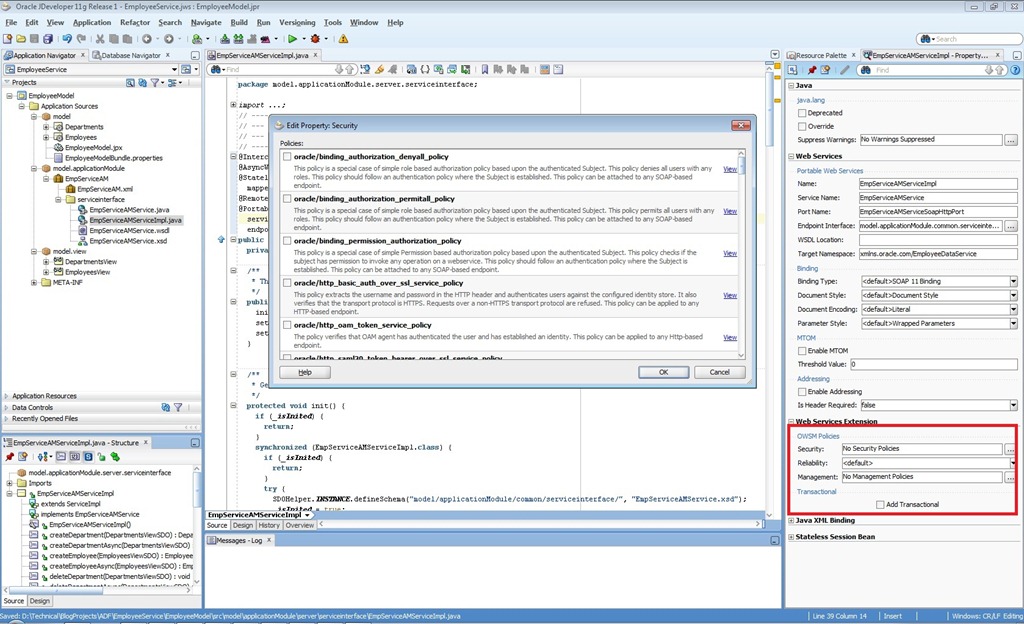
Go to ‘Web Services Extension’ in the property inspector and click on the LOV for Security that  brings up the all available OWSM policies.

policy

Select any service policy from the list based on your requirements and click on OK.

policySel

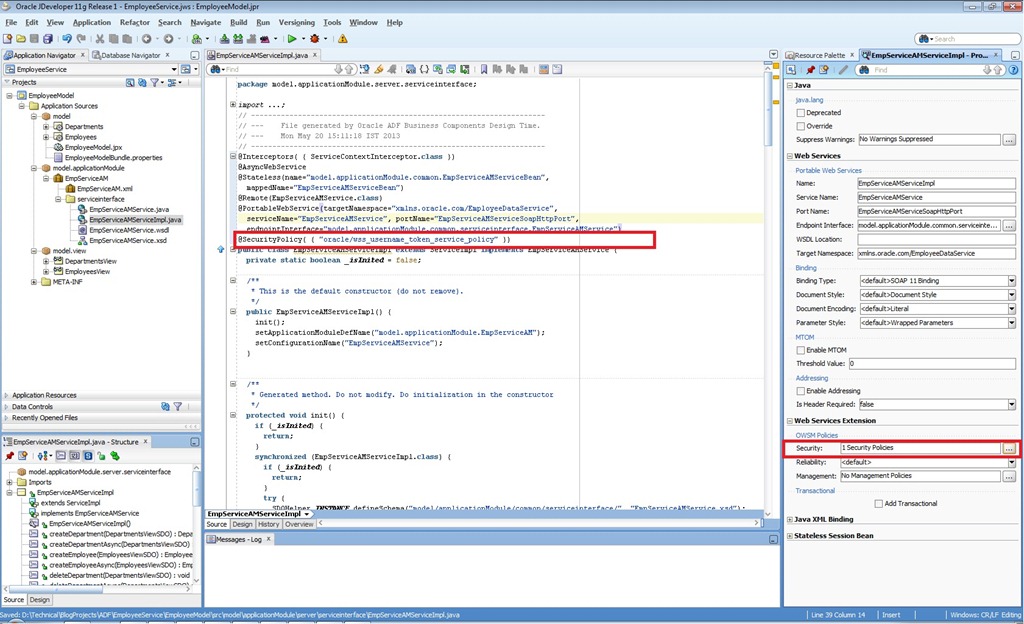
Observe that ServiceImpl is updated showing new annotation with the selected OWSM policy.

policy2


Pages

Enter your email address to subscribe to this blog and receive notifications of new posts by email.

Join 196 other subscribers

Enter your email address to follow this blog and receive notifications of new posts by email.