Archive Page 10

Database Polling in OSB – Part I

Most of us have used DB Adapter in BPEL to perform operation in database. One of the features that is widely used is database polling when working with database. OSB also supports JCA DB adapter since it’s initial release in 11g. In a series of posts, i will show you different polling strategies in ACTION from OSB perspective.

I had used a use case of migrating data (smaller volume) from SI_EMPLOYEE table (source) to SI_EMPLOYEE_COPY (target) using DB adapter in OSB for this demo. And JDeveloper 11.1.1.6 and OSB 11.1.1.6 are used for this demo.

This post assumes that reader has basic understanding of working with DB Adapter in BPEL, OSB and using JDeveloper and Eclipse IDEs.

Create Business Service:

This business service merges the rows into target table using DB adapter. So create DB adapter files in JDeveloper by selecting the merge operation.

InsertDBOperation

In the next step of the wizard, select target table and finish the DB wizard to create all necessary files (.JCA, mappings, properties, WSDL and XSD). Import all of these files into Eclipse IDE and create business service from JCA file.

BusinessService

The JCA properties from configuration file can be verified and modified from the JCA transport tab of the business service.

JCA Transport

Delete Polling Strategy:

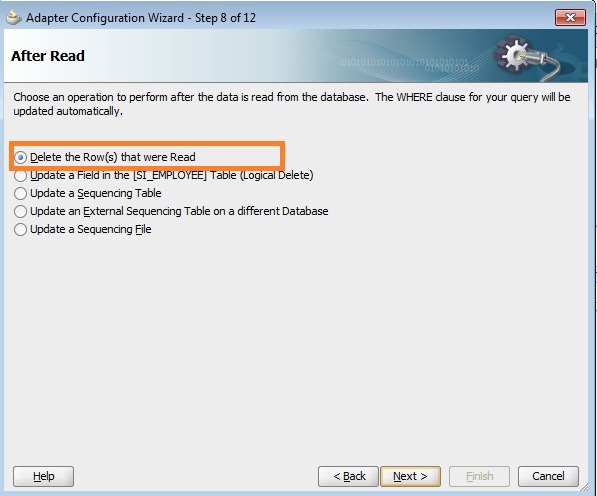
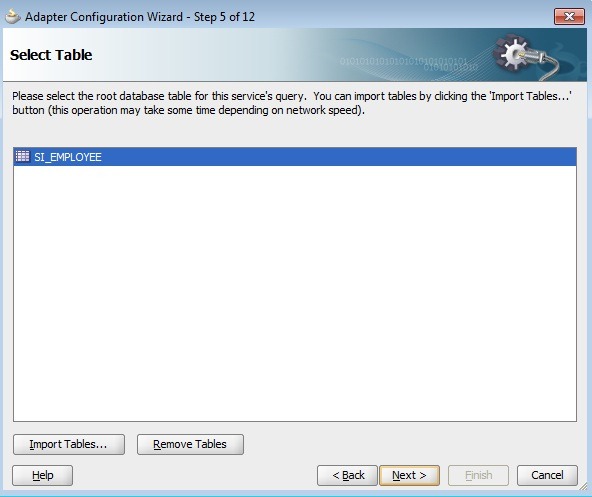
Create DB adapter files in JDeveloper by selecting Poll operation, source table and the polling strategy (After Read) as ‘Delete the Row(s) that were Read’.
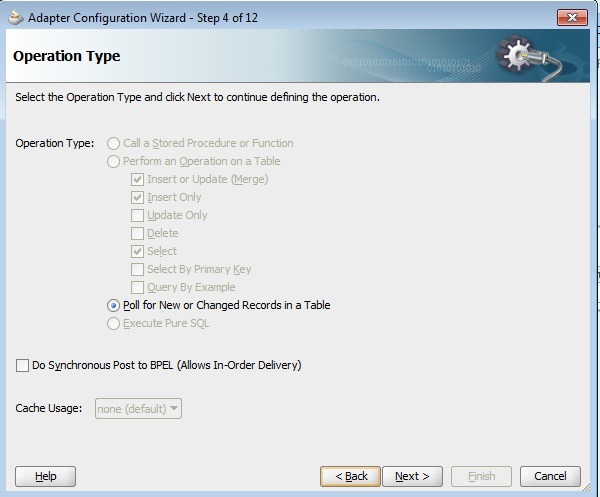
Poll

table

AfterReadDelete

Import all of these files (JCA, mappings file, properties file, WSDL and XSD) into Eclipse IDE and create proxy service from .JCA file. Also the JCA properties can be verified in ‘JCA Transport’ tab including the polling strategy and the polling interval (60 sec in this scenario).

eclipsepoll

Complete the message flow in proxy service by adding Routing and Replace activity to transform $body as required by business service.
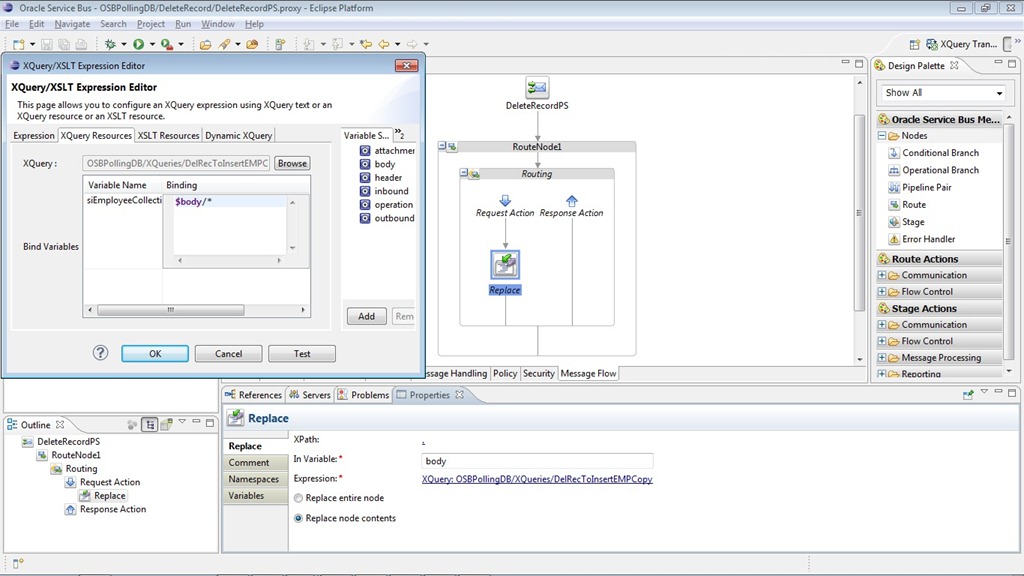
xquery

Deploy OSB project. Now insert a few rows in source table. Verify that polling happens and target table is populated with records and also the records got deleted from source table.

Before Polling:
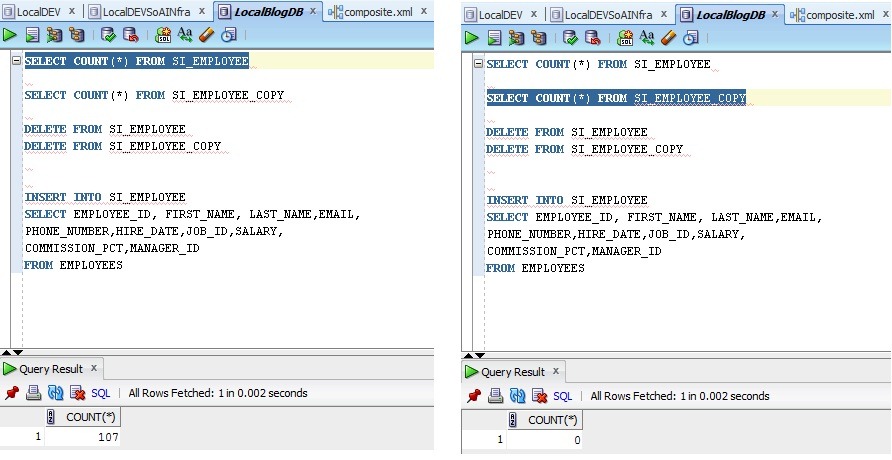
b4poll

After Polling:

aftrpoll

Logical Delete Polling Strategy:

In this polling strategy, a column in the table is marked with particular value to designate the logical delete thus avoids DB adapter to pick it up the same record again and again. Currently our table does not have any column for this purpose, so add a column ISACTIVE VARCHAR2(1) in source table.

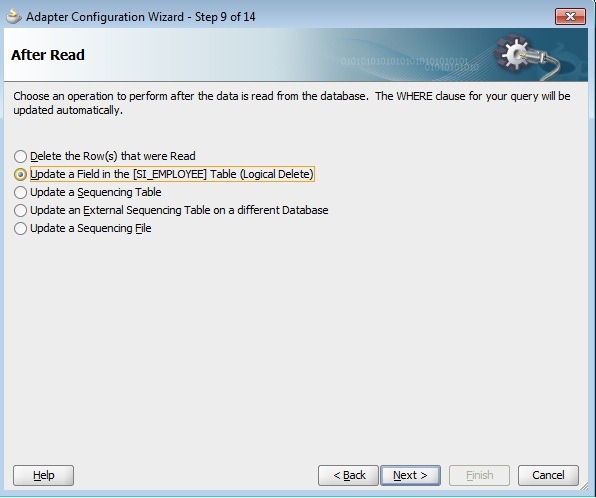
Create DB adapter files in JDeveloper by selecting Poll operation, source table and the polling strategy (After Read) as ‘Logical Delete’.
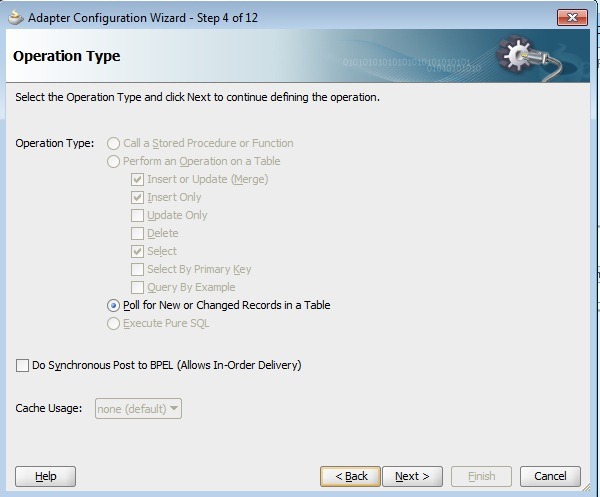
Poll

table

logdelete

Enter ‘Read Value’ as ‘N’ and ‘Unread Value’ as ‘Y’ so that DB adapter would only poll active records.

logdeleteac

In the next step of DB wizard, one can verify SQL statement used for polling and finish the wizard.
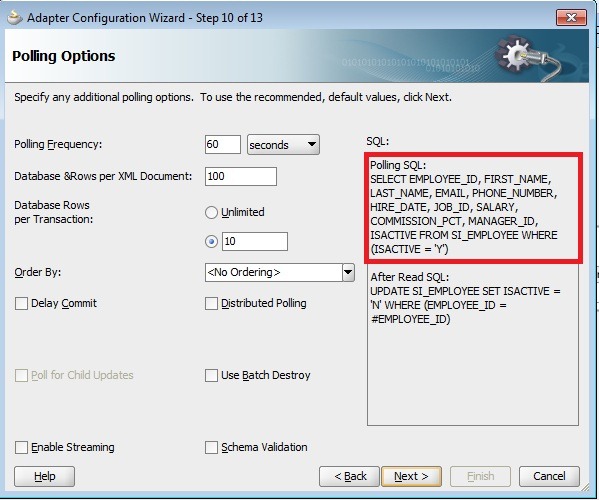
pollsql

Import all of these files (JCA, mappings file, properties file, WSDL and XSD) into Eclipse IDE and create proxy service from .JCA file. Also the JCA properties can be verified in ‘JCA Transport’ tab including the polling strategy and the polling interval (60 sec in this scenario).

logdelete1

Complete the message flow in proxy service by adding Routing and Replace activity to transform the payload as required by business service.

logdelete2

Deploy OSB project and disable the proxy DeleteRecordPS so that only our new proxy service will poll DB table.
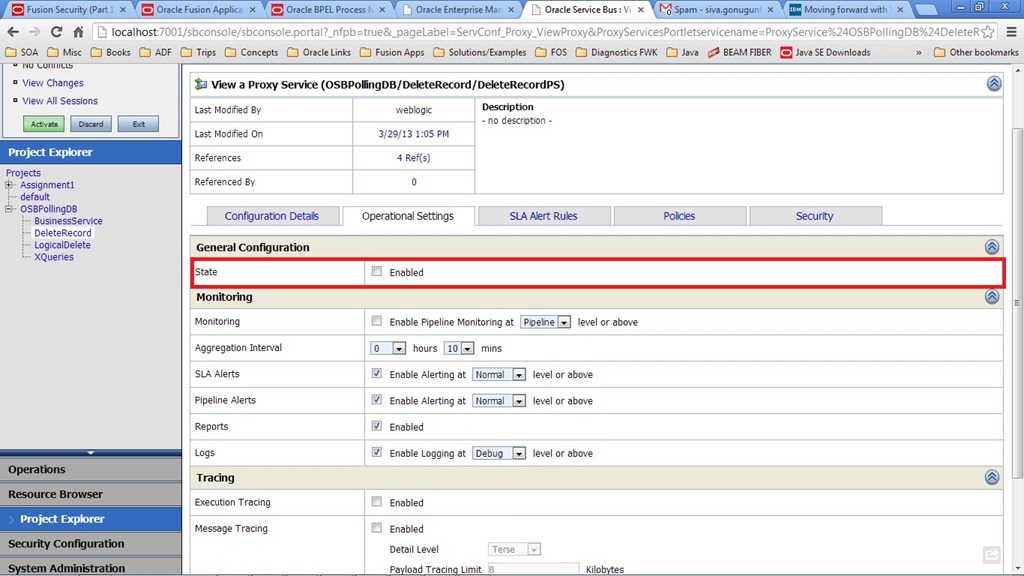
disable

Insert a few rows in source table with value ‘Y’ for ‘ISACTIVE’ column.Verify that polling happens and target table is populated with records and also the records in source table are marked with value ‘N’.

Before Polling:
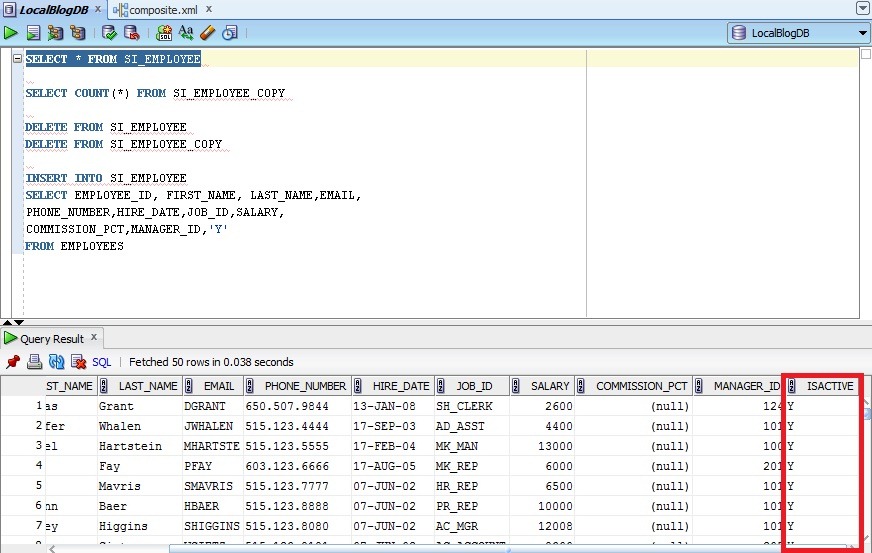
activewithY

withzero

After Polling:

withN

with107

The configuration jar of this demo OSB project can be downloaded from here.
Extending the Weblogic Domain

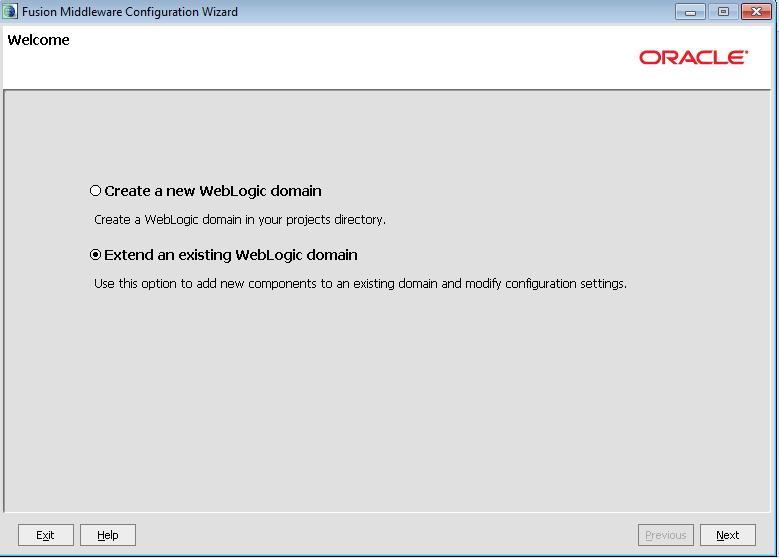
In this post, I quickly show you how to extend an existing weblogic domain which is quite simple and straight forward. Initially i have OSB domain and extended the same domain to include SOA.

Open the configuration wizard (config.cmd) from $MW_HOME/wlserver_10.3\common\bin and select the option as shown below and click on Next.

image

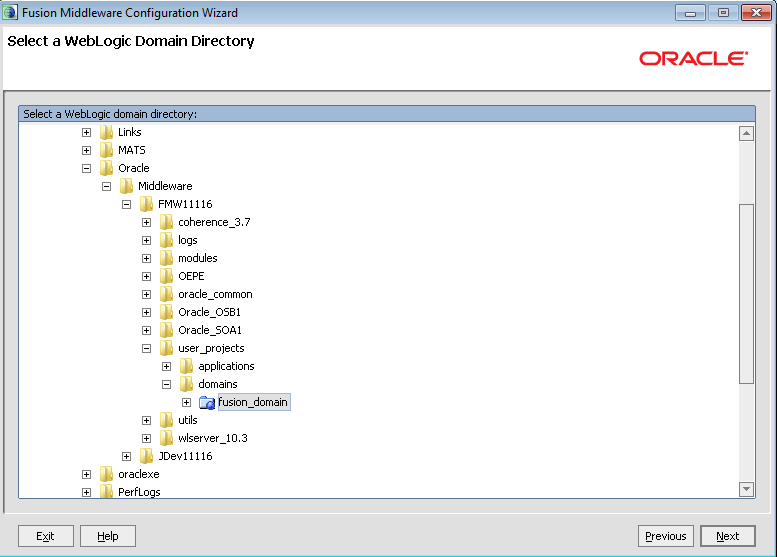
Select the domain directory from the selection browser.

image

Choose the products from the displayed list.

image

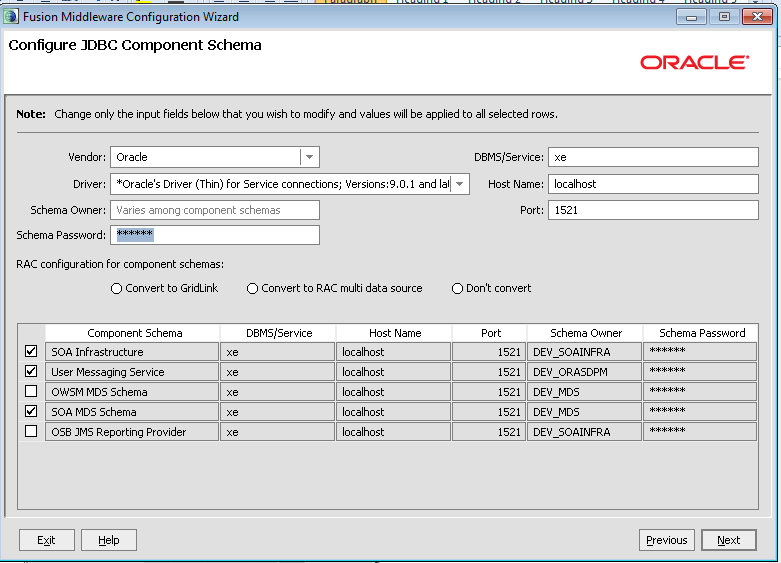
Give database schema details for new components that get added because of the selection in the previous screen. For example, in the current scenario the component schemas ‘SOA Infrastructure’ , ‘User Messaging Service’ and ‘SOA MDS Schema’ have to modified with correct database information as shown below and click on Next.

image

Make sure that connection is successful by observing the logs shown and click on Next twice.

image

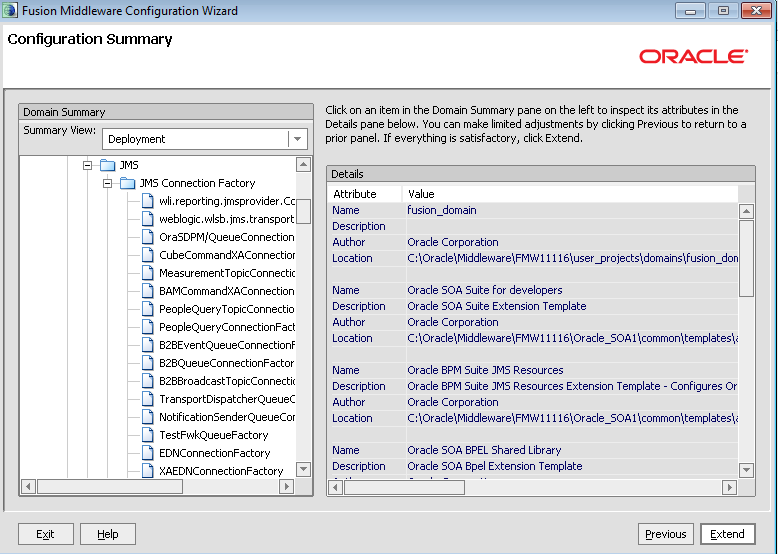
Verify the configuration summary and click on Extend button to finish.

image

Once the domain is created, click on Done button and bring up the server to verify the installation of SOA server by opening the EM console and look for soa_infra.

image

Sending JSON payload requests from BPEL

In this blog post, I am sharing sample code that demonstrates the usage of JSON in BPEL context. The code is refactored into 2 projects containing the java utility code and  a sample BPEL process. The code can be downloaded from here.

Demonstrates:

Java Utility Code:

  • Using cookies to pass authentication info (username and password).
  • Sending XML payload as URL parameters using intermediate conversion to JSON for GET request.
  • Sending HTTP request through HTTP proxy.
  • Sending JSON or XML payload in the POST request.

BPEL Process:

  • Using BPEL preferences to store any configurable information.
  • Using java embedding activity to call the external java code. The jar file has to be kept in SCA-INF/lib to refer to java code.
  • Using Replay activity. The fault policy mechanism can also be used for retry functionality, if we throw BPEL related faults from java code.
  • Converting JSON to XML and vice-versa using java utility routines in BPEL.
  • An example on creating XSD similar to JSON data format representing the service response so that XPath expressions can be used in BPEL.

Does not cover:

  • HTTP Basic Authentication
  • Using XML APIs (like JAXP) to convert input XML to URL parameters
  • URL encoding while calling HTTP GET method
  • Using JAX-RS to invoke REST based services

FYI:

  • XMLToJSONUtil.java in the code zip file is taken from Biemond’s blog.
  • The libraries used for JSON processing can be downloaded from here .
  • JSR – 353 Java API for JSON Processing is closed for public review.

The code is uploaded for reference and  this may not be the only way to achieve this.

Query to find BPEL execution time

I had a scenario where business event is captured by a mediator in one of the composites and routes it to several BPEL processes in a sequence to complete particular business flow. I had to know the time taken by each of these BPELs in my end-to-end flow. Instead of going through each of the BPEL instance in EM console, I came up with the following query to find out the time taken. I used the ECID to correlate all the BPEL instances generated during my process flow. Check if it’s of help to any.

SELECT INSTANCE_KEY, COMPOSITE_NAME, COMPONENT_NAME,
       CREATION_DATE, MODIFY_DATE, EVAL_TIME
FROM (SELECT INSTANCE_KEY, COMPOSITE_NAME, COMPONENT_NAME,
               CREATION_DATE, MODIFY_DATE, EVAL_TIME
       FROM BPEL_PROCESS_INSTANCES
        WHERE instance_key IN (SELECT cikey FROM CUBE_INSTANCE
                              WHERE ecid = <<ecid>>)
       UNION ALL
       SELECT 1 INSTANCE_KEY, ‘Comp’ COMPOSITE_NAME, COMPONENT_NAME,
             CREATED_TIME CREATION_DATE, UPDATED_TIME MODIFY_DATE,
             CASE
          WHEN UPDATED_TIME IS NOT NULL THEN
            (extract(DAY FROM (UPDATED_TIME – CREATED_TIME)) * 24 * 60 * 60 +
             extract(hour FROM (UPDATED_TIME – CREATED_TIME)) * 60 * 60 +
             extract(minute FROM (UPDATED_TIME – CREATED_TIME)) * 60 +
             extract(second FROM (UPDATED_TIME – CREATED_TIME))) * 1000
         ELSE NULL
             END AS eval_time
        FROM MEDIATOR_INSTANCE
    WHERE ecid = <<ecid>>
       )
ORDER BY INSTANCE_KEY;

In case of the multiple events, we can rewrite the query if the composites are using sensors. The following query has been used in our case to monitor and to get execution times, minimum and maximum time taken for each of the component in process flow.

/*SELECT ECID, INSTANCE_KEY, CID, COMPOSITE_NAME, COMPONENT_NAME, CREATION_DATE,  MODIFY_DATE, EVAL_TIME */
–SELECT COMPONENT_NAME,  min(EVAL_TIME), max(eval_time)
SELECT ECID, count(component_name) cnt
FROM (SELECT ECID, CIKEY INSTANCE_KEY, CIKEY CID, COMPOSITE_NAME, COMPONENT_NAME, CREATION_DATE, MODIFY_DATE,
        CASE
        WHEN MODIFY_DATE IS NOT NULL
        THEN (extract(DAY FROM (MODIFY_DATE – CREATION_DATE)) * 24 * 60 * 60 +
              extract(hour FROM (MODIFY_DATE – CREATION_DATE)) * 60 * 60 +
              extract(minute FROM (MODIFY_DATE – CREATION_DATE)) * 60 +
              extract(second FROM (MODIFY_DATE – CREATION_DATE))) * 1000
          ELSE NULL
              END AS EVAL_TIME
      FROM CUBE_INSTANCE
      WHERE ecid IN (SELECT b.ecid FROM COMPOSITE_SENSOR_VALUE a, MEDIATOR_INSTANCE b
                                               WHERE sensor_name = <<sensor name>>
                            AND  a.composite_instance_id = b.composite_instance_id
                                        AND string_value IN (<<values>>)
                        )                           
    UNION ALL
    SELECT a.ECID, 1 INSTANCE_KEY, a.composite_instance_id CID,
               ‘Comp’ COMPOSITE_NAME, a.COMPONENT_NAME,
              a.CREATED_TIME CREATION_DATE, a.UPDATED_TIME MODIFY_DATE,
              CASE
        WHEN UPDATED_TIME IS NOT NULL
        THEN (extract(DAY FROM (UPDATED_TIME – CREATED_TIME)) * 24 * 60 * 60 +
              extract(hour FROM (UPDATED_TIME – CREATED_TIME)) * 60 * 60 +
              extract(minute FROM (UPDATED_TIME – CREATED_TIME)) * 60 +
              extract(second FROM (UPDATED_TIME – CREATED_TIME))) * 1000
          ELSE NULL
              END AS eval_time
      FROM MEDIATOR_INSTANCE a, COMPOSITE_SENSOR_VALUE b
      WHERE a.composite_instance_id = b.composite_instance_id
        AND b.sensor_name = <<sensor name>>
        AND b.string_value IN (<<values>>)
  )
–GROUP BY COMPONENT_NAME
GROUP BY ECID order by cnt

–ORDER BY ecid, INSTANCE_KEY, CID;

Note: Based on the requirement, the above select and group by statements have to be commented/uncommented.

SOA Project Compilation Issue

Recently we came across some compilation issue with SOA composite. Though it’s a small issue, I feel worth sharing as we often forget few basic things during development.

The SOA composite uses DB Adapter for polling the database. Every time we refresh or run through the database wizard and compiles the composite, we are getting compilation error saying ‘variable <<variable name>> of type <<variable type>> is not defined’.

Reason: We will have a WSDL represents the service interface exposed by the DB adapter even when we used the polling option. Whenever we define a variable in BPEL the corresponding XSD (where the elements are defined) will be imported or included into this service WSDL. These import/include statements are getting removed in the WSDL every time we refresh the DB adapter. Re-adding these import/include statements in the WSDL had resolved the issue. This also applies to other kind of service interfaces

We observed the same issue with some of SOA composites after migrating from 10g to 11g.

HTTP Binding In BPEL- Testing from SOAP UI

Recently, we came across a requirement of exposing the BPEL service to be accessible over HTTP without exposing it as SOAP service. We have used the HTTP binding for this purpose. This blog provides the useful information on coming up with actual HTTP url to be used for testing as we faced issues with testing the process from EM console.

Basically the url should be some thing like below for GET invocation:

<<url given in EM>>/?<your query string>&operationName=<get operation name>

Just wanted to add simple update on this topic, the URL is working even by giving different name for operation other than default operation name ‘Request-Response’. The same has been tested from SOAP UI (GET method invocation).

Error while using the HTTP Binding in BPEL

HTTP Binding can be used in BPEL to call the RESTful services. We might have come across one common error REPLACE_WITH_ACTUAL_URL while calling. Came across a metalink note that talks about this so thought of sharing the same.

Metalink Note ID: 1328955.1

Following are the few reasons that i found during my testing with the HTTP adapter to invoke REST based urls:

–  If the URL is not accessible from the server because of the firewall or HTTP proxy

– Using the XML complex types in the request structure.

Though, the metalink url says that XML complex types are not supported it’s working in 11.1.1.5 version ( i verified only in this version). The same working sample can be downloaded from here.

The example calls the Echo application which can be downloaded from  here (Antony Reynold’s blog).

Deployment of SOAP UI Mock Service to Weblogic

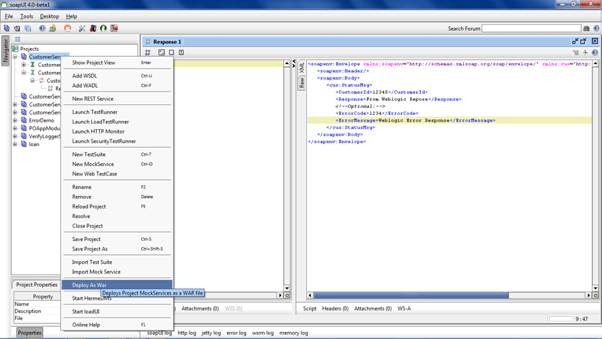
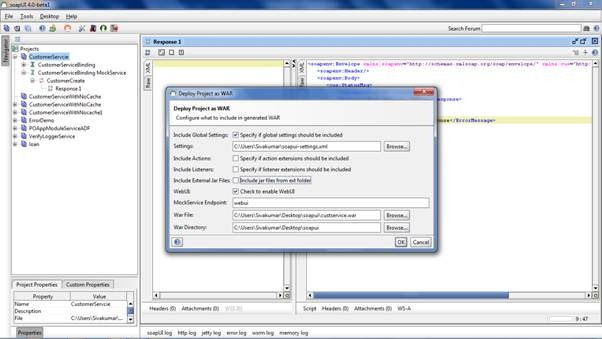
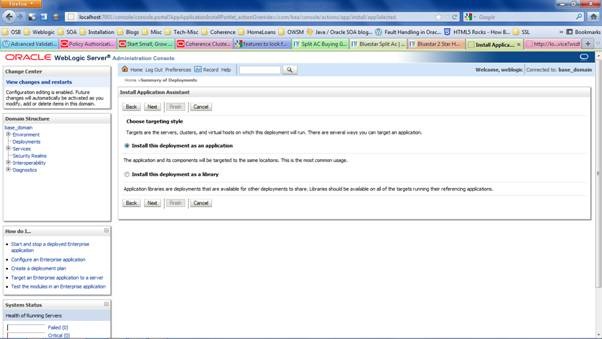
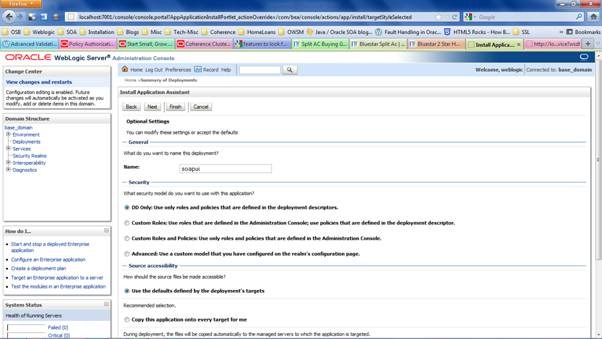
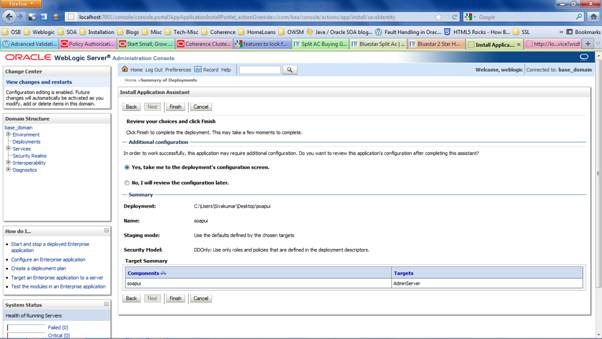
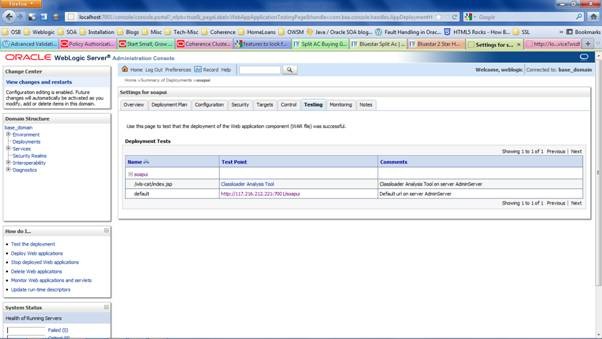
In this post, i show how a SOAP UI mock service can be deployed as a war to weblogic server. It’s very self explanatory and based on the examples given in SOAP UI documentation.

clip_image002

clip_image004

clip_image006

clip_image008

clip_image010

clip_image012

clip_image014

clip_image016

clip_image018

clip_image020

clip_image022

clip_image024

clip_image026

clip_image028

clip_image030

OSB 11.1.1.6 Documentation Update..

OSB 11.1.1.6 documentation gave the following long waited update on usage of OWSM policies to use with SwA and the same can be found in the link.

Notes:

Oracle Service Bus does not support attaching OWSM policies on proxy/business services that process messages with MIME attachments, including message protection policies with SwA (SOAP with Attachments) properties enabled. Using OWSM policies with MTOM-enabled services is also not supported.

Release 11.1.1.7 supports WS-Security with MTOM and SwA and new features are summarized here.

OSB 11g book published..

OSB 11g Development cookbook authored by Guido Schmutz, Edwin Biemond , Jan van Zoggel , Mischa Kölliker , Eric Elzingam is available  at http://www.packtpub.com/oracle-service-bus-11g-development-cookbook/book


Pages

Enter your email address to subscribe to this blog and receive notifications of new posts by email.

Join 196 other subscribers

Enter your email address to follow this blog and receive notifications of new posts by email.