Posts Tagged 'SOA'


Service Bus 12c – A Hands-on Tutorial

I published a Service Bus 12c Tutorial considering the use case described in my previous blogs. The Tutorial is available for download here and would like to know your valuable comments. The WSDLs and other material used in this tutorial can be downloaded from here.

By the time you finish this tutorial, you will learn:

  • Creating Service Bus Application, Project, Proxy and Business services.
  • Working with resources like WSDL, XSD, XSLT, XQuery etc.
  • Sharing Service Bus resources across Service Bus projects to enable reuse and modularity.
  • Creating Pipeline Templates, Pipelines and using nodes like Pipeline Pair, Stage, Routing and Operational Branches.
  • Using Domain Value Maps (DVM) for storing configuring properties and using them in message flow.
  • Creating Service Accounts and using them in message flow at Runtime.
  • Enriching the messages using intermediate Service callouts in Pipelines.
  • Routing messages to business services using Service Callout, Routing and Routing Table.
  • Working with Split-Joins.
  • Using Service error handlers in Pipelines.
  • Securing Proxy service using OWSM.
  • Deploying and Testing Proxy and Business services.

SOA 12c – Durable Subscribers with Weblogic JMS

Business Events are used to notify the interested parties (subscribers) about an occurrence of activity which is of important to them. On raising the business events, the subscribers would consume them and process it based on their business flows. All these things would happen in a highly loose coupled manner and business events producers may not be aware of the subscribers. So when designing an application based on business events one of the aspects requires attention is, Will there be any loss of event? This is very important as subscribers are not in a position to request providers to raise event again, even if they do its going to be a duplicate event (occurrence) for other subscribers. Technically speaking, the loss of event can be translated into any of these following scenarios:

  • Subscriber received the business event but faulted during processing.
  • Subscriber is unavailable when the business event is published.
  • The hosted server itself is down when the business event is published.

Scenario 1: For this scenario, EDN provides different Consistency levels and Auto Retry feature which you can use. The post discusses this behavior and also highlights major differences between 11g and 12c SOA Suite releases. In other cases where this feature can’t be leveraged, developer had to take care of manually storing event information and retrieving later on processing failure.

Scenario 2: Typically this scenario may not arise in production environments but there is a possibility when event producer and subscribers are deployed on different managed servers and maintenance cycles for both are different. EDN 11g does not support for this case and it mandates Subscribers to be available when event is published. But in 12c, this scenario is handled using Durable Subscribers which we see shortly.

Scenario 3: This scenario also automatically handled by EDN as it queues the events. And once the server is up, the events in queue will get delivered to their respective subscribers.

In this post, we will see how Durable property works for Business Events. We will use the same 3 composites used in previous post, where we have 3 subscribers for CreateOrder and 1 subscriber for UpdateOrder business events respectively. From here onwards, we will use subscribers or composites terminology interchangeably.

  • Deployment of composites with Durable property to Yes.
  • Any of the Composites subscribed to business events are shutdown.
  • Redeployment of composites with same revision.
  • Redeployment of composites with different default revision.
  • Server shutdown and restart when a few business events are pending to be delivered.
  • Un-deployment of the composites.
  • Redeployment of composites after modifying Durable property to No.

So let’s us get started!!!

To start with let’s have a quick look at Events and Subscriptions used for demonstration. To view these navigate to soa-infra->Business Events.


Durable property to Yes:

Set Durable property to Yes for all subscribers and do deploy.

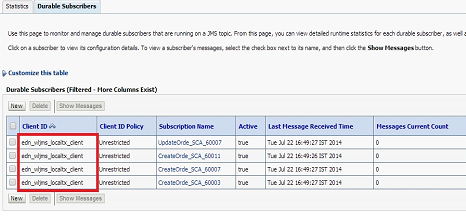
When Durable property is set to Yes, EDN leverages Weblogic JMS durable subscriptions and creates Durable subscribers for each such subscription. Durable subscriptions mean that Weblogic server will store the messages in persistent store until it gets delivered to subscriber. This can be observed in Weblogic Admin Console by navigating to Services->Messaging->JMS Modules->SOAJMSModule->EDNTopic->Monitoring->Durable Subscribers.

You can observe 4 Durable subscribers in the above screen where 3 of them for CreateOrder and 1 for UpdateOrder business events respectively. You can find out JNDI of JMS Topic used for an event in default JMS Mapping by navigating to Business Events screen from soa-infra and you can also modify this default JMS Mapping for business events.

Subscribers Down:

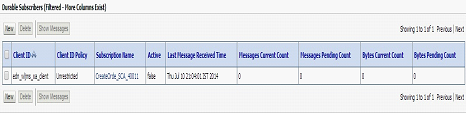
Shutdown EDNSubscribeSync composite and observe durable subscribers.

In above screenshot, you can observe that corresponding durable subscriber is inactive (observe value for Active column).

Now raise CreateOrder business event. Go to flow trace and observe that event is not delivered to this composite.

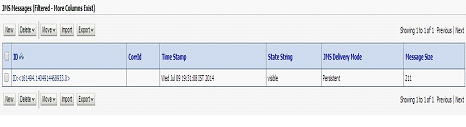
Also, since it’s a durable subscriber we would ideally expect this message to be stored by Weblogic server. Now go to Durable Subscribers and you can observe a pending message to be delivered.

Click Show Messages to see all pending messages.


Click on message to see details as shown below.


Now shutdown EDNSubscribeAsync composite and observe corresponding durable subscribers.

Raise another CreateOrder business event and observe pending messages.


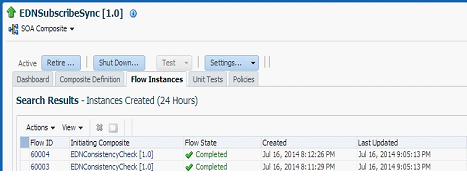
Bring up EDNSubscribeAsync composite and you will see a new composite instance gets generated as the pending event is delivered by EDN.


Also observe that corresponding Durable Subscribers are active.

Now bring up EDNSubscribe composite and observe 2 new composite instances are generated for both of the pending messages.

Also observe that all Durable Subscribers are up.

Redeployment of Composites:

There will be no change in Durable subscribers, when composites are redeployed with the same revision or different revision as the default.

Server shutdown:

Shutdown EDNSubscribeSync and EDNSubscribeASync composites and raise 2 CreateOrder and 1 UpdateOrder business events. As shown below, these will be shown as pending for corresponding Durable Subscribers.


Now Shutdown SOA server and restart it. Navigate to EDNTopic and observe that messages are not lost and survived the server shutdown as expected. Bring up the composites and you would observe new instances get created as shown below.


In the above screenshot, the first 2 instances are created for CreateOrder and 3rd instance is created for UpdateOrder business events respectively.

Un-deployment of Composites:

Now Un-deploy EDNSubscribeSync composite. Navigate to Durable Subscribers and observe that only 3 subscribers exist.

Un-deploy EDNSubscribeASync composite too and observe that Durable Subscribers is reduced to 1 as shown below.

Now un-deploy all the composites and observe that all Durable Subscribers are deleted automatically.

Durable property to No

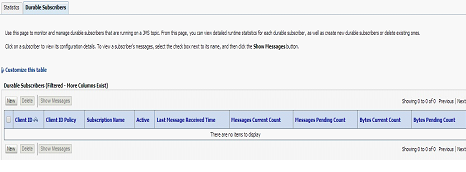
When you set Durable property to No and deploy the composites, you will not see any of the Durable Subscribers for EDNTopic as shown below.


Other Observations:

  • Durable subscribers are taking a little time to become active when server is restarted and shutdown composites are started up (scenario described above in Server shutdown section).
  • Client IDs for Durable subscribers are getting created differently based on event subscription consistency level. Observed that Client ID is set as edn_wljms_xa_client for OneandOnlyOne consistency level. For Guaranteed consistency level, it’s edn_wljms_localtxn_client. This denotes Global Transaction used for OneandOnlyOne and Local Transaction used for Guaranteed consistency levels respectively.

  • 12c documentation for EDN mentions, The EDN does not support durable subscriptions (whether they are backed by native AQ or Oracle WebLogic Server JMS). The subscribing service component must be running to receive events, though we are able to achieve this using Durable Subscribers. We see the same mention in 11g documentation too.

All of the above observations are nicely summarized over here, see table 33-2.

SOA 12c – Business Events and Consistency Levels

I have chosen Business Events as first feature to explore in recent release of SOA Suite12c. Also, I want to cross verify my earlier observations in 11g.

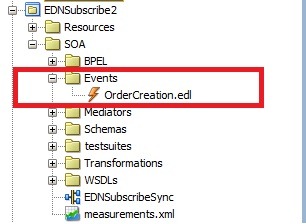
The initial observation is, now the new SOA project will have the folders for different artifacts and the folder Events is for edl files.

soaproj

Secondly, 12c   supports One and Only one and  Guaranteed consistency only and no longer supports immediate. Also new property Durable is added to event subscriptions.

edn1

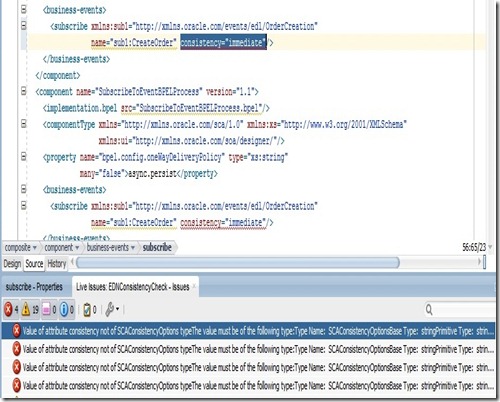
Even migration of 11g composites to 12c is resulting into error, if composite uses immediate consistency level. We have to manually make this change by choosing either of the 2 supported consistency levels.
edn2

But in EM Console, we are still able to see immediate consistency level in the search region. You can navigate to this UI by selecting soa-infra –> Business Events.

edn3

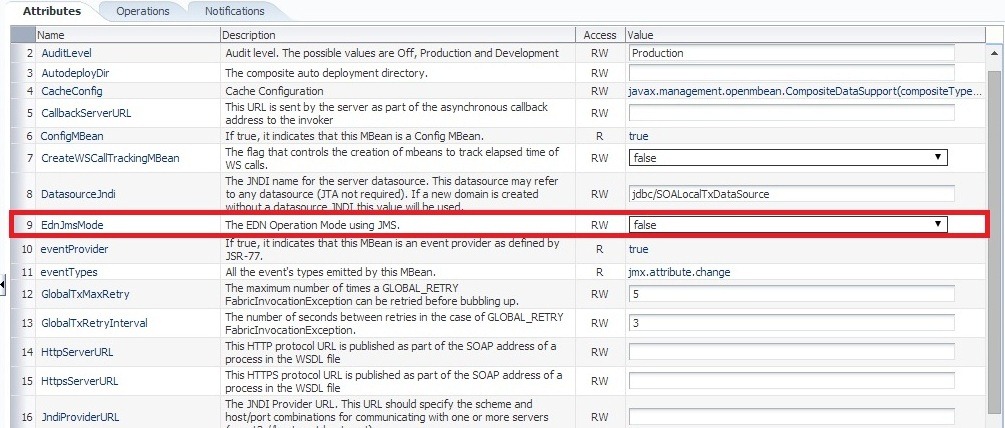
Thirdly, in 11g  EDN uses DB AQ 11g by default for publish and subscribe model of business events. This can be confirmed by verifying value of MBean property EdnJmsMode.  False value denotes EDN using DB and True value denotes EDN using Weblogic JMS. You can verify by navigating to oracle.as.soainfra. config –> SoaInfraConfig –> soa-infra in Application Defined MBeans.
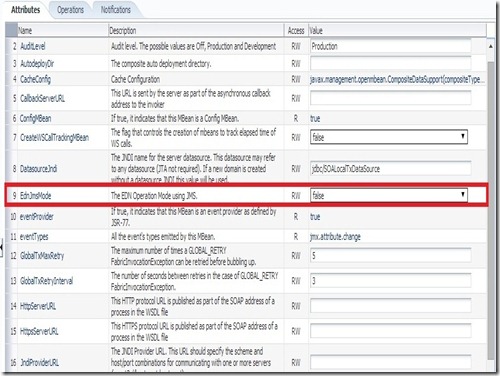
edn5

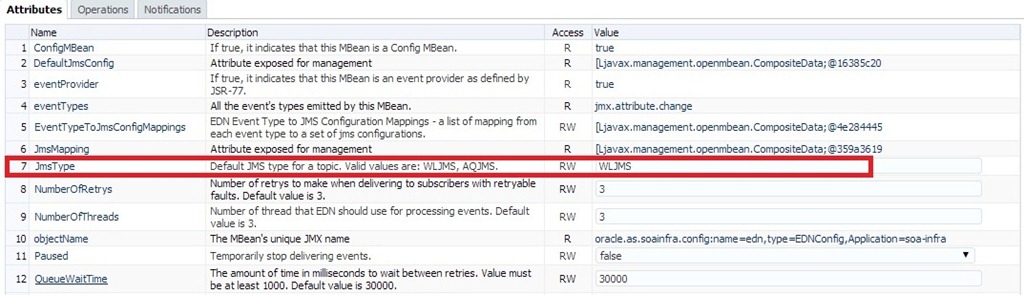
But in 12c, EDN uses Weblogic JMS by default.  This can be confirmed by verifying value of MBean property JmsType .  WLJMS value denotes EDN  using Weblogic JMS and  AQJMS value denotes EDN using AQ DB . You can verify by navigating to oracle.as.soainfra.config –> EDNConfig –> edn in Application Defined MBeans.
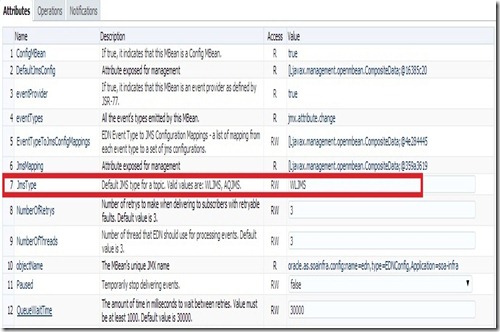
edn4

Another quick observation is, in 12c there is no Faults tab shown in Business Events page. You can select soa-infra –> Business Events to bring up this page. In 12c, we can do manual Retry and Abort of Business Events in Flow Instances screen itself which we will observe later in this post.

soainfra

Now let us start exploring functionality of Business Events from perspective of consistency levels like we did it earlier. As per 12c documentation, one of the major differences is auto retry is supported by Guaranteed consistency level too.

Use case:

We use mediator to raise  2 business events CreateOrder and UpdateOrder. We have following subscribers for CreateOrder event:

  • Mediator routing request to Async BPEL (EDNSubscribeToBPEL process in composite EDNSubscribe).
  • Mediator routing request to Sync BPEL (EDN2BPEL process in composite EDNSubscribe2 ).
  • Asynchronous BPEL process (SubscribeToEventBPELProcess  process in composite EDNConsistencyCheck).

And we have following subscribers for UpdateOrder event:

  • A mediator routing the request to ASync BPEL (in different composite)

Test EDNConsistencyCheck from EM console to raise these business events. The sample composites are available here.

Earlier to simulate Fault condition, we used <onReply/> tag  in mediator while routing to Asynchronous BPEL as shown below.

<switch>

<case executionType=”direct”

name=”Order2BPELProcess1.order2bpelprocess1_client.process”>

<action>

<transform>

<part name=”$out.payload”

function=”xslt(xsl/CreateOrder_To_process.xsl, $in.payload)”/>

</transform>

<invoke reference=”Order2BPELProcess1.order2bpelprocess1_client”

operation=”process”>

<onReply/>

</invoke>

</action>

</case>

</switch>

The behavior is quite different in 12c when same approach has been used to simulate Fault condition. This is resulting into non-recoverable fault in all the times. Though the same behavior is expected in 11g, in actual this fault was considered as recoverable and also auto-retry is made. So here we will simulate Fault condition by throwing Remote Fault manually.
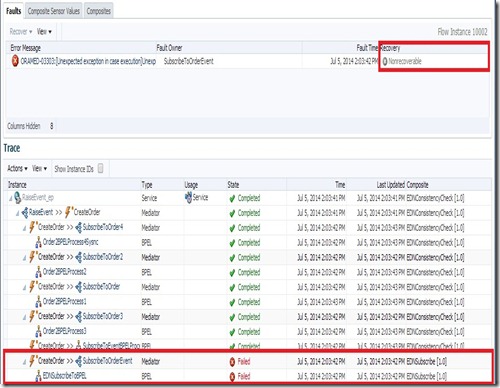
edn6

Configuration:

Navigate to soa-infra-> Administration –> System MBean Browser -> Application Defined MBeans -> oracle.as.soainfra.config -> EDN Config –> edn in EM Console. Here, we can set EDN configuration including properties NumberOfRetrys and QueueWaitTime.

Though 11g has QueueWaitTime property, it was not considered as the retry interval. But in 12c, this property is being honored and we will observe the same later in this post.

edn4

Demonstration:


Verify Events and Subscriptions in Business Events. You can observe that there are 2 business events and 4 subscriptions The subscriptions page also shows you consistency level for each subscription.

events

subscr

Consistency Level – Guaranteed:

Make sure that all event subscriptions consistency level is set to Guaranteed and raise CreateOrder business event.

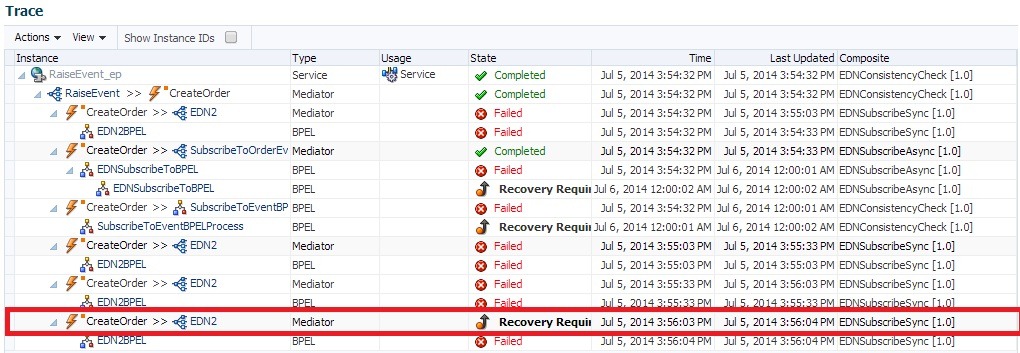
We can observe a lot of visual improvements in this Flow Trace screen. The composite instances are clearly marked as ‘Recovery Required’ and ‘Auto-retrying’ as applicable. As expected, the Asynchronous BPELs went into Auto Recovery and   Event auto retry is happening for Synchronous BPEL process. Also note that all  subscribers have received the business event raised though some faulted subscribers exist.

edn9

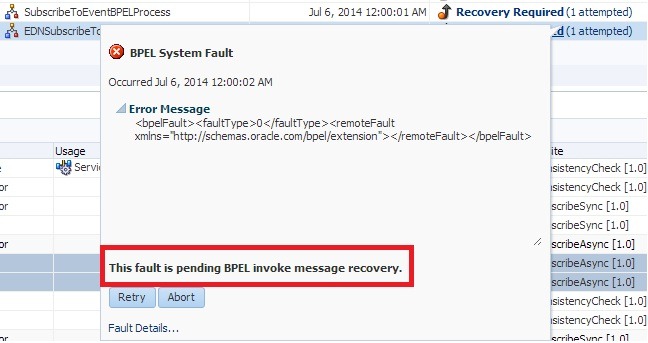
By clicking on the ‘Recovery Required’ link in Faults tab, we can observe that BPEL fault is pending for Invoke message recovery as shown below.

bpel recovery

You can also observe that Synchronous BPEL is marked as Recovery Required after retry is done for configurable number of times. Also the property value of QueueWaitTime is honored as the event Retry Interval.
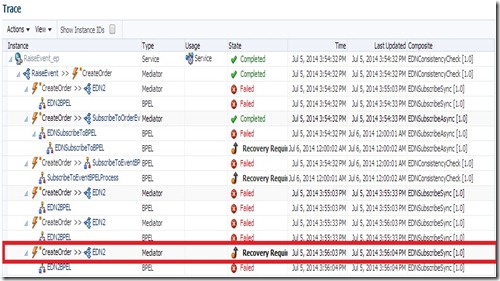
eventrecovery

The Faults tab is shown as below along with number of retry attempts.

attempt

By clicking on the ‘Recovery Required’ link in Faults tab for this flow instance, we can observe that fault is pending for EDN recovery as shown below. From this popup, we can again do Retry manually or abort the flow using Retry and Abort buttons respectively.

ednrecover

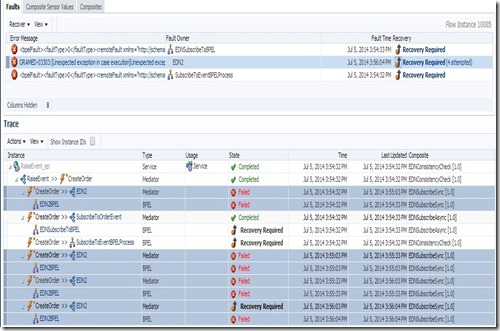
Selecting a fault from Faults tab will highlight the corresponding flow instances along with retry attempts (if any).
edn11

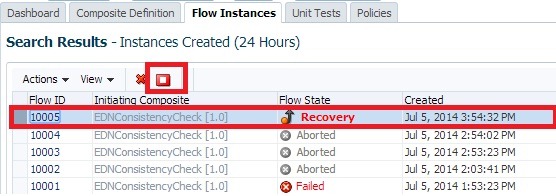
We can also do manual Retry or Abort from Flow Instances page. Selecting a Flow ID row will enable Abort Selected icon as shown below (if applicable).

abort

And same Faults tab shown earlier is also available in Flow Instances page as shown below.

fault2

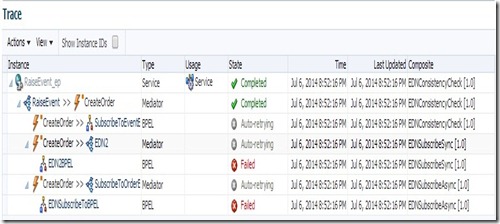
Now set bpel.config.oneWayDeliveryPolicy to sync for all the Asynchronous BPELs. Raise CreateOrder event and observe that all the instances are auto-retrying as the BPELs would be invoked in Synchronous manner.
asyncassync

Now set bpel.config.oneWayDeliveryPolicy to async.cache for all the Asynchronous BPELs. Raise CreateOrder event and observe that auto-retrying is only happening for Synchronous BPEL.

asynccache

Now reset bpel.config.oneWayDeliveryPolicy to async.persist and bpel. config.transaction to requiresNew for Asynchronous and Synchronous BPEL respectively. Raise CreateOrder event and observe auto-retry is happening for Synchronous BPEL only.

Now set bpel.config.transaction  to notSupported for the Synchronous BPEL.  Raise CreateOrder event and again observe auto-retry is happening only for Synchronous BPEL.

Consistency Level – One and Only One:

When  above scenarios are tried using One and Only One consistency level, I observed the same behavior as Guaranteed. As per 12c documentation, the difference lies in type of transaction used (Local vs Global). Guaranteed uses Local where as One and Only one uses Global Transaction for De-queue and Delivery of Business Events.

Summary:

  • When Mediator routes request to Sync BPEL that throws fault and not caught, then event auto retry is happening irrespective of consistency level and value of bpel.config.transaction.
  • When Mediator routes request to ASync BPEL that throws fault and not caught, then event auto retry is not happening irrespective of consistency level with async.persist as value for bpel.config. oneWayDeliveryPolicy.  This makes sense as the transaction can’t be  propagated and value of bpel.config.transaction is irrelevant.
  • When Mediator routes request to ASync BPEL that throws fault and not caught, then event auto retry is happening irrespective of consistency level with sync as value for bpel.config.oneWayDeliveryPolicy. This makes sense as BPEL is invoked in Synchronous manner. Also the same behavior is observed, when an Async BPEL is directly subscribed to business event.
  • When Mediator routes request to ASync BPEL that throws fault and not caught, then event auto retry is not happening irrespective of consistency level with async.cache as value for bpel.config. oneWayDeliveryPolicy.

We will explore the Durable property of Event Subscriptions in next blog.

SOA Suite 12c Released!!!!

Oracle had officially released SOA Suite 12c (12.1.3) yesterday and can be downloaded from OTN.

SOA Suite download itself contains JDeveloper (including SOA Extension), RCU and Weblogic Server 12.1.3.

Extending the Weblogic Domain

In this post, I quickly show you how to extend an existing weblogic domain which is quite simple and straight forward. Initially i have OSB domain and extended the same domain to include SOA.

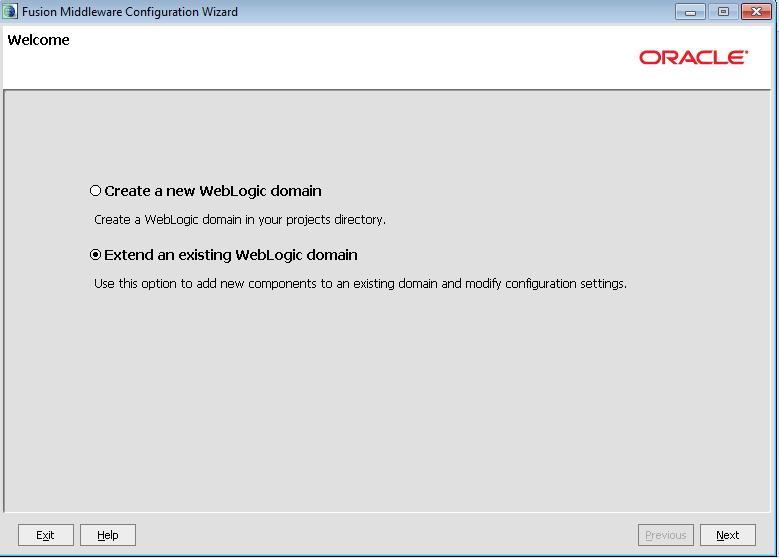
Open the configuration wizard (config.cmd) from $MW_HOME/wlserver_10.3\common\bin and select the option as shown below and click on Next.

image

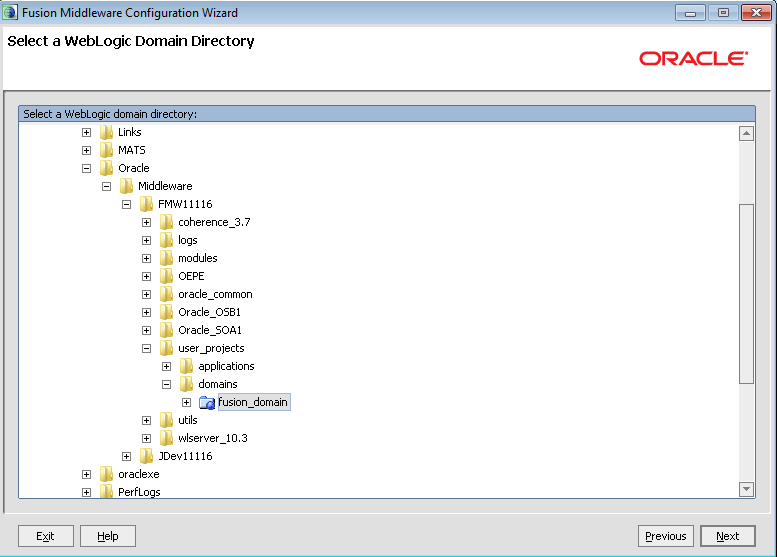
Select the domain directory from the selection browser.

image

Choose the products from the displayed list.

image

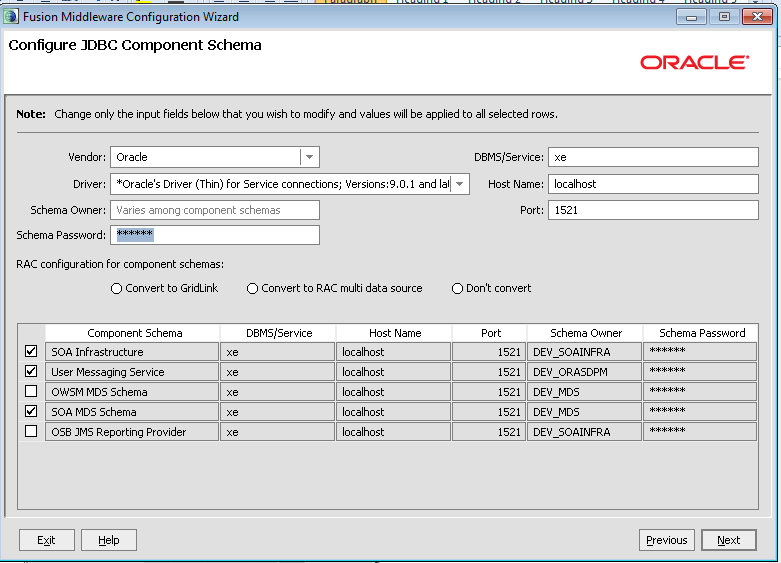
Give database schema details for new components that get added because of the selection in the previous screen. For example, in the current scenario the component schemas ‘SOA Infrastructure’ , ‘User Messaging Service’ and ‘SOA MDS Schema’ have to modified with correct database information as shown below and click on Next.

image

Make sure that connection is successful by observing the logs shown and click on Next twice.

image

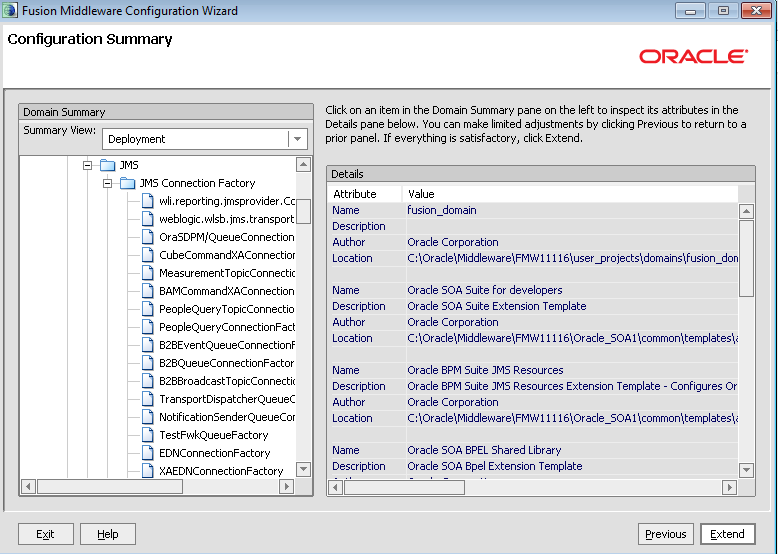
Verify the configuration summary and click on Extend button to finish.

image

Once the domain is created, click on Done button and bring up the server to verify the installation of SOA server by opening the EM console and look for soa_infra.

image

SOA-INFRA Issue

I have installed SOA Suite and OSB several times but never observed an issue with soa-infra. I used Oracle DB Enterprise Edition in all these installations.

Today i have tried with SOA Suite 11.1.1.4 installation with XE database as i was just preparing an environment for developers for their practice. But observed an issue with soa-infra in EM console which showing it as down. So went to deployments in weblogic admin console and verified the status of soa-infra application and found it in ‘Failed’ status. So the first thing i tried out was starting the soa-infra from deployments section in admin console. When i did this, i encountered the following error:

ORA-04063: package body "DEV_MDS.MDS_INTERNAL_SHREDDED" has errors ORA-06508: PL/SQL: could not find program unit being called: "DEV_MDS.MDS_INTERNAL_SHREDDED" ORA-06512: at line 1

Solution:

  • Do ‘grant execute on dbms_lob to public’ in sqlplus using sys login.
  • Recompile the package DEV_MDS.MDS_INTERNAL_SHREDDED

Restart the server and verify that soa-infra is in Active status now. If the issue is not resolved drop the schema and recreate using the RCU. But before recreating, make sure that following environment variable is set when using XE database.

set RCU_JDBC_TRIM_BLOCKS=TRUE

SOA Suite 11g R1 Developers Guide

Ever since i have seen this post by Antony Reynolds, i wanted to grab my copy of this book. But the price of the book in India kept me away for some time. Finally last week i am able to get my copy of it.

The first sight of the book perplexed me as i was expecting the book to be of size similar to Thomas Erls’ book ‘Web Service Contract Design & Versioning for SOA’. But the contents of the book made me realize that the size does not matter always.

The book is well organized into 3 parts. Part-I  introduces the SOA architecture SCA, developing BPEL composites, endpoint virtualization using OSB and using JCA Adapters, Human workflows, Business Rules, Business Events and Business Activity Monitoring (BAM) that are components of Oracle SOA Suite. Part-II introduces the business requirements of a fictitious company and proceed with the development of application using SOA architecture by making use of the components described in Part-I. Finally the book ends with chapters on deployment, testing and security which constitutes Part-III of the book.

The first thing i did was the search for the following 2 things as i wanted to confirm the best practices from what i know currently:

  • Scheduling the BPEL processes
  • Way to differentiate System and Business faults in OSB

The above things are covered in Chapter 16 and Chapter 14 respectively.

I am reading the chapters in no sequence and i found the chapters Designing Service Contract (Chapter 11), Error Handling (Chapter 14) and Message Interaction Patterns (Chapter 16) very interesting as of now.

Though my recommendation does not add any brownie points, i recommend this book to novice to learn the basics of SOA Suite11g and to experts to get the quick summary.

I want to finish it off asap before somebody steals the book Smile.


Pages

Enter your email address to subscribe to this blog and receive notifications of new posts by email.

Join 196 other subscribers

Enter your email address to follow this blog and receive notifications of new posts by email.