Archive Page 9

How-To: Populate PL/SQL Collections in ADF Code

People tend to write lot of business logic in PL/SQL when there is lot of data to manipulate with or to improve the performance. When PL/SQL collections are the best way to accept multiple records as input and return the response.

This post shows the sample code to call a PL/SQL API accepting PL/SQL table from an ADF application module.

PL/SQL Objects:

CREATE OR REPLACE TYPE emp_rec_type AS OBJECT (
    employee_id     NUMBER(18),
    first_name      VARCHAR2(30),
    last_name       VARCHAR2(30),
    middle_name     VARCHAR2(30),
    employee_type   VARCHAR2(30),
    location        VARCHAR2(30),
    addr_line1      VARCHAR2(30),
    addr_line2      VARCHAR2(30),
    addr_line3      VARCHAR2(30)
    city            VARCHAR2(30)
);

CREATE OR REPLACE TYPE emp_tbl_type AS TABLE OF emp_record;

CREATE OR REPLACE PACKAGE emp_ddl_package AS
   PROCEDURE validate_emp_records (
      emp_rec_list        IN OUT NOCOPY emp_tbl_type,
      validation_status OUT NOCOPY VARCHAR2     
    );
END emp_ddl_package;

CREATE OR REPLACE PACKAGE BODY emp_ddl_package AS 
 
  PROCEDURE validate_emp_records(
      emp_rec_list IN OUT NOCOPY emp_tbl_type,
      validation_status OUT NOCOPY VARCHAR2
  )IS   
  BEGIN 
          — do the coding here
  END validate_emp_records;
END emp_ddl_package;


Sample Code of Java Method in Application Module:

Following is the typical piece of code that can be used in ADF application module to call the PL/SQL API:

public List<EmpVORowImpl> validateEmployees(List<EmpVORowImpl> empList) throws Exception {
  OracleCallableStatement stmt = null;
  ArrayList<EmpVORowImpl> empRespList = null;

  if (empList != null && empList.size() > 0) {
         empRespList = new ArrayList<EmpVORowImpl>();

    try {
      // Call the pl/sql API to determine invoice status
      String sql = 
"begin emp_ddl_package.validate_emp_records(emp_rec_list=>:1,validation_status=>:2); end;";

      stmt =
          (OracleCallableStatement)getDBTransaction().createCallableStatement(sql,0); 
ArrayList<STRUCT> inputEmpList  = new ArrayList<STRUCT>();

StructDescriptor structDescriptor = StructDescriptor.createDescriptor(“EMP_REC_TYPE”,stmt.getConnection());

  for (int i = 0; i < empList.size(); i++) {
        EmpVORowImpl empRow = empList.get(i);
        Object[] o =
          new Object[] { empRow.getEmployeeId(), empRow.getFirstName(),
                         empRow.getLastName(), empRow.getMiddleName(),
                         empRow.getEmployeeType(), empRow.getLocation(),
                         empRow.getAddrLine1(), empRow.getAddrLine2(),
                         empRow.getAddrLine3(), empRow.getCity() };

        STRUCT empRowStruct = new STRUCT(structDescriptor,stmt.getConnection(), o); 
        inputEmpList.add(empRowStruct);

      }

      ArrayDescriptor empArray =
        ArrayDescriptor.createDescriptor("EMP_TBL_TYPE",
                                         stmt.getConnection());
      ARRAY empArrayTbl =
        new ARRAY(empArray, stmt.getConnection(), inputEmpList.toArray());

      stmt.registerOutParameter(1, OracleTypes.ARRAY, "EMP_TBL_TYPE");
      stmt.setARRAY(1, empArrayTbl);
      stmt.registerOutParameter(2, OracleTypes.VARCHAR, 0, 1);
      stmt.execute();

      //get the output table from pl/sql API and return
      Array outputArray = stmt.getArray(1);
      String returnStatus = stmt.getString(2);

      if (returnStatus != null && "Success".equals(returnStatus) &&
          outputArray != null) {
        ResultSet rs = outputArray.getResultSet();
        EmpVORowImpl tempRow;

        while (rs != null && rs.next()) {
          Struct empRespStruct = (Struct)rs.getObject(2);
          Object[] empAttributes = empRespStruct.getAttributes();

          if (empAttributes != null) {
            tempRow = (EmpVORowImpl)getEmpVO().createRow();
          tempRow.setAttributeValues(Arrays.asList(tempRow.getAttributeNames()), Arrays.asList(empAttributes));
            empRespList.add(tempRow);
          }
        }
      }
    } catch (SQLException sqlex) {
      throw new Exception("sql exception");
    } catch (Exception ex) {
      throw new Exception("exception");
    } finally {
      try {
        stmt.close();
      } catch (SQLException sqlex) {
        throw new Exception("sql exception");
      }
    }
  }

  return empRespList;
}
Links

I will use this post as a repository of useful links and blogs which I can expect to grow exponentially over the time, so will try to include links on more generalized or important topics of much interest.

– SOA Suite PS6 New Features

Generic:

– SOA SDLC by Mark Nelson

ADF

– Understanding View Accessors

Adapters

-12c JMS Adapter Scalability

Weblogic

Cluster Messaging Protocols

Adapters

– Multiple SOA Suite Revisions with DB Adapter

Mediator

– Message Sequencing Patterns (white paper)

– Parallel Routing Rules

BPEL

BPEL Mania

List of All Instance States

– Transaction Boundaries and Rollbacks

Fault Handling

OTN Article Series

Fault Handling in SOA Suite – Advanced Concepts

Business Rules

Self-Study Course

EDN

EDN Debugging

– Fanning out Events

– SOA 12c – EDN Articles

Continuous Integration

Deploy SOA Composites using Hudson

OSB

Best Practices

– 11g Hands-on Tutorial

– WLST Fundamentals in context of OSB

– Working with Oracle Security Token Service

– One-Way Authentication Policies in OSB

– Coherence Integration

– Caching Strategies for OSB 11g

Out-of-Process Coherence Servers

– 12c Hands-on Tutorial

12c – Series of Articles

– 12c – REST enabling SOA

OWSM

Oracle Blog

BPM

    BPM vs BPEL

     Case Management

Quick Series

Case Activities, Part-I

SOA Governance

 – SOA Governance Through Enterprise Architecture

Fusion Applications

 Fusion Applications Life Cycle

 – Request Flow in Fusion Applications

 – Asynchronous Web Services in Fusion Applications

 – Oracle Fusion DOO – Integrating External Systems using EIL

Customizations

   – Translating Customizations

Transactions when using DB Adapter vs ADF BC Service

Most of us are well aware of global transactions (XA) when using DB Adapter and setting XADataSourceName during creation of DB Connection Pool. ADF BC Services are widely used in Oracle Fusion Applications at Data Service layer  instead DB Adapters. So it’s worth investigating or finding out the scope of transaction when calling these ADF BC Services.

Sample code for this demonstration can be found here and accepts string input, where valid values are ‘DB’ or ‘ADF’.

Conclusion:

  • ADF BC Service call does not get enlisted into main BPEL txn, so system fault, user defined fault or Roll back fault will not revert the changes done by ADF BC Service. So developer should think of compensation in failure scenarios in case of faults.

ADF-BC Service

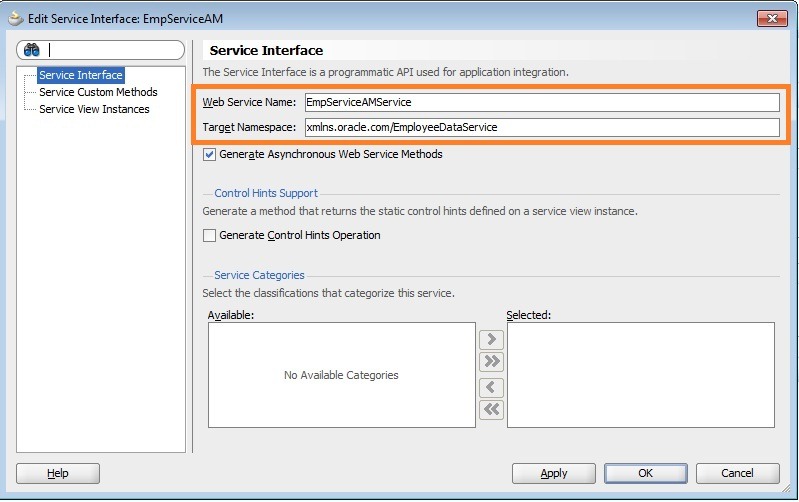
Recently started looking into Fusion Applications, where ADF BC Services are used at the Data Service layer rather than DB adapter. Lot of articles are found and there is nice documentation as well on how to create the ADF-BC services. I just want to highlight following points as It might take a little while to figure out for novices. And  the existing SOA domain (11.1.1.7) did not enforce any additional runtime/libraries installation for deploying ADF-BC services EAR file .

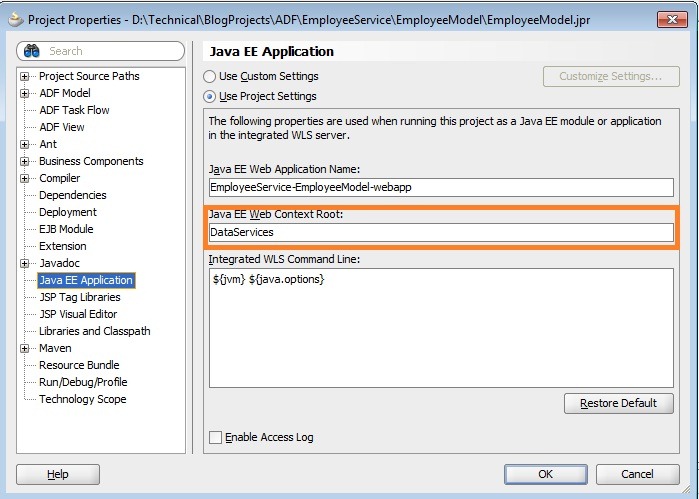
  • Typical ADF-BC service URL looks like ://http://<host>:<port>/<context-root>/<servicename>.  Context Root should be mentioned in Project Properties –> Java EE Application –> Java EE Web Context Root and always give a meaningful name instead of the default value.

contextroot

  • And service name is the one given while exposing the application module as the service and it’s not Application Module name.

servicename

  • By default, AM uses JNDI of data source in specific format as shown below. If we want to use existing data source make sure that it’s modified to your data source JNDI and not JNDI of DB connection pool.

db

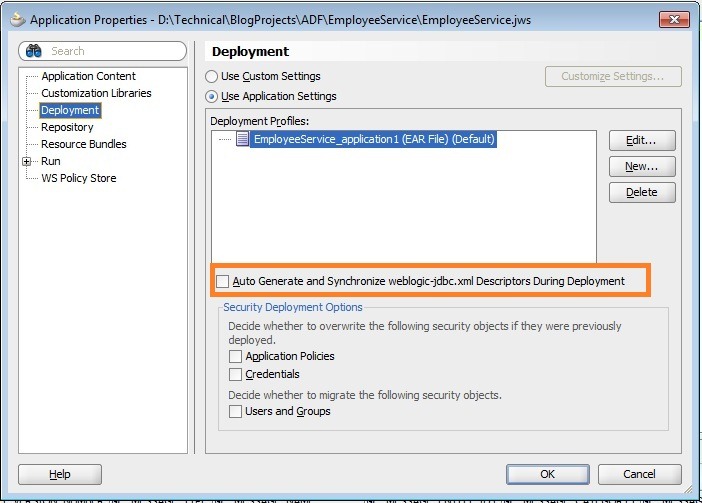
  • Also make sure you uncheck ‘Auto Generate’ option in application deployment profile(EAR) if existing data source has to be used and does not want to create data sources defined in AM.

autogenerate

Business Events in Action

The purpose of this blog post is to explore subscription consistency levels. Subscriber can use any of the following consistency levels while subscribing to business events raised by publisher:

    • immediate
    • guaranteed
    • one and only one

Following is an extract from documentation explaining the functionality of each consistency level:

    • immediate – Events are delivered to the subscriber in the same global transaction and same thread as the publisher. The publish call does not return until all immediate subscribers have completed processing. If any subscribers throw an exception, no additional subscribers are invoked and an exception is thrown to publisher. The transaction is rolled back in case of any error during immediate processing
    • guaranteed – Events are delivered to the subscriber asynchronously without a global transaction. The subscriber can choose to create its own local transaction for processing, but it is committed independently of the rest of event processing. In addition, EDN does not attempt to resend an event (regardless of the backing store being AQ or JMS). If one or more subscribers fail to consume the event (while others succeed), those subscribers lose the message.
    • one and only one – Events are delivered to the subscriber in its own global (that is, JTA) transaction. Any changes made by the subscriber within that transaction are committed after the event processing is complete. If the subscriber fails, the transaction is rolled back. Failed events are retried a configured number of times.

This document shows you business events in action from the perspective of above highlighted points and might help you in choosing the right consistency level depending on the scenario.

Assumptions:

    • Using EDN-DB, though observations noted here will not vary when used EDN-JMS.
    • No clustered environment.

Use case:

A mediator raises 2 business events CreateOrder and UpdateOrder. For CreateOrder , we have the following subscribers:

    • Mediator routing the request to ASync BPEL (within same composite)
    • Mediator routing the request to Sync BPEL (within same composite)
    • Asynchronous BPEL process (within same composite)
    • Mediator throws exception while routing the request to Asynchronous BPEL (in different composite)

For UpdateOrder, we have the following subscribers:

    • Mediator routing the request to Asynchronous BPEL (in different composite)

We will observe the behavior in different scenarios by modifying event subscription consistency levels for above subscribers. The exception during the mediator routing is simulated by adding <onReply/> tag which is not needed in actual when routing to Async BPEL process. Example is shown below:

<switch>

<case executionType="direct"

name="Order2BPELProcess1.order2bpelprocess1_client.process">

<action>

<transform>

<part name="$out.payload"

function="xslt(xsl/CreateOrder_To_process.xsl, $in.payload)"/>

</transform>

<invoke reference="Order2BPELProcess1.order2bpelprocess1_client"

operation="process">

<onReply/>

</invoke>

</action>

</case>

</switch>

Configuration:

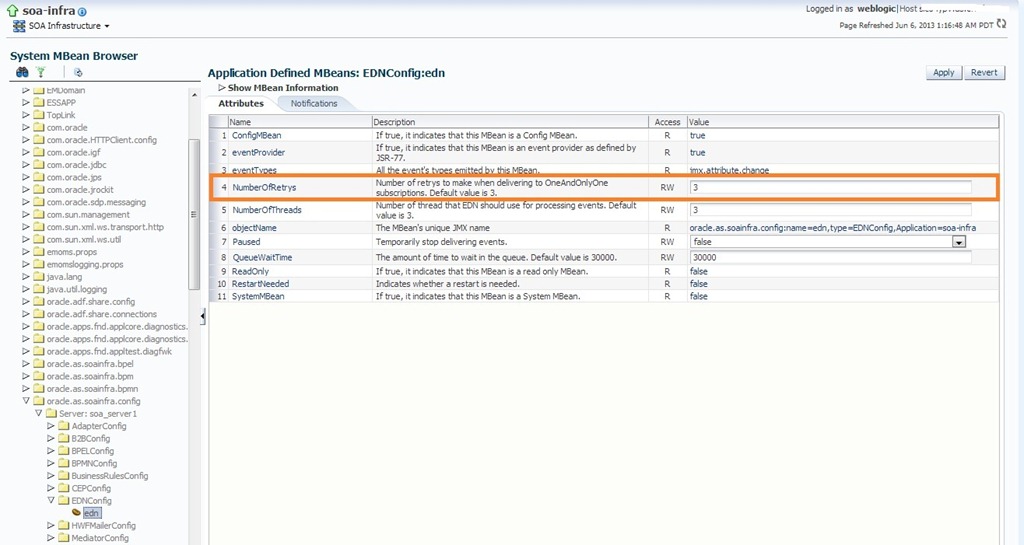
The retry configuration for one and only one subscribed events and the other EDN configuration can be set in EM console by navigating to soa-infra -> Administration -> System MBean Browser -> Application Defined MBeans -> oracle.as.soainfra.config -> EDN Config -> edn. This will bring up the following screen showing the default parameters.

event retry

Demonstration:

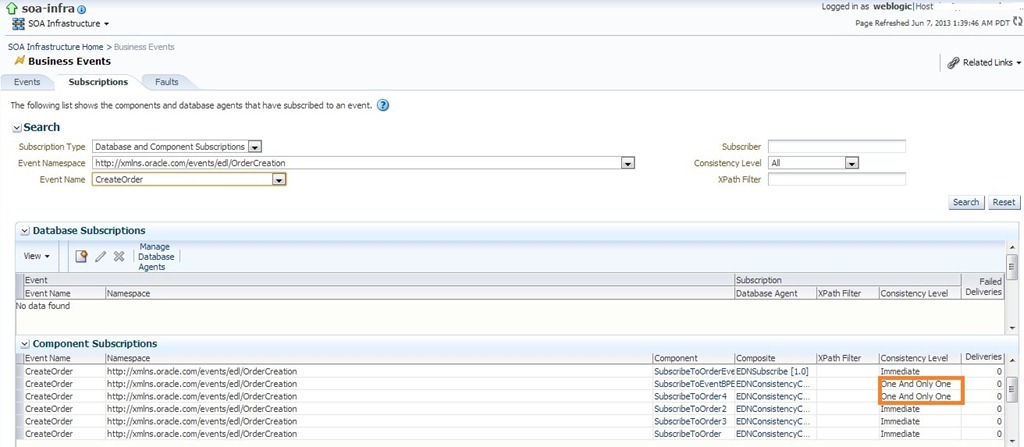
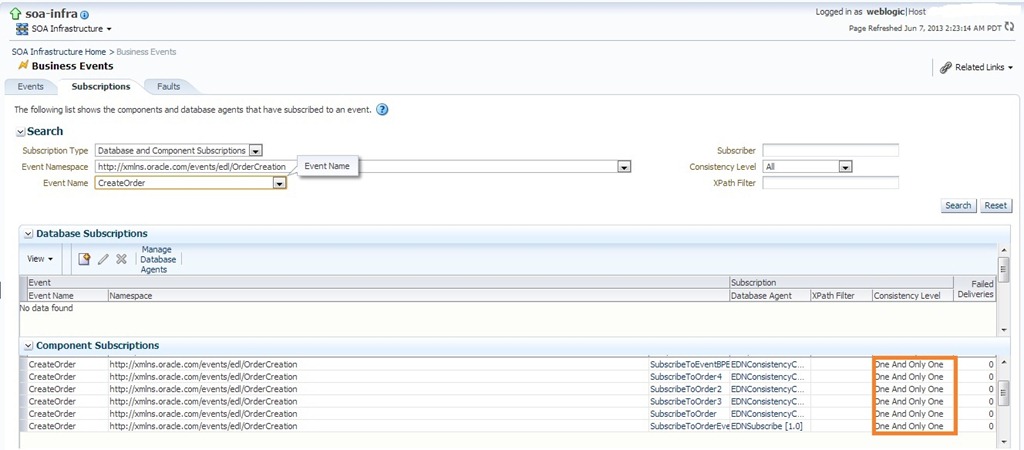
To start with, have a look at the list of events being used and it’s subscriptions below:

events

subsc

Consistency Level – immediate:

Modify all the event subscriptions to immediate consistency level.

immediate

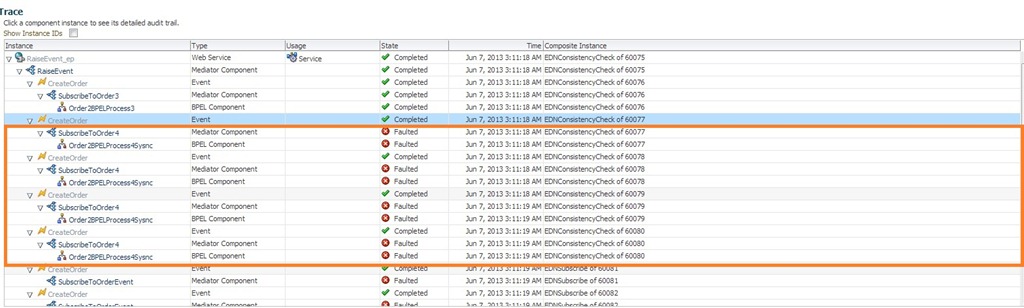
Now raise the CreateOrder event and observe flow trace shown below. Since consistency level is immediate and the exception is thrown by one of the subscribers not all of the subscribers have received the event at all. And also no retry happened in case of faulted subscriber.

flowtrace1

Also we can’t find this event in event recovery console which is shown below:

immediaterecover

To confirm the above observed behavior, now modify the consistency level of few of the events to either guaranteed or one and only one.

imm1

Now again raise the CreateOrder event and observe flow trace shown below. We don’t see any change in behavior from previous iteration. So if an exception is thrown by any one of the immediate consistency level subscribers, then remaining subscribers will not get the event at all irrespective of their subscription consistency levels. And also we would see the exception thrown back while executing from EM console.

imme2

exceptionimmedaite

Consistency Level – guaranteed:

Modify all the event subscriptions to guaranteed consistency level.

gua1

Now raise the CreateOrder event and observe flow trace shown below. Since consistency level is guaranteed all the subscribers have received the event though one of the subscriber is faulted. And no fault is thrown back while testing from EM console as we saw in ‘immediate’ . Also no retry happened in case of faulted subscriber and the event is lost for that subscriber.

gua2

Also we can’t find this event in event recovery console which is shown below:

immediaterecover

Consistency Level – one and only one:

Modify all the event subscriptions to one and only one consistency level.

oaoo1

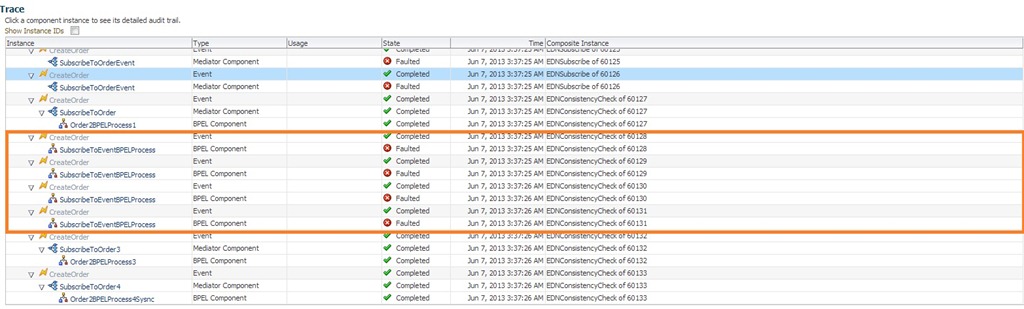
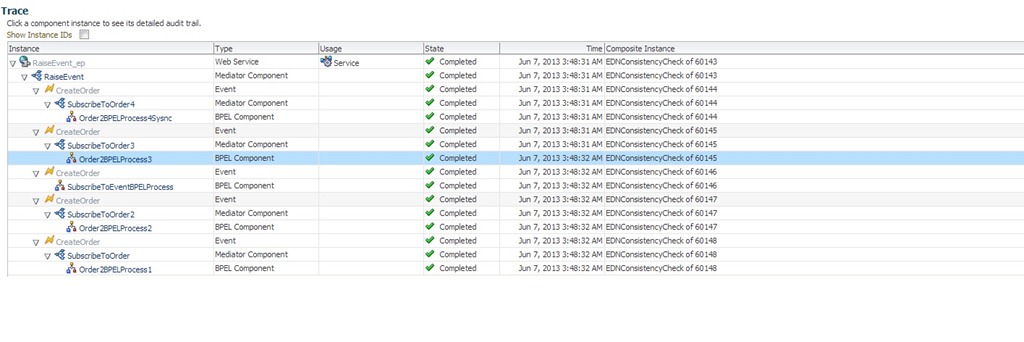
Now raise the CreateOrder event and observe flow trace shown below. Since consistency level is ‘one and only one’ all the subscribers have received the event though one of the subscriber is faulted. And no fault is thrown back while testing from EM console as we saw in ‘immediate’ . Also retry happened thrice in case of faulted subscriber as we configured the NumberOfRetrys property to 3 (see Configuration section).

oaoo2

If event delivery is failed even after the configured number of retries that event will be marked for Recovery and will be shown in Faults section of Business Events screen in EM console as shown below. Use ‘Retry’ button to recover the event delivery or use ‘Abort’ button to discard.

oaoo3

Other Observations:

Scenario 1: Mediator routes the request to Sync BPEL which throws fault and not caught, then event retry is happening irrespective of the value set for property bpel.config.transaction.

obs1

Scenario 2: Mediator routes the request to ASync BPEL which throws fault and not caught, then event retry is not happened as expected, as the fault in Async BPEL process will not propagated back unless we do it by explicit callback and bpel.config.transaction is irrelevant in this case and the value of property bpel.config.oneWayDeliveryPolicy is set to async.persist.

obs2

Scenario 3: Mediator routes the request to ASync BPEL which throws fault and not caught having the value of property bpel.config.oneWayDeliveryPolicy is set to sync. As expected, the event retry happened in this case.

obs3

The same behavior isobserved, when BPEL is subscribed to event (no mediator in between) and the value of property bpel.config.oneWayDeliveryPolicy is set to sync.

obs31

Scenario 4: Event is published and one of the subscribers is not active. In this case, non-active subscriber will loose event and no event delivery happens even after bringing up the subscriber. We will simulate this case using by doing shutdown of another composite. In the below screenshot, we could see that event is not delivered to 6th subscriber as the composite is down and the flow trace will not change even after bringing up the composite.

obs4

This is due to fact that list of subscriptions no longer has this entry as shown below, so one should think about this type of possibility in real time use cases and have contingency plan in place for such cases.

obs5

References:

http://docs.oracle.com/cd/E28280_01/dev.1111/e10224/obe_intro.htm#CHDIBHBE

Download:

Sample code used in this post can be downloaded from here.

Auto Recovery BPEL Use Case

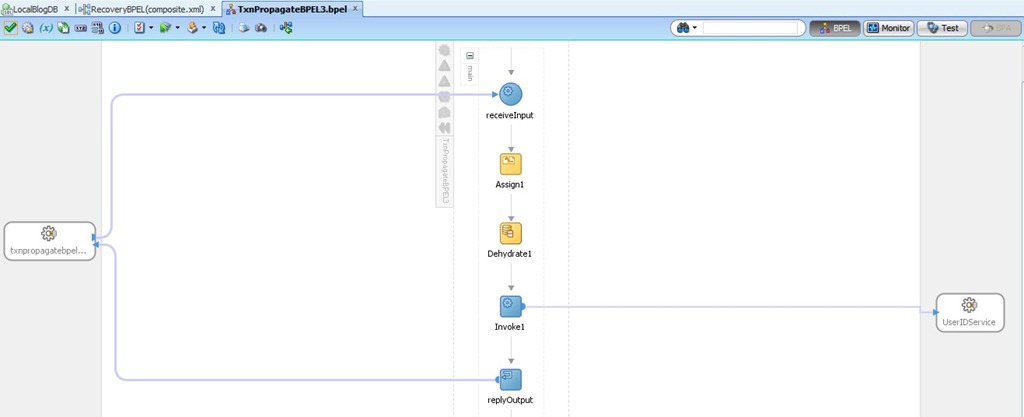
Having seen ‘Auto Recovery’ feature in previous post, I tried the following use case to observe the behavior as we have some BPEL processes that follow this pattern. An asynchronous BPEL process (BPELA) calls synchronous BPEL (BPELB) having mid dehydration point and both of these BPEL processes don’t have the fault handlers.

BPELA:

BPEL A

BPELB:

bpel b

Flow Trace:

flow trace

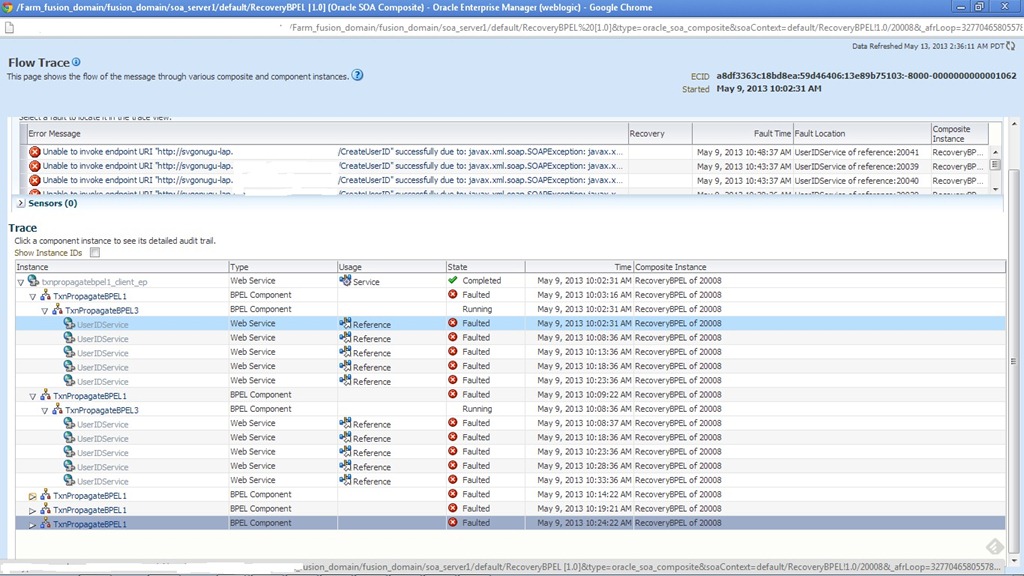
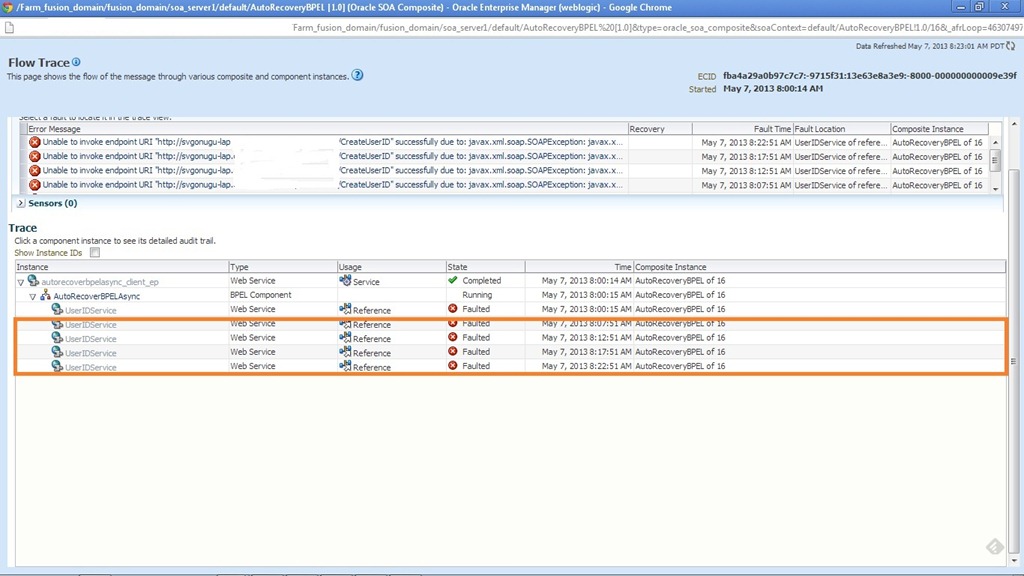
If we observe, the auto recovery is happening for Sync BPEL from dehydration point and also the entire flow. This is because of the fault is not caught either in caller or calle which was propagated to runtime. One should be careful about such scenario if we are relying on auto recovery. This can be avoided by using reply activity to send the fault from sync process back to caller.

Database Polling in OSB – Part IV

In this final post of this series, we will look at remaining polling strategies in ACTION from OSB perspective. Based on my past experience, I would say these are the less frequent used polling strategies (Of course, you should not consider this as granted though).

All 3 strategies highlighted in the below screenshot are based on simple principle and can be used if we have any running sequence or date in the source table. Every time the row gets updated/inserted a new running sequence or date used in the respective table column.

poll strats. Once the polling is done, this running sequence can be stored external to the source table. So next time, when the polling happens it will be always that running sequence column value > stored value.

The only difference in these strategies is where we store the value that is used for polling query. In ‘Update a Sequence Table’ polling strategy, we use external table in same DB to store the value .  In ‘Update an External Sequencing Table on a different Database’ polling strategy, we use external table in different database altogether. We can have a single global table that can be used for this purpose. In ‘Update a Sequencing File’ polling strategy, we use the a file in server file system to store the value rather than DB tables. This file will reside in SOA server file system.

For this post also, the use case remains same where we migrate the data from SI_EMPLOYEE (source table) to SI_EMPLOYEE_COPY (target table). I will demonstrate using only one of these strategies as all 3 are similar. We will use EMPLOYEE_ID column as the sequence i.e. every time we insert a sequence value in this column every time we insert a new record (it does not make sense for the update scenario, then we can add update_date as the column and follow this strategy).

Create a new table to store running sequence with following table definition

CREATE TABLE SI_POLL_TAB(TABLE_NAME VARCHAR2(30), SEQ NUMBER);

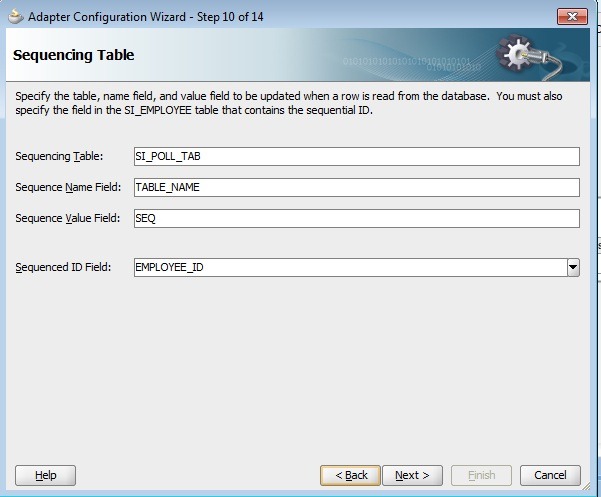
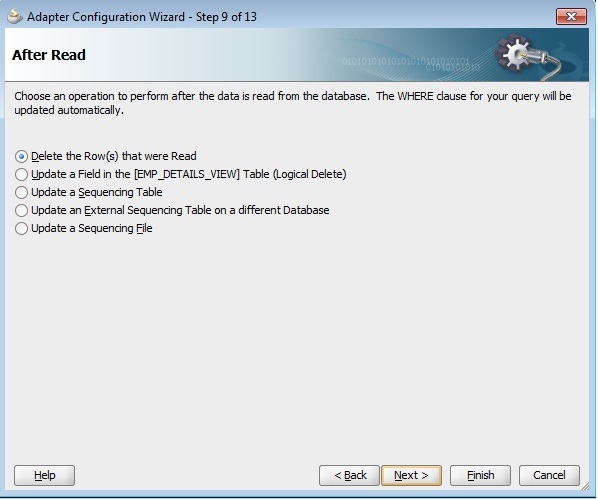
Create DB adapter files in JDeveloper by selecting the polling strategy ‘Update a Sequence Table’ as shown above. Click on Next and enter the values as shown below.

Seq Table

Click on Next, observe Polling SQL and After Read SQL statements.

poll sql

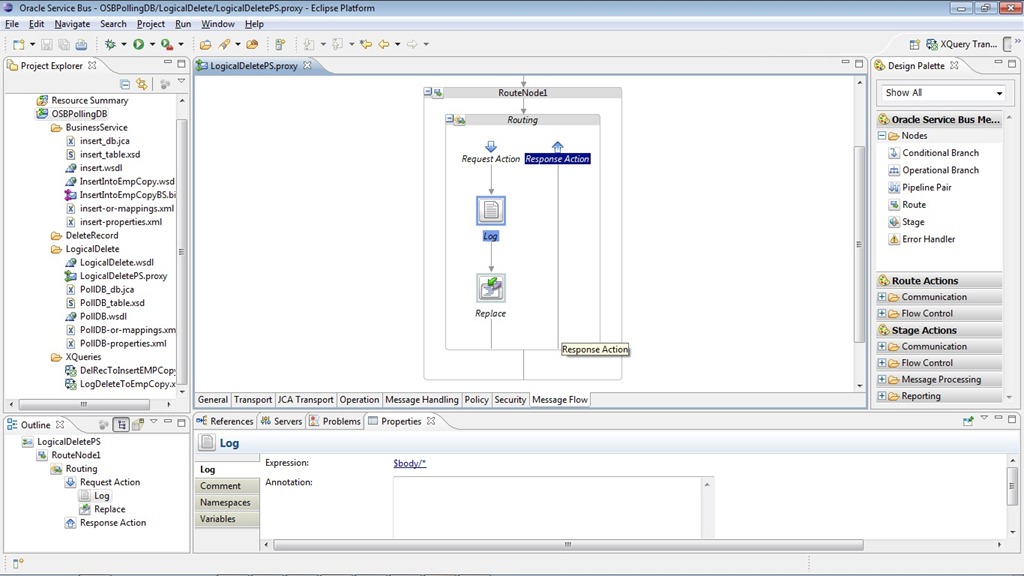
Finish the DB adapter wizard, import the related files into OSB project and create a proxy service from the JCA file and complete the message flow to route the polled data to business service.

proxyservice

Now deploy configuration jar to OSB server and also disable all other proxy services polling on same DB table. Now do the insertion of a single row with using the following statement.

insert into si_employee(EMPLOYEE_ID, FIRST_NAME, LAST_NAME,EMAIL, PHONE_NUMBER,HIRE_DATE,JOB_ID,SALARY,COMMISSION_PCT, MANAGER_ID)
select EMPLOYEE_ID,FIRST_NAME,LAST_NAME,EMAIL,PHONE_NUMBER, HIRE_DATE, JOB_ID,SALARY,COMMISSION_PCT,MANAGER_ID
from employees where employee_id = 100

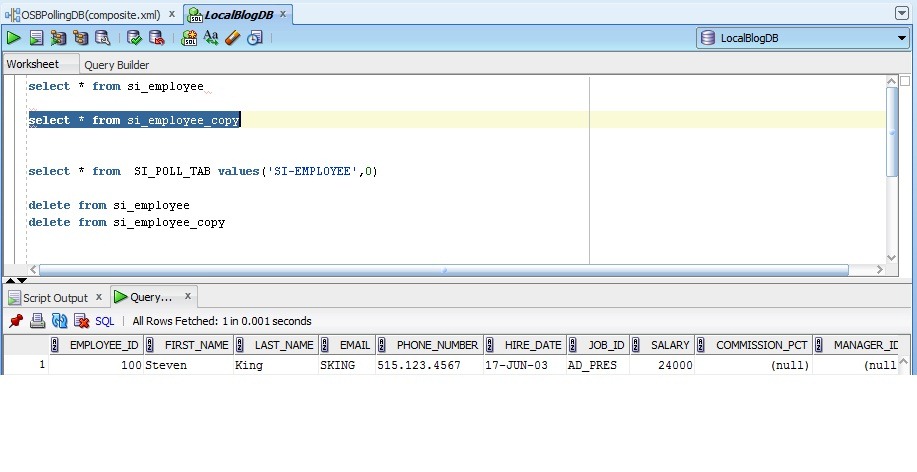
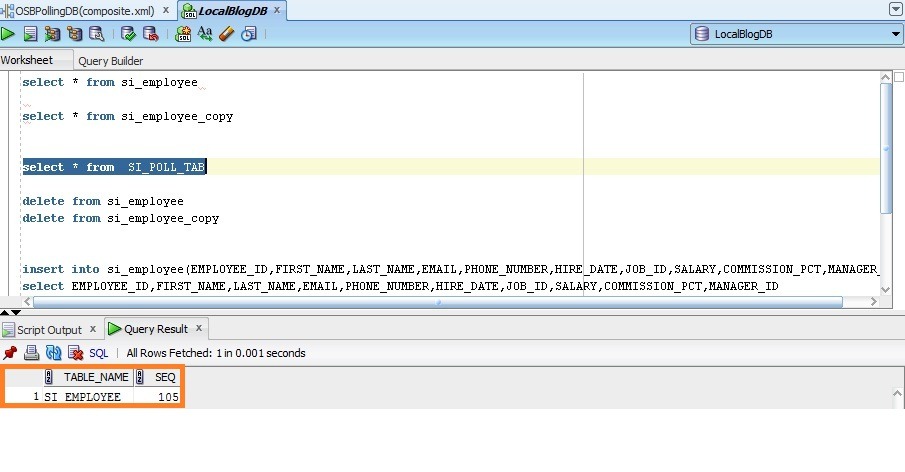
After polling interval, verify that target table is populated this row along with SI_POLL_TAB.

insertion1 

poll tab

Repeat this by inserting more number of records.

insert into si_employee(EMPLOYEE_ID, FIRST_NAME, LAST_NAME,EMAIL, PHONE_NUMBER,HIRE_DATE,JOB_ID,SALARY,COMMISSION_PCT, MANAGER_ID)
select EMPLOYEE_ID,FIRST_NAME,LAST_NAME,EMAIL,PHONE_NUMBER, HIRE_DATE, JOB_ID,SALARY,COMMISSION_PCT,MANAGER_ID
from employees where employee_id between 101 and 105;

insertion2

poll tab1

In case of ‘Update an External Sequencing Table on a different Database’, we also have to specify Data Source to connect to an external table in different DB as shown below. Except this, everything remains same as  discussed above.

external table

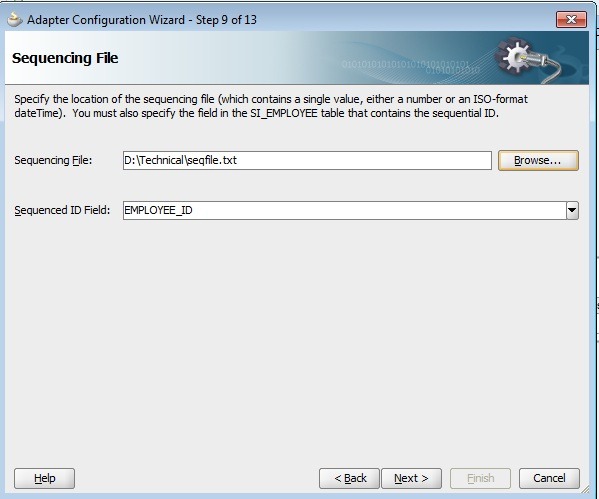
In case of ‘Update a Sequencing File’ polling strategy, we have to specify the location of file resides in SOA server as shown below. Except this, everything remains same as  discussed above. Make sure that file location is writable.

file

The updated configuration jar can be downloaded from here.

Auto Recovery feature in BPEL

Most of us are well versed with Fault Management Framework in 11g, where one of the generic feature that we implement is Retry mechanism. Recently I heard about the feature ‘Auto Recovery’ in BPEL and was a part of discussion to conclude when we should (not) rely on this feature during BPEL process execution. Actually this was a new feature for me as I ever explored and considered during the development though I heard of manual recovery. This made me realize that I am still novice :).

So the purpose of this post is to explore ‘Auto Recovery’ in BPEL that include the following. And does not discuss about required configuration in clustered environment, startup related configuration and Callback Recovery.

  • Configuration
  • BPEL Recovery Console
  • Auto Recovery Behavior
  • Auto Recovery in Action
    • Invoke
    • Activity

Configuration:

‘Auto Recovery’ configuration is done by setting few of the MBean properties in EM console. To configure it in EM console one should navigate to soa-infra -> SOA Administration -> BPEL Properties -> More BPEL Configuration Properties -> RecoveryConfig. This will bring up the following screen showing the default parameters. BPEL Auto recovery is enabled by default.

RecoveryConfig

The properties startWindowTime and stopWindowTime specify the period during which Auto Recovery is active. By default auto recovery feature will be active from 12AM to 4AM everyday (remember that it’s SOA server time), shown in above screenshot. We can change these settings by simply updating the time values in 24 hr format and do click on Apply.

The property maxMessageRaiseSize specifies the number of messages to be sent in each recovery attempt, in effect resembles the batch size.

The property subsequentTriggerDelay specifies interval between consecutive auto recovery attempts and the value is 300 sec by default.

The property threshHoldTimeInMinutes is used by BPEL engine, to mark particular instance eligible for auto recovery once the recoverable fault occurs which is 10 min by default.

If we observe closely, none of these properties mention about number of recovery attempts to be made which is altogether a separate MBean property. To set, navigate to soa-infra -> SOA Administration -> BPEL Properties -> More BPEL Configuration Properties -> MaxRecoverAttempt. The default value is 2.

RecoveryAttempt

To disable ‘Auto Recovery’, set the maxMessageRaiseSize property value to 0.

BPEL Recovery Console:

Navigate to soa-infra -> Service Engines -> BPEL -> Recovery to view the recoverable instances. Note that, the console shows all recoverable instances irrespective of enabled/disabled ‘Auto Recovery’. We can manually recover the  faulted instances from this console when Auto recovery is not enabled.

recoveryconsole

Auto Recovery Behavior:

Whenever a recoverable fault (this term is more abstract, I verified this behavior with Remote, Binding and User Defined Faults) occurs during the BPEL processing, it will be visible in Recovery console. If Auto Recovery is enabled, after threshHoldTimeInMinutes BPEL runtime will try to auto recover the instance. If it’s not successful, again number of recovery attempts will be made as given for MaxRecoverAttempt with an interval as given for subsequentTriggerDelay. If instance fails even after these maximum recover attempts, the instance will be marked as exhausted (can be queried on recovery console using message state as exhausted). We can use ‘Reset’ button to make these instances eligible for Auto Recovery again.

Note that, we observe this behavior only when the fault is thrown back to BPEL runtime or fault is not caught within BPEL process.

Auto Recovery in Action:

Developed a simple one-way BPEL process for demonstration. This BPEL has invoke activity that results in RemoteFault and dehydrate activity after that.

Scenarios Verified:

  • No Catch -> Got Remote Fault -> Auto Recovery happened.
  • Catch All -> Got Remote Fault -> Auto Recovery did not happen.
  • Catch All (Scope level) -> Got Remote Fault -> Re-throw Remote Fault -> Auto Recovery happened.
  • Catch All (Scope level) -> Got Remote Fault -> Re-throw User Defined Fault -> Auto Recovery happened.
  • Catch All (Scope level) -> Got Binding Fault -> Re-throw User Defined Fault -> Auto Recovery happened.
  • Catch All (Scope level) -> Got User Defined Fault -> Re-throw User Defined Fault -> Auto Recovery happened.

Configuration Used:

startWindowTime – 0.00

stopWindowTime – 7.00

maxMessageRaiseSize – 50

subsequentTriggerDelay – 300 (sec)

threshHoldTimeInMinutes – 5 (min)

MaxRecoverAttempt – 4

Invoke Auto Recovery in Action:

The instance is faulted with remote fault.

invoke1

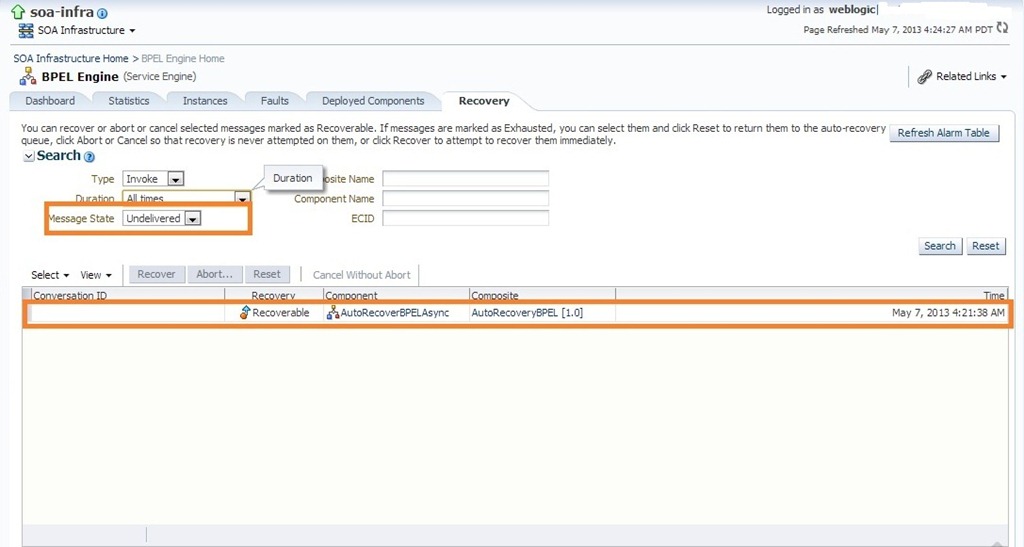
The BPEL process instance is visible in Recovery console as ‘Undelivered’.

invoke2

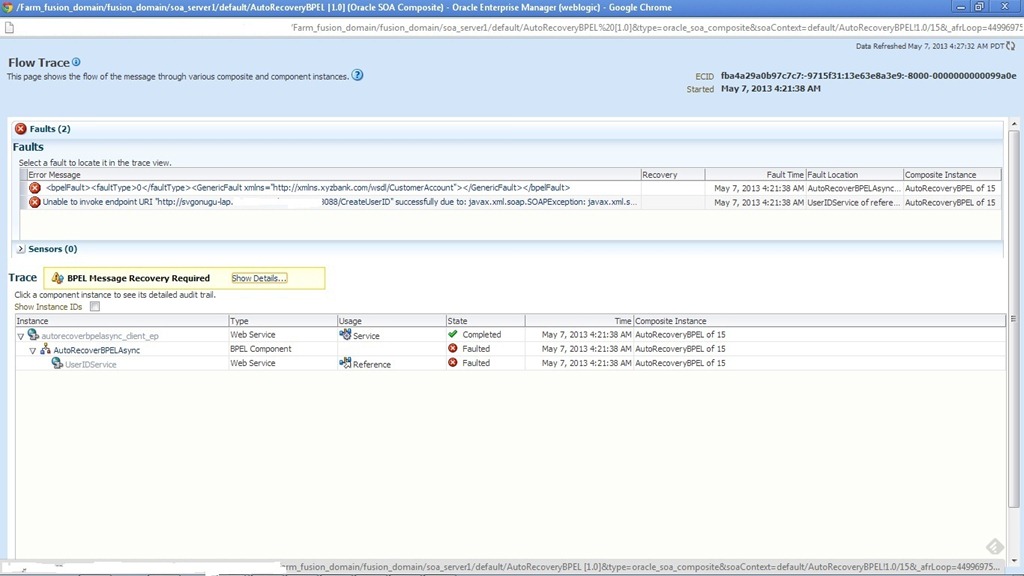
Observed that, ‘BPEL Message Recovery Required’ notification is visible after expiration of time as given for the property threshHoldTimeInMinutes.

invoke3

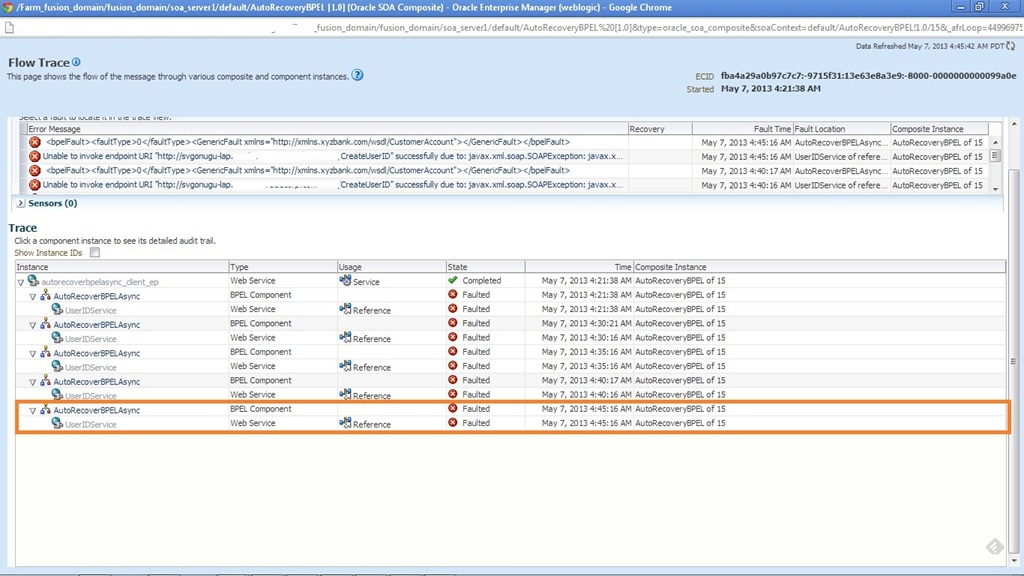
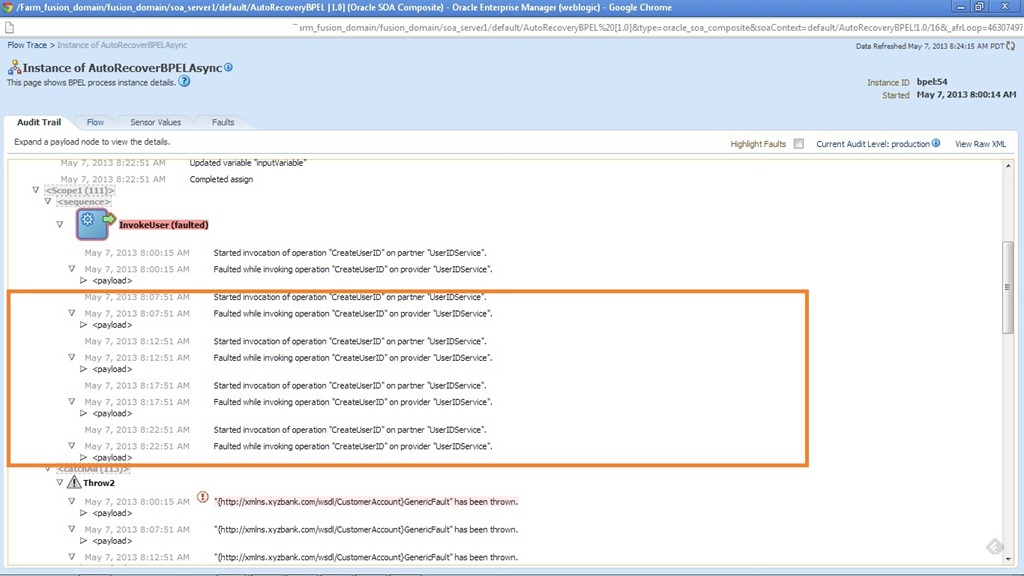
After the first auto recovery attempt made by BPEL engine. Observe that retry happened by initiating process from the start as there is no dehydration point before faulted invoke.

invoke4

After the 2nd recovery attempt. Observe the time difference between the successive recovery attempts.

invoke5

After the 4 the and final recovery attempt.

invoke6

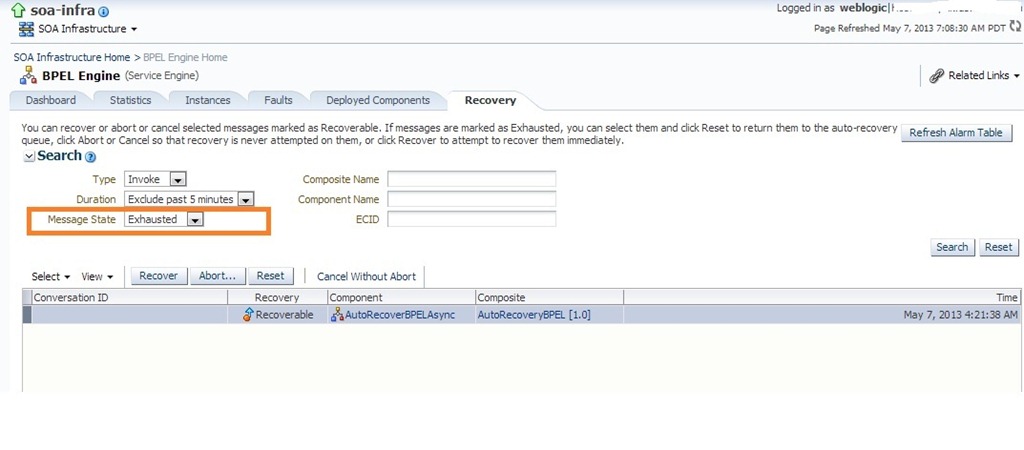
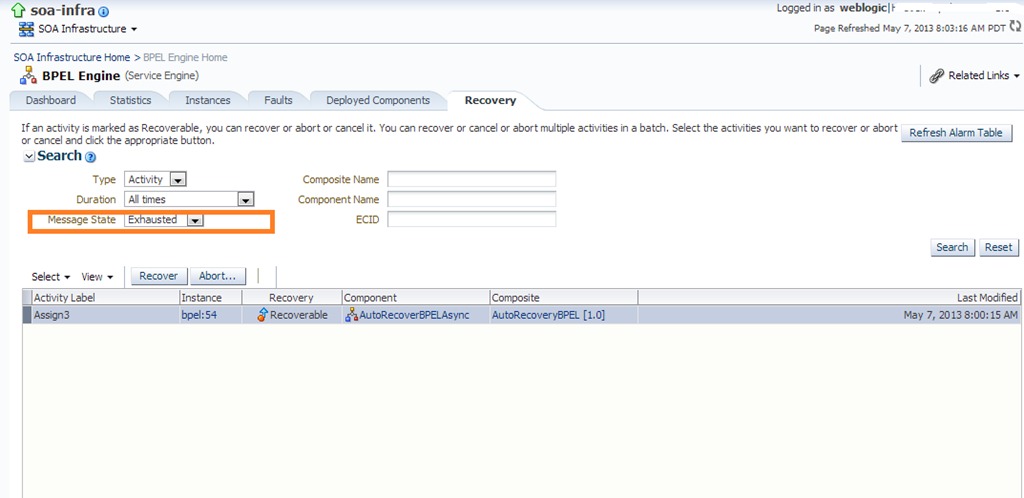
Now this BPEL process can be seen in recovery console with message state as ‘Exhausted’ (shown below) as all the 4 recovery attempts are done. Now we can recover this BPEL process manually by clicking on ‘Recover’ button or click on ‘Reset’ button to make this process eligible for auto recovery again.

invoke7

Clicking on Reset button which makes this process to be eligible for auto recovery again and BPEL engine will restart recovery attempts (shown below).

invoke8

Activity:

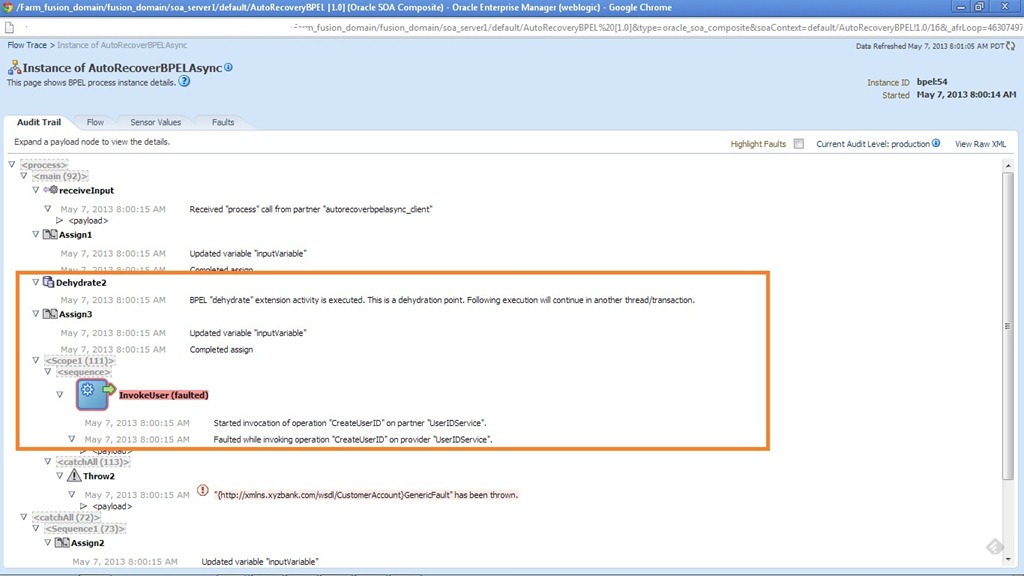
To demonstrate Activity auto recovery, modify BPEL process to add Dehydrate and Assign activity before faulted invoke. This case also demonstrates that auto recovery will happen from the last break point. The highlighted part shown below shows the difference from the previous scenario with Dehydrate activity along with remote fault at invoke activity level.

act1

In BPEL recovery console, we can search for the activities that are marked for recovery. Assign3 is the first activity after the dehydrate activity so the recovery should happen from this activity.

act2

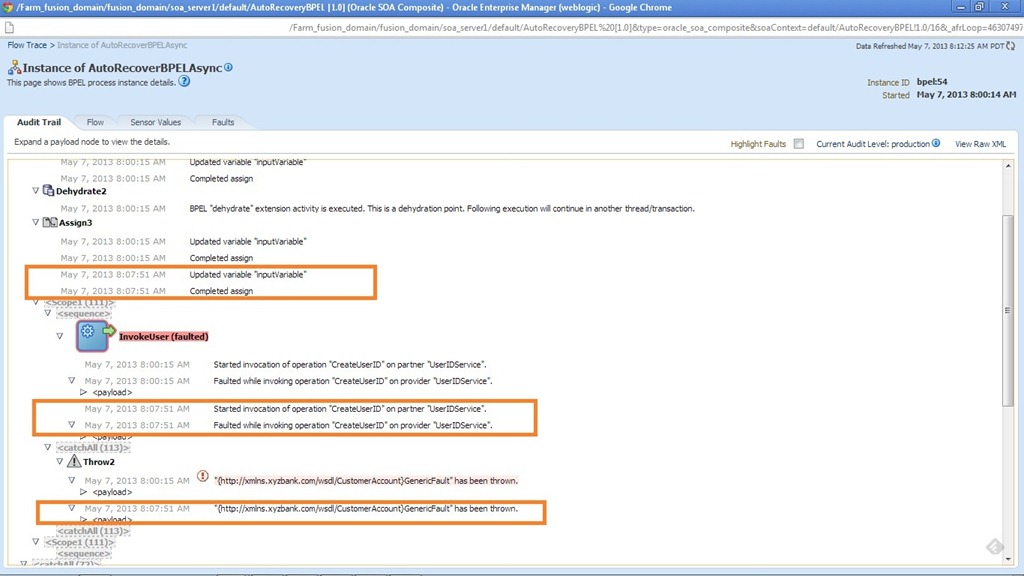
Following screenshots show flow trace after the first auto recovery attempt made by BPEL engine. Observe the difference from previous run in this flow trace. Now the entire BPEL process is not started rather it starts from Assign 3 activity as expected.

act3

act4

After the 4 the recovery attempt.

act5

act6

act7

Now this BPEL process can be seen in recovery console with message state as ‘Exhausted’ (shown below) as all the 4 recovery attempts are done. Now we can recover this BPEL process manually by clicking on ‘Recover’. Observe that reset button is not available and it needs a manual recovery.

act8

Other Observations:

  • The above mentioned behavior is observed only for ASync BPEL and for Sync BPEL processes (Transient Sync) no auto recovery is performed. However, the same is not verified in case of Durable Sync BPEL processes for the time being.


Sample code can be downloaded from here.

References:

http://docs.oracle.com/cd/E17904_01/integration.1111/e10226/bp_config.htm

Database Polling in OSB – Part III

In this post, we will have a look at another typical use case of polling DB View using DB adapter before proceeding to other polling strategies.

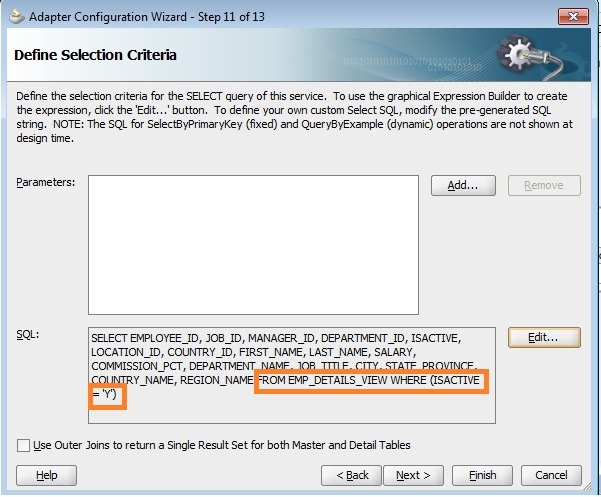
As we know, DB view restricts the update if it’s based on multiple tables so we would not be able to use ‘Logical Delete’ polling strategy in it’s original fashion. To overcome this, one of the common techniques is that use ‘Delete’ polling strategy and override the default delete query with update. This technique is well known among BPEL 10g developers.

For this post also, our use case remains same where we poll using DB view EMP_DETAILS_VIEW instead of table and inserts only active employees (ISACTIVE flag is Y).

DB View Definition:

SELECT e.employee_id, e.job_id, e.manager_id,
    e.department_id, e.isactive, d.location_id,
    l.country_id, e.first_name, e.last_name,
    e.salary, e.commission_pct, d.department_name,
    j.job_title, l.city, l.state_province,
    c.country_name, r.region_name
  FROM employees e, departments d,
    jobs j, locations l,
    countries c, regions r
  WHERE e.department_id = d.department_id
  AND d.location_id     = l.location_id
  AND l.country_id      = c.country_id
  AND c.region_id       = r.region_id
  AND j.job_id          = e.job_id;

Re-create DB adapter related files for polling using this DB view in JDeveloper and import them into OSB project as shown below.

dbview

PollStartegy

PollOptions

isactive

wherecondn

OSBImport

After importing into OSB project, open the mappings.xml file and override the delete query to perform the update as shown below.

override

Create new proxy service from JCA file and add message flow similar to previous scenarios to call business service that inserts data into target table.

msgflow

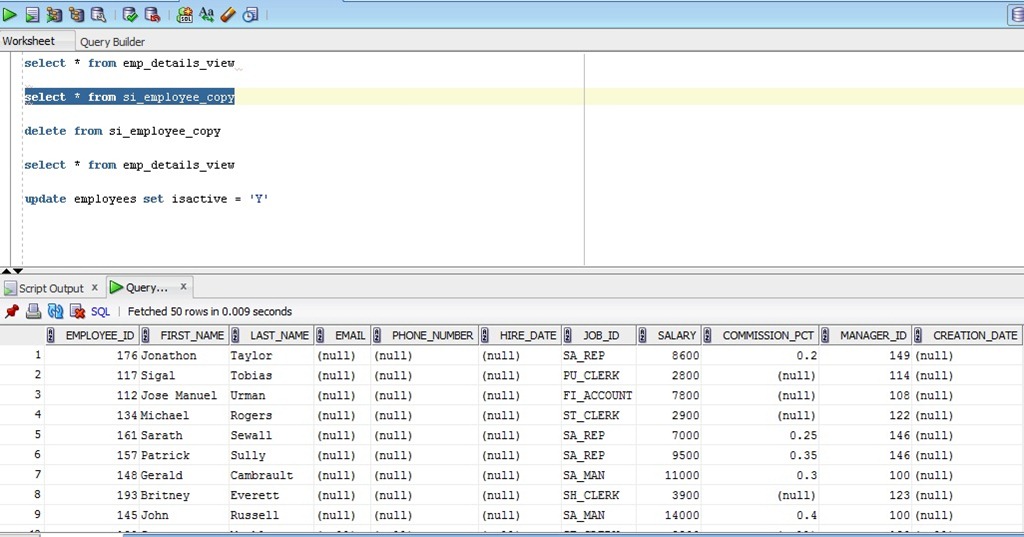
Deploy the jar file to OSB server and disable other proxy services except the recent one that we created, so that only one proxy service will be populating our target table. Update the ISACTIVE flag to Y in EMPLOYEES table.

Before polling:

beforeinview

beforetargettbl

After polling:

aftertblview

aftertargettbl

From the above screenshots, we can observe that ISACTIVE flag is set to N after polling the records from the DB view and also populated our target table as expected. The updated jar file can be found in the same location as given in previous posts.

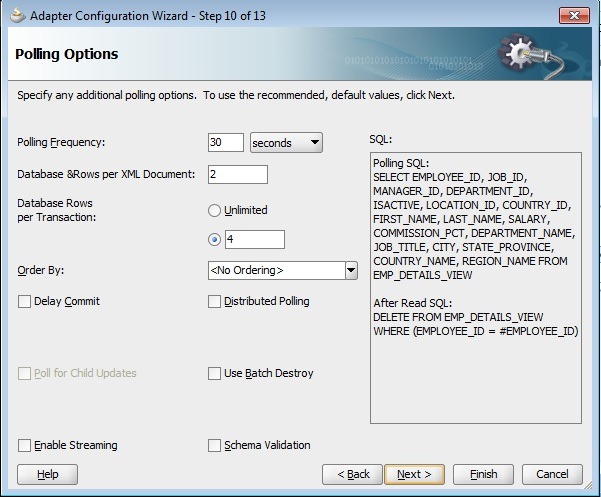
Database Polling in OSB – Part II

Before proceeding to other polling strategies, we will look at effect of MaxTransactionSize and MaxRaiseSize parameter values in the JCA file. This post assumes the reader has the basic understanding of OSB log activity.

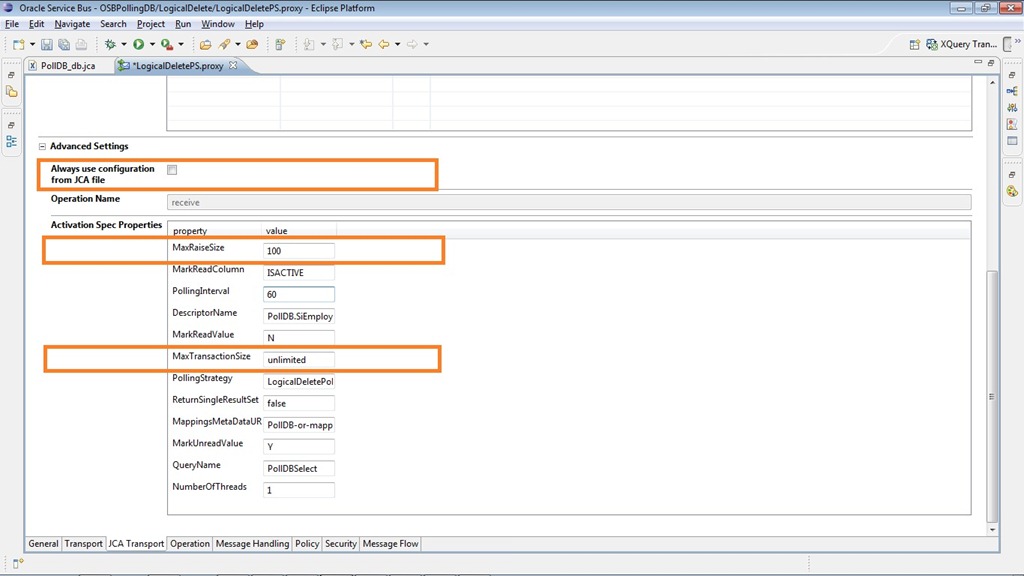
jcaparams

MaxTransactionSize determines number of records to be polled in each transaction and MaxRaiseSize determines batch size i.e. the number of records to be processed in a single XML document. In BPEL, we can observe this behavior clearly as number of BPEL instances will be created with each instance processing the number of records as indicated by MaxRaiseSize. Since OSB is stateless no instances will be created. So we apply simple technique using OSB log activity to observe this behavior.

Consider value 4 as MaxTransactionSize and 2 as MaxRaiseSize. These values can be directly modified in JCA file (see above screenshot) or in the proxy service directly by unchecking option ‘Always use configuration from JCA file’. I recommend modifying JCA file as these changes would be directly used by proxy service and will not create any confusion when JCA file is further modified by DB adapter wizard at later stages during maintenance.

proxyjcamodify

So modify the parameter values as shown below.

ModifyParaminJCA

Now modify the proxy service message flow to include a log activity as shown below to log the payload before the request is routed to business service.

logactivity

Deploy the project and inserts 4 rows in the source table to observe the behavior from the logs. The following is the log for the AdminServer.log file stored at location <DOMAIN_HOME>\servers\AdminServer\logs. From the log it’s clearly visible that 4 records have been processed in 2 attempts by OSB consists of 2 records in each time. We can observe the behavior from logs by modifying MaxRaiseSize to different values like 1, 3 etc..

####<Apr 9, 2013 5:26:49 PM IST> <Error> <ALSB Logging> <SVGONUGU-LAP> <AdminServer> <[ACTIVE] ExecuteThread: ’25’ for queue: ‘weblogic.kernel.Default (self-tuning)’> <<anonymous>> <BEA1-313CB0682087E97D79BE> <361a19a2fa60e1ab:7e5f3ca6:13ded702d81:-8000-0000000000006661> <1365508609568> <BEA-000000> < [RouteNode1, null, null, REQUEST] <pol:SiEmployeeCollection xmlns:xsi="http://www.w3.org/2001/XMLSchema-instance" xmlns:soap-env="http://schemas.xmlsoap.org/soap/envelope/" xmlns:pol="http://xmlns.oracle.com/pcbpel/adapter/db/top/PollDB">
  <pol:SiEmployee>
    <pol:employeeId>100</pol:employeeId>
    <pol:firstName>Steven</pol:firstName>
    <pol:lastName>King</pol:lastName>
    <pol:email>SKING</pol:email>
    <pol:phoneNumber>515.123.4567</pol:phoneNumber>
    <pol:hireDate>2003-06-17T00:00:00.000+05:30</pol:hireDate>
    <pol:jobId>AD_PRES</pol:jobId>
    <pol:salary>24000</pol:salary>
    <pol:commissionPct xsi:nil="true"/>
    <pol:managerId xsi:nil="true"/>
    <pol:isactive>Y</pol:isactive>
  </pol:SiEmployee>
  <pol:SiEmployee>
    <pol:employeeId>101</pol:employeeId>
    <pol:firstName>Neena</pol:firstName>
    <pol:lastName>Kochhar</pol:lastName>
    <pol:email>NKOCHHAR</pol:email>
    <pol:phoneNumber>515.123.4568</pol:phoneNumber>
    <pol:hireDate>2005-09-21T00:00:00.000+05:30</pol:hireDate>
    <pol:jobId>AD_VP</pol:jobId>
    <pol:salary>17000</pol:salary>
    <pol:commissionPct xsi:nil="true"/>
    <pol:managerId>100</pol:managerId>
    <pol:isactive>Y</pol:isactive>
  </pol:SiEmployee>
</pol:SiEmployeeCollection>>
####<Apr 9, 2013 5:26:49 PM IST> <Info> <JCA_FRAMEWORK_AND_ADAPTER> <SVGONUGU-LAP> <AdminServer> <[ACTIVE] ExecuteThread: ’25’ for queue: ‘weblogic.kernel.Default (self-tuning)’> <<anonymous>> <BEA1-313CB0682087E97D79BE> <361a19a2fa60e1ab:7e5f3ca6:13ded702d81:-8000-0000000000006661> <1365508609647> <BEA-000000> <servicebus:/WSDL/OSBPollingDB/BusinessService/insert [ {
http://xmlns.oracle.com/pcbpel/adapter/db/BlogWS/OSBPollingDB/insert}insert_ptt ]: Using JCA Connection Pool – max size = <unbounded>>
####<Apr 9, 2013 5:26:49 PM IST> <Info> <Common> <SVGONUGU-LAP> <AdminServer> <[ACTIVE] ExecuteThread: ’25’ for queue: ‘weblogic.kernel.Default (self-tuning)’> <<anonymous>> <BEA1-313CB0682087E97D79BE> <361a19a2fa60e1ab:7e5f3ca6:13ded702d81:-8000-0000000000006661> <1365508609689> <BEA-000628> <Created "1" resources for pool "eis/DB/LocalDBHR", out of which "1" are available and "0" are unavailable.>
####<Apr 9, 2013 5:26:49 PM IST> <Info> <JCA_FRAMEWORK_AND_ADAPTER> <SVGONUGU-LAP> <AdminServer> <[ACTIVE] ExecuteThread: ’25’ for queue: ‘weblogic.kernel.Default (self-tuning)’> <<anonymous>> <BEA1-313CB0682087E97D79BE> <361a19a2fa60e1ab:7e5f3ca6:13ded702d81:-8000-0000000000006661> <1365508609701> <BEA-000000> <<oracle.tip.adapter.db.DBAdapterConstants getUniqueProcessIdentifier> Unique process identifier will be _393083366_393083366
>
####<Apr 9, 2013 5:26:49 PM IST> <Info> <JCA_FRAMEWORK_AND_ADAPTER> <SVGONUGU-LAP> <AdminServer> <[ACTIVE] ExecuteThread: ’25’ for queue: ‘weblogic.kernel.Default (self-tuning)’> <<anonymous>> <BEA1-313CB0682087E97D79BE> <361a19a2fa60e1ab:7e5f3ca6:13ded702d81:-8000-0000000000006661> <1365508609710> <BEA-000000> <<oracle.tip.adapter.db.ox.TopLinkXMLProjectInitializer initialize> Initializing toplink project for use by the database adapter.
>
####<Apr 9, 2013 5:26:49 PM IST> <Error> <ALSB Logging> <SVGONUGU-LAP> <AdminServer> <[ACTIVE] ExecuteThread: ’25’ for queue: ‘weblogic.kernel.Default (self-tuning)’> <<anonymous>> <BEA1-313CB0682087E97D79BE> <361a19a2fa60e1ab:7e5f3ca6:13ded702d81:-8000-0000000000006661> <1365508609823> <BEA-000000> < [RouteNode1, null, null, REQUEST] <pol:SiEmployeeCollection xmlns:xsi="
http://www.w3.org/2001/XMLSchema-instance" xmlns:soap-env="http://schemas.xmlsoap.org/soap/envelope/" xmlns:pol="http://xmlns.oracle.com/pcbpel/adapter/db/top/PollDB">
  <pol:SiEmployee>
    <pol:employeeId>102</pol:employeeId>
    <pol:firstName>Lex</pol:firstName>
    <pol:lastName>De Haan</pol:lastName>
    <pol:email>LDEHAAN</pol:email>
    <pol:phoneNumber>515.123.4569</pol:phoneNumber>
    <pol:hireDate>2001-01-13T00:00:00.000+05:30</pol:hireDate>
    <pol:jobId>AD_VP</pol:jobId>
    <pol:salary>17000</pol:salary>
    <pol:commissionPct xsi:nil="true"/>
    <pol:managerId>100</pol:managerId>
    <pol:isactive>Y</pol:isactive>
  </pol:SiEmployee>
  <pol:SiEmployee>
    <pol:employeeId>103</pol:employeeId>
    <pol:firstName>Alexander</pol:firstName>
    <pol:lastName>Hunold</pol:lastName>
    <pol:email>AHUNOLD</pol:email>
    <pol:phoneNumber>590.423.4567</pol:phoneNumber>
    <pol:hireDate>2006-01-03T00:00:00.000+05:30</pol:hireDate>
    <pol:jobId>IT_PROG</pol:jobId>
    <pol:salary>9000</pol:salary>
    <pol:commissionPct xsi:nil="true"/>
    <pol:managerId>102</pol:managerId>
    <pol:isactive>Y</pol:isactive>
  </pol:SiEmployee>
</pol:SiEmployeeCollection>>

Now insert 5 rows into the source table and observe the logs which are given below:

####<Apr 10, 2013 1:58:27 PM IST> <Error> <ALSB Logging> <SVGONUGU-LAP> <AdminServer> <[ACTIVE] ExecuteThread: ‘3’ for queue: ‘weblogic.kernel.Default (self-tuning)’> <<anonymous>> <BEA1-320F158CE2D2E97D79BE> <361a19a2fa60e1ab:7e5f3ca6:13ded702d81:-8000-000000000000dd83> <1365582507415> <BEA-000000> < [RouteNode1, null, null, REQUEST] <pol:SiEmployeeCollection xmlns:xsi="http://www.w3.org/2001/XMLSchema-instance" xmlns:soap-env="http://schemas.xmlsoap.org/soap/envelope/" xmlns:pol="http://xmlns.oracle.com/pcbpel/adapter/db/top/PollDB">
  <pol:SiEmployee>
    <pol:employeeId>100</pol:employeeId>
    <pol:firstName>Steven</pol:firstName>
    <pol:lastName>King</pol:lastName>
    <pol:email>SKING</pol:email>
    <pol:phoneNumber>515.123.4567</pol:phoneNumber>
    <pol:hireDate>2003-06-17T00:00:00.000+05:30</pol:hireDate>
    <pol:jobId>AD_PRES</pol:jobId>
    <pol:salary>24000</pol:salary>
    <pol:commissionPct xsi:nil="true"/>
    <pol:managerId xsi:nil="true"/>
    <pol:isactive>Y</pol:isactive>
  </pol:SiEmployee>
  <pol:SiEmployee>
    <pol:employeeId>101</pol:employeeId>
    <pol:firstName>Neena</pol:firstName>
    <pol:lastName>Kochhar</pol:lastName>
    <pol:email>NKOCHHAR</pol:email>
    <pol:phoneNumber>515.123.4568</pol:phoneNumber>
    <pol:hireDate>2005-09-21T00:00:00.000+05:30</pol:hireDate>
    <pol:jobId>AD_VP</pol:jobId>
    <pol:salary>17000</pol:salary>
    <pol:commissionPct xsi:nil="true"/>
    <pol:managerId>100</pol:managerId>
    <pol:isactive>Y</pol:isactive>
  </pol:SiEmployee>
</pol:SiEmployeeCollection>>
####<Apr 10, 2013 1:58:27 PM IST> <Error> <ALSB Logging> <SVGONUGU-LAP> <AdminServer> <[ACTIVE] ExecuteThread: ‘3’ for queue: ‘weblogic.kernel.Default (self-tuning)’> <<anonymous>> <BEA1-320F158CE2D2E97D79BE> <361a19a2fa60e1ab:7e5f3ca6:13ded702d81:-8000-000000000000dd83> <1365582507450> <BEA-000000> < [RouteNode1, null, null, REQUEST] <pol:SiEmployeeCollection xmlns:xsi="
http://www.w3.org/2001/XMLSchema-instance" xmlns:soap-env="http://schemas.xmlsoap.org/soap/envelope/" xmlns:pol="http://xmlns.oracle.com/pcbpel/adapter/db/top/PollDB">
  <pol:SiEmployee>
    <pol:employeeId>102</pol:employeeId>
    <pol:firstName>Lex</pol:firstName>
    <pol:lastName>De Haan</pol:lastName>
    <pol:email>LDEHAAN</pol:email>
    <pol:phoneNumber>515.123.4569</pol:phoneNumber>
    <pol:hireDate>2001-01-13T00:00:00.000+05:30</pol:hireDate>
    <pol:jobId>AD_VP</pol:jobId>
    <pol:salary>17000</pol:salary>
    <pol:commissionPct xsi:nil="true"/>
    <pol:managerId>100</pol:managerId>
    <pol:isactive>Y</pol:isactive>
  </pol:SiEmployee>
  <pol:SiEmployee>
    <pol:employeeId>103</pol:employeeId>
    <pol:firstName>Alexander</pol:firstName>
    <pol:lastName>Hunold</pol:lastName>
    <pol:email>AHUNOLD</pol:email>
    <pol:phoneNumber>590.423.4567</pol:phoneNumber>
    <pol:hireDate>2006-01-03T00:00:00.000+05:30</pol:hireDate>
    <pol:jobId>IT_PROG</pol:jobId>
    <pol:salary>9000</pol:salary>
    <pol:commissionPct xsi:nil="true"/>
    <pol:managerId>102</pol:managerId>
    <pol:isactive>Y</pol:isactive>
  </pol:SiEmployee>
</pol:SiEmployeeCollection>>
####<Apr 10, 2013 1:58:27 PM IST> <Error> <ALSB Logging> <SVGONUGU-LAP> <AdminServer> <[ACTIVE] ExecuteThread: ‘3’ for queue: ‘weblogic.kernel.Default (self-tuning)’> <<anonymous>> <BEA1-3211158CE2D2E97D79BE> <361a19a2fa60e1ab:7e5f3ca6:13ded702d81:-8000-000000000000dd83> <1365582507526> <BEA-000000> < [RouteNode1, null, null, REQUEST] <pol:SiEmployeeCollection xmlns:xsi="
http://www.w3.org/2001/XMLSchema-instance" xmlns:soap-env="http://schemas.xmlsoap.org/soap/envelope/" xmlns:pol="http://xmlns.oracle.com/pcbpel/adapter/db/top/PollDB">
  <pol:SiEmployee>
    <pol:employeeId>104</pol:employeeId>
    <pol:firstName>Bruce</pol:firstName>
    <pol:lastName>Ernst</pol:lastName>
    <pol:email>BERNST</pol:email>
    <pol:phoneNumber>590.423.4568</pol:phoneNumber>
    <pol:hireDate>2007-05-21T00:00:00.000+05:30</pol:hireDate>
    <pol:jobId>IT_PROG</pol:jobId>
    <pol:salary>6000</pol:salary>
    <pol:commissionPct xsi:nil="true"/>
    <pol:managerId>103</pol:managerId>
    <pol:isactive>Y</pol:isactive>
  </pol:SiEmployee>
</pol:SiEmployeeCollection>>

If we observe the logs, all the 5 rows have been picked up rather than 4 as mentioned by MaxTransactionSize parameter. This behavior is documented in DB Adapter documentation mentioning “If distributed polling is not set, then the adapter tries to process all unprocessed rows in a single polling interval”.

As FYI, distributed polling is an option at DB adapter level as shown below. Also observe polling SQL when distributed polling option is used.

distpolling

The OSB configuration jar can be downloaded from here.


Pages

Enter your email address to subscribe to this blog and receive notifications of new posts by email.

Join 196 other subscribers

Enter your email address to follow this blog and receive notifications of new posts by email.