Often there is a need to interact with credential or policy store from java/ADF code which requires code source grants/system policies. Typically the application’s jazn file will have these values like the following.
<grant>
<grant>
<grantee>
<codesource>
<url>file:${domain.home}/servers/AdminServer/upload/HumanTaskApiTestService/-
</codesource>
</grantee>
<permissions>
<permission>
<class>oracle/security/jps/service/credstore/CredentialAccessPermission
<name>context=SYSTEM,mapName=admin/security,keyName=ADMIN_KEY</name>
<actions>read</actions>
</permission>
<permission>
<class>oracle.security.jps.service.policystore.PolicyStoreAccessPermission</class>
<name>context=APPLICATION,name=*</name>
<actions>*</actions>
</permission>
</permissions>
</grant>
</grant>
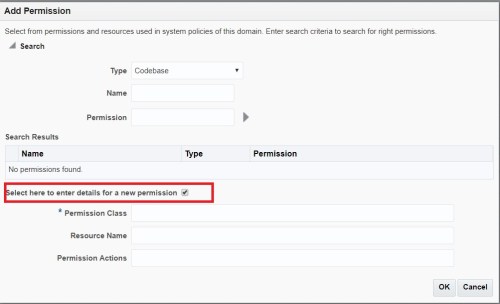
Use the following steps to provide these grants through EM Console.
Login to EM Console and navigate to Weblogic Domains -> <> -> Security (on right click) -> System Policies




 Siva's Blog